Generate lead qualification reports in Gmail from Tally Forms via Qwen-3
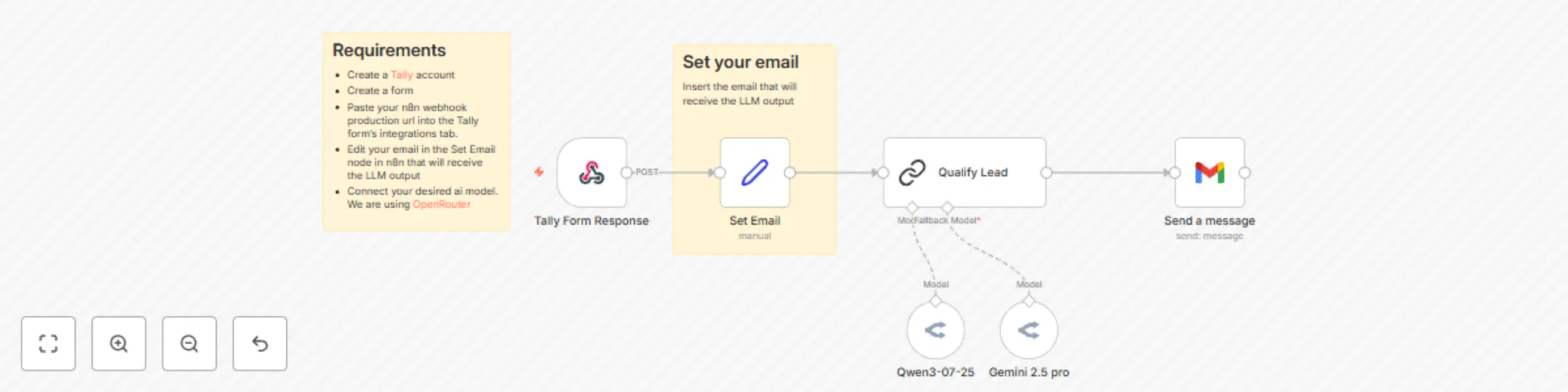
Workflow preview


 Early Deal
DISCOUNT 20%

Important notice
This workflow is provided as-is. Please review and test before using in production.
Overview
This automated n8n workflow streamlines lead qualification by taking structured lead data from Tally forms, enriching it with Qwen-3’s AI analysis, and promptly notifying your sales or delivery teams. It provides concise summaries, actionable insights, and highlights missing information to focus outreach efforts efficiently. The workflow includes security best practices to prevent prompt injections and ensures data integrity and privacy throughout.
Requirements
Tally Forms
- A Tally account with an active lead qualification form
- Webhook integration enabled to send form responses to n8n
Qwen-3 Large Language Model
- API key and access to your chosen AI model via OpenRouter
Gmail Notification
- Gmail account credentials connected in n8n
Workflow Breakdown
Trigger: Receive Tally form submission via n8n Webhook
The workflow starts from a Webhook node listening for POST requests from your Tally form.Extract and map Tally form data
Parse JSON to obtain fields like Company Name, Full Name, Work Email, Employee Count, Industry, Main Challenges Encountered, Goals With the Project, Urgency or Date When Solution Is Needed, Estimated Budget, and Anything Else We Should Know.Construct the Lead Qualification prompt
Combine a secure system prompt with user data from the form. This prompt instructs Qwen-3 to generate summaries, identify key challenges, recommend action points, suggest follow-up questions, and more.Send notification with AI analysis
Deliver the formatted message through your chosen channel(s) such as email or Slack, enabling your team to quickly act on qualified leads.
Potential Improvements
Capture Lead Role and Authority:
Add fields to the form for role and decision-making authority to improve lead qualification accuracy.Expand Notification Channels:
Include SMS or Microsoft Teams notifications alongside email and Slack for better team reach.Automate Lead Scoring:
Incorporate a numeric or qualitative lead score based on key input factors to prioritize follow-ups.Integrate CRM Task Creation:
Automatically create follow-up tasks or reminders in CRM systemss.
🙋♂️ Need Help?
Feel free to contact us at 1 Node
Get instant access to a library of free resources we created.