Block 1 - Qwen3-07-25
- Type / Role
- @n8n/n8n-nodes-langchain.lmChatOpenRouter - lmChatOpenRouter
- Config choices
- Version 1


 Early Deal
This workflow is provided as-is. Please review and test before using in production.
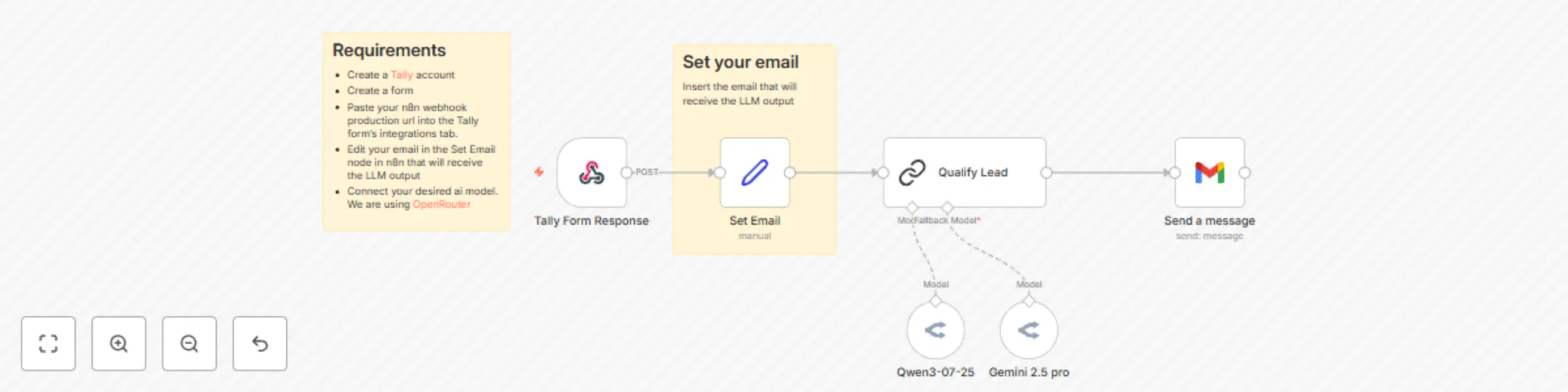
This automated n8n workflow streamlines lead qualification by taking structured lead data from Tally forms, enriching it with Qwen 3’s AI analysis, and promptly notifying your sales or delivery tea...
@n8n/n8n-nodes-langchain.lmchatopenrouter, n8n-nodes-base.gmail, n8n-nodes-base.set, n8n-nodes-base.stickynote, @n8n/n8n-nodes-langchain.chainllm, n8n-nodes-base.webhook
This workflow is cataloged by N8N Workflows and links back to its original n8n.io source page by Aitor | 1Node.
Original n8n.io sourceThis automated n8n workflow streamlines lead qualification by taking structured lead data from Tally forms, enriching it with Qwen-3’s AI analysis, and promptly notifying your sales or delivery teams. It provides concise summaries, actionable insights, and highlights missing information to focus outreach efforts efficiently. The workflow includes security best practices to prevent prompt injections and ensures data integrity and privacy throughout.
Trigger: Receive Tally form submission via n8n Webhook
The workflow starts from a Webhook node listening for POST requests from your Tally form.
Extract and map Tally form data
Parse JSON to obtain fields like Company Name, Full Name, Work Email, Employee Count, Industry, Main Challenges Encountered, Goals With the Project, Urgency or Date When Solution Is Needed, Estimated Budget, and Anything Else We Should Know.
Construct the Lead Qualification prompt
Combine a secure system prompt with user data from the form. This prompt instructs Qwen-3 to generate summaries, identify key challenges, recommend action points, suggest follow-up questions, and more.
Send notification with AI analysis
Deliver the formatted message through your chosen channel(s) such as email or Slack, enabling your team to quickly act on qualified leads.
Capture Lead Role and Authority:
Add fields to the form for role and decision-making authority to improve lead qualification accuracy.
Expand Notification Channels:
Include SMS or Microsoft Teams notifications alongside email and Slack for better team reach.
Automate Lead Scoring:
Incorporate a numeric or qualitative lead score based on key input factors to prioritize follow-ups.
Integrate CRM Task Creation:
Automatically create follow-up tasks or reminders in CRM systemss.
Feel free to contact us at 1 Node
Get instant access to a library of free resources we created.
This catalog entry is organized from the workflow JSON. The node-level section below shows the executable blocks available for review before importing the template.
| Workflow | Generate lead qualification reports in Gmail from Tally Forms via Qwen-3 |
|---|---|
| Complexity | intermediate |
| Nodes | 8 |
| Categories | Lead Generation, AI Summarization |
| Author | Aitor | 1Node |
| Published | 25 Jul 2025 |
Use the JSON export at /data/workflows/6422/6422.json as the source template for this automation.
Open n8n, import the downloaded JSON, and review each node before activating the workflow.
Replace placeholder credentials, API keys, webhook URLs, account IDs, and environment-specific values with your own settings.
Run the workflow manually or in a staging workspace, inspect node output, and confirm downstream systems receive the expected data.
Enable the workflow only after testing, then monitor executions, errors, and rate limits during the first production runs.
Review imported nodes carefully before activation. This catalog entry is intended to help you inspect the workflow structure, understand required services, and find related templates faster.
Node names, credentials, schedules, webhook paths, and external service limits may need adjustment for your workspace.
This automated n8n workflow streamlines lead qualification by taking structured lead data from Tally forms, enriching it with Qwen 3’s AI analysis, and promptly notifying your sales or delivery tea...
Review the workflow JSON, configure any required credentials in n8n, and test the automation in a safe workspace before using it in production.
Yes. Use the block-by-block analysis and the downloadable JSON to inspect each node, then adjust credentials, prompts, schedules, filters, or destinations for your Lead Generation, AI Summarization use case.