AI-powered lead qualification with Zoho CRM, People Data Labs and Google Gemini
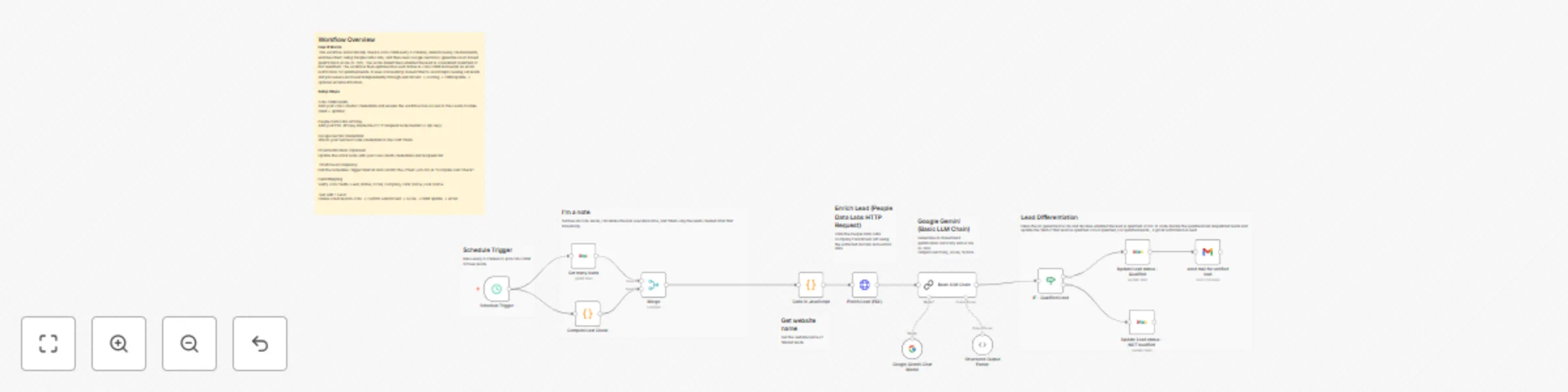
Workflow preview


 Early Deal
DISCOUNT 20%

Important notice
This workflow is provided as-is. Please review and test before using in production.
Overview
AI-Powered Lead Qualification using Zoho CRM, People Data Labs, and Google Gemini
This workflow automatically checks Zoho CRM every 5 minutes for newly created leads, enriches each lead using People Data Labs, evaluates its quality using Google Gemini (LLM Chain) and updates the lead status in Zoho CRM as Qualified or Not Qualified. Qualified leads trigger an automated Gmail notification to the sales team.
Quick Start Setup
- Add Zoho CRM OAuth credentials.
- Add your People Data Labs API key.
- Add your Google Gemini (PaLM) LLM API credentials.
- Add Gmail OAuth credentials and set your recipient email.
- Activate the workflow.
- Create a test lead and verify enrichment → scoring → update → email.
What It Does
This workflow serves as an automated AI-driven lead qualification engine. Every 5 minutes, it fetches leads from Zoho CRM, filters newly created ones, enriches them using People Data Labs and scores them via Google Gemini. Based on the AI-generated score, the workflow updates the lead status and optionally sends an email notification.
Who’s It For
- Sales teams using Zoho CRM
- SDR/Marketing automation teams
- Agencies performing automated lead pre-qualification
- Businesses with high inbound lead volume
- Anyone wanting AI-powered CRM automation via n8n
Requirements
- n8n instance
- Zoho CRM OAuth credentials
- People Data Labs API key (can use another service , modify accordingly)
- Google Gemini API credentials
- Gmail OAuth credentials
- Zoho fields: Company, Email, First_Name, Last_Name, Created_Time, Lead_Status
How It Works & Setup Steps
Step 1: Run every 5 minutes via Schedule Trigger
Triggers the workflow and computes a timestamp window.
Step 2: Fetch Zoho leads
Retrieves all leads from Zoho CRM.
Step 3: Filter newly created leads
Compares Created_Time with timestamp from previous run.
Step 4: Extract website field
Extract the website field, Used for People Data Labs enrichment API for search about that company.
Step 5: Enrich via People Data Labs
Adds company size, industry, founding year, etc.
Step 6: Score using Google Gemini
LLM produces a JSON response: summary, score, factors.
Step 7: Update CRM status
IF score > 80 → Qualified Else → Not Qualified
Step 8: Send Gmail notification
Send gmail notifications to sales team, Only for Qualified leads - informs that this Lead is marked as Qualified Leads
Customization
- Adjust score threshold in IF node
- Edit email recipients in Gmail node
- Modify AI prompt in LLM Chain
- Change 3rd party api for enrichment, if required
- Modify PDL parameters
- Change Zoho CRM fields
Add‑Ons
- Slack notifications
- Google Sheets logging
- Auto-create Deals in Zoho
- Add CRM notes
- Owner reassignment
- Tagging
Use Case Examples
- Automated B2B lead scoring
- High-intent lead notifications
- CRM hygiene automation
- Enriched lead analytics
- SDR productivity boost
Troubleshooting Guide
| Issue | Cause | Solution |
|---|---|---|
| No new leads detected | Timestamp mismatch | Validate “Compute Last Check” logic |
| No enrichment data | Empty website / invalid API key | Check PDL credentials & website value |
| AI output invalid | Prompt overwritten | Restore original prompt |
| CRM update fails | Wrong leadId mapping | Confirm Zoho lead ID |
| Gmail errors | OAuth expired | Reconnect Gmail credentials |
| No qualified leads | Score too strict | Lower IF threshold |
Need Help?
WeblineIndia can help with workflow customization, advanced automations, CRM integrations and AI-driven business processes. Contact us for expert assistance.