Send automated recruitment rejection email at end-of-day (Google Sheets | Gmail)
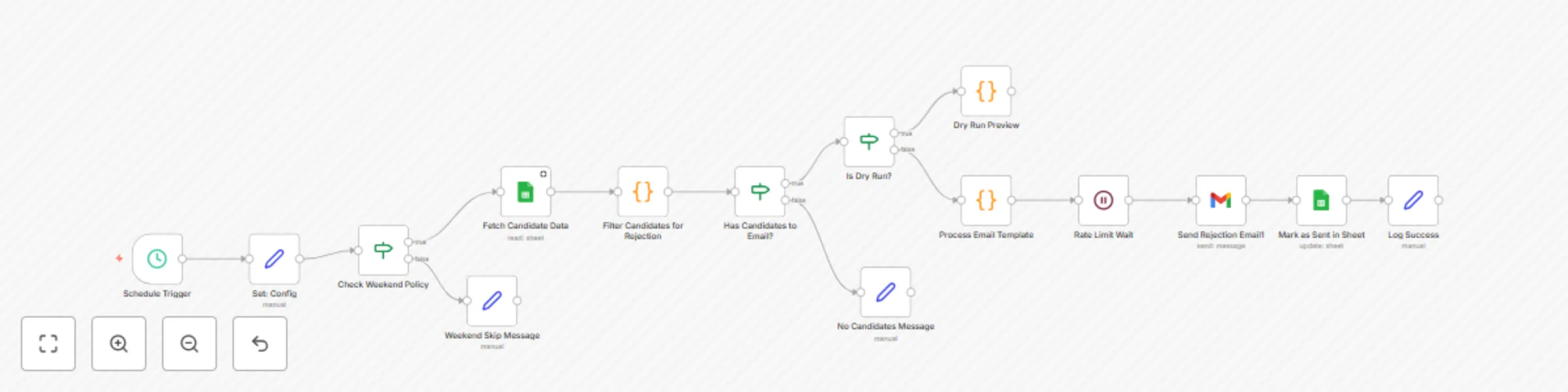
Workflow preview


 Early Deal
DISCOUNT 20%

Important notice
This workflow is provided as-is. Please review and test before using in production.
Overview
Send Automated Recruitment Rejection Emails with Google Sheets and Gmail at End-of-Day.
Automatically reads a “Candidate Status” tab in Google Sheets every day at 18:00 Asia/Kolkata, filters rows with exact (case-sensitive) rejection statuses and sends one personalized rejection email per candidate via SMTP (Gmail). It rate-limits sends, supports DRY_RUN previews and writes a timestamp back to rejection_sent_at to avoid duplicates.
Who’s it for
- Recruiters needing consistent, respectful closure at day end.
- Teams tracking hiring outcomes in Google Sheets.
- Coordinators who prefer a scheduled, hands-off workflow with safeguards.
How it works
- Cron (18:00 IST) triggers daily
- Google Sheets Read → loads Candidate Status tab
- Filter → keep rows where
statusREJECT_STATUS_CSV(exact match), with validcandidate_emailand emptyrejection_sent_at - DRY\RUN? If true → output preview only; if false → proceed
- Rate limit → wait
RATE_LIMIT_SECONDS(default 10s) between emails - SMTP (Gmail) → send personalized email per row using templates
- Mark as sent → write current timestamp to
rejection_sent_at
How to set up
- Sheet & Columns: Create “Candidate Status” tab with:
candidate_name, candidate_email, role, status, recruiter_name, recruiter_email, company_name, interview_feedback (optional), template_variant (optional), language (optional), rejection_sent_at - Credentials: Connect Google Sheets (OAuth) and SMTP (Gmail) in n8n (use App Password if 2FA)
- Config (Set node):
SPREADSHEET_IDSOURCE_SHEET=Candidate StatusTIMEZONE=Asia/KolkataREJECT_STATUS_CSV= e.g.,RejectedSMTP_FROM= e.g.,[email protected]SUBJECT_TEMPLATE=Regarding your application for {{role}} at {{company_name}}HTML_TEMPLATE/TEXT_TEMPLATERATE_LIMIT_SECONDS=10INCLUDE_WEEKENDS=trueDRY_RUN=false
- Activate: Enable the workflow
Requirements
- Google Sheet with the “Candidate Status” tab and columns above.
- SMTP (Gmail) account for sending.
- n8n (cloud or self-hosted) with Google Sheets + SMTP credentials.
How to customize
Statuses:
REJECT_STATUS_CSVsupports comma-separated exact values (e.g.,Rejected,Not Selected)Templates: Edit
SUBJECT_TEMPLATE,HTML_TEMPLATE,TEXT_TEMPLATEVariables:
{{candidate_name}},{{role}},{{company_name}},{{recruiter_name}}, and optional{{feedback_text}}/{{feedback_html}}frominterview_feedbackSchedule: Change Cron time from 18:00 to your preferred hour
Rate limit: Tune
RATE_LIMIT_SECONDSfor SMTP policyPreview: Set
DRY_RUN=truefor a safe, no-send preview
Add-ons
- Dynamic Reply-To per
recruiter_email - Localization/Variants via
languageortemplate_variantcolumns - Daily summary email: sent/skip/error counts
- Validation & logging: log invalid emails to another tab
- Gmail API: swap SMTP with Gmail nodes if preferred
Use Case Examples
- Daily round-up: 18:00 IST closure emails for all candidates marked
Rejectedtoday - Multi-brand hiring: Switch
company_nameper row and personalize subject lines - Compliance/logging: DRY\RUN each afternoon, review, then flip to live sends
Common troubleshooting
- No emails sent: Ensure
statusexactly matchesREJECT_STATUS_CSV(case-sensitive) andcandidate_emailis present - Duplicates: Verify
rejection_sent_atis blank before run; workflow sets it after sending - Blank variables: Fill
candidate_name,role,company_name,recruiter_namein the sheet - SMTP errors: Check credentials, sender permissions, and daily limits
- Timing: Confirm workflow timezone
Asia/Kolkataand Cron = 18:00
Need Help?
Want us to tailor the template, add a summary report or wire up company-based variants? Contact our n8n automation engineers at WeblineIndia and we’ll plug it in.