Block 1 - Schedule Trigger
- Type / Role
- n8n-nodes-base.scheduleTrigger - scheduleTrigger
- Config choices
- Version 1.2


 Early Deal
This workflow is provided as-is. Please review and test before using in production.
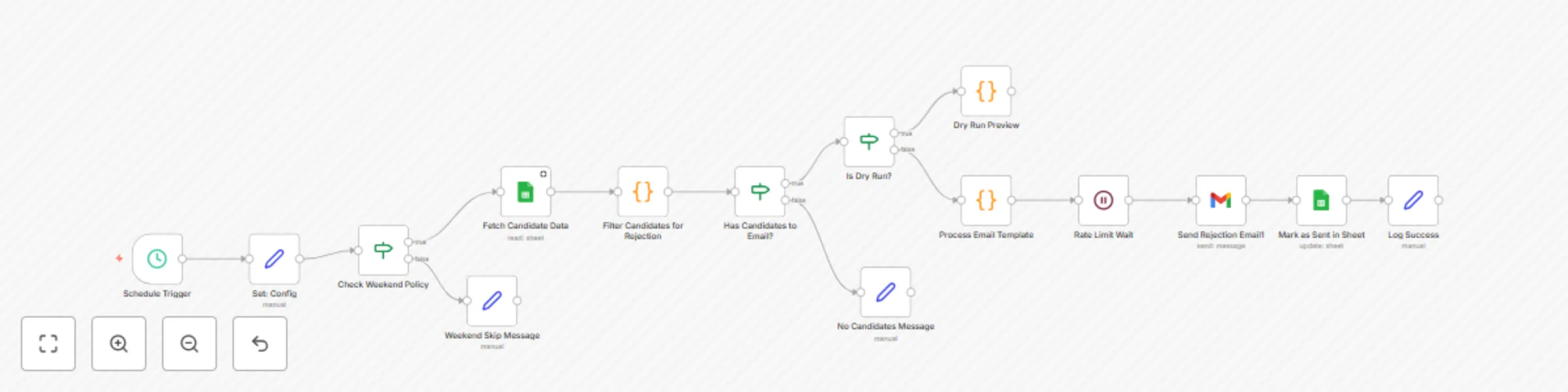
Send Automated Recruitment Rejection Emails with Google Sheets and Gmail at End of Day. Automatically reads a “Candidate Status” tab in Google Sheets every day at 18:00 Asia/Kolkata, filters rows w...
n8n-nodes-base.scheduletrigger, n8n-nodes-base.set, n8n-nodes-base.if, n8n-nodes-base.code, n8n-nodes-base.wait, n8n-nodes-base.googlesheets, n8n-nodes-base.gmail
This workflow is cataloged by N8N Workflows and links back to its original n8n.io source page by WeblineIndia.
Original n8n.io sourceAutomatically reads a “Candidate Status” tab in Google Sheets every day at 18:00 Asia/Kolkata, filters rows with exact (case-sensitive) rejection statuses and sends one personalized rejection email per candidate via SMTP (Gmail). It rate-limits sends, supports DRY_RUN previews and writes a timestamp back to rejection_sent_at to avoid duplicates.
status REJECT_STATUS_CSV (exact match), with valid candidate_email and empty rejection_sent_atRATE_LIMIT_SECONDS (default 10s) between emailsrejection_sent_atcandidate_name, candidate_email, role, status, recruiter_name, recruiter_email, company_name, interview_feedback (optional), template_variant (optional), language (optional), rejection_sent_atSPREADSHEET_IDSOURCE_SHEET = Candidate StatusTIMEZONE = Asia/KolkataREJECT_STATUS_CSV = e.g., RejectedSMTP_FROM = e.g., [email protected]SUBJECT_TEMPLATE = Regarding your application for {{role}} at {{company_name}}HTML_TEMPLATE / TEXT_TEMPLATERATE_LIMIT_SECONDS = 10INCLUDE_WEEKENDS = trueDRY_RUN = falseStatuses: REJECT_STATUS_CSV supports comma-separated exact values (e.g., Rejected,Not Selected)
Templates: Edit SUBJECT_TEMPLATE, HTML_TEMPLATE, TEXT_TEMPLATE
Variables: {{candidate_name}}, {{role}}, {{company_name}}, {{recruiter_name}}, and optional {{feedback_text}}/{{feedback_html}} from interview_feedback
Schedule: Change Cron time from 18:00 to your preferred hour
Rate limit: Tune RATE_LIMIT_SECONDS for SMTP policy
Preview: Set DRY_RUN=true for a safe, no-send preview
recruiter_emaillanguage or template_variant columnsRejected todaycompany_name per row and personalize subject linesstatus exactly matches REJECT_STATUS_CSV (case-sensitive) and candidate_email is presentrejection_sent_at is blank before run; workflow sets it after sendingcandidate_name, role, company_name, recruiter_name in the sheetAsia/Kolkata and Cron = 18:00Want us to tailor the template, add a summary report or wire up company-based variants? Contact our n8n automation engineers at WeblineIndia and we’ll plug it in.
This catalog entry is organized from the workflow JSON. The node-level section below shows the executable blocks available for review before importing the template.
| Workflow | Send automated recruitment rejection email at end-of-day (Google Sheets | Gmail) |
|---|---|
| Complexity | advanced |
| Nodes | 15 |
| Categories | HR, Multimodal AI |
| Author | WeblineIndia |
| Published | 23 Aug 2025 |
Use the JSON export at /data/workflows/7766/7766.json as the source template for this automation.
Open n8n, import the downloaded JSON, and review each node before activating the workflow.
Replace placeholder credentials, API keys, webhook URLs, account IDs, and environment-specific values with your own settings.
Run the workflow manually or in a staging workspace, inspect node output, and confirm downstream systems receive the expected data.
Enable the workflow only after testing, then monitor executions, errors, and rate limits during the first production runs.
Review imported nodes carefully before activation. This catalog entry is intended to help you inspect the workflow structure, understand required services, and find related templates faster.
Node names, credentials, schedules, webhook paths, and external service limits may need adjustment for your workspace.
Send Automated Recruitment Rejection Emails with Google Sheets and Gmail at End of Day. Automatically reads a “Candidate Status” tab in Google Sheets every day at 18:00 Asia/Kolkata, filters rows w...
Review the workflow JSON, configure any required credentials in n8n, and test the automation in a safe workspace before using it in production.
Yes. Use the block-by-block analysis and the downloadable JSON to inspect each node, then adjust credentials, prompts, schedules, filters, or destinations for your HR, Multimodal AI use case.