Check and deactivate broken job apply URLs with Postgres and Google Sheets

Workflow preview

Workflow preview
100%
Check and deactivate broken job apply URLs with Postgres and Google Sheets preview
Open on n8n.io

1. Workflow Overview

Keep your job listings database clean without manual checks. Every three days, this workflow fetches all active jobs from your Postgres database, runs each application URL through a validation chec...

Best for

  • HR automation workflows
  • intermediate n8n builders looking for reusable templates

Tools used

n8n-nodes-base.stickynote, n8n-nodes-base.scheduletrigger, n8n-nodes-base.postgres, n8n-nodes-base.code, n8n-nodes-base.httprequest, n8n-nodes-base.if, n8n-nodes-base.googlesheets

Source and attribution

This workflow is cataloged by N8N Workflows and links back to its original n8n.io source page by Panth1823.

Original n8n.io source

1.1 Workflow description

Title
Check and deactivate broken job apply URLs with Postgres and Google Sheets
Workflow name
Check and deactivate broken job apply URLs with Postgres and Google Sheets

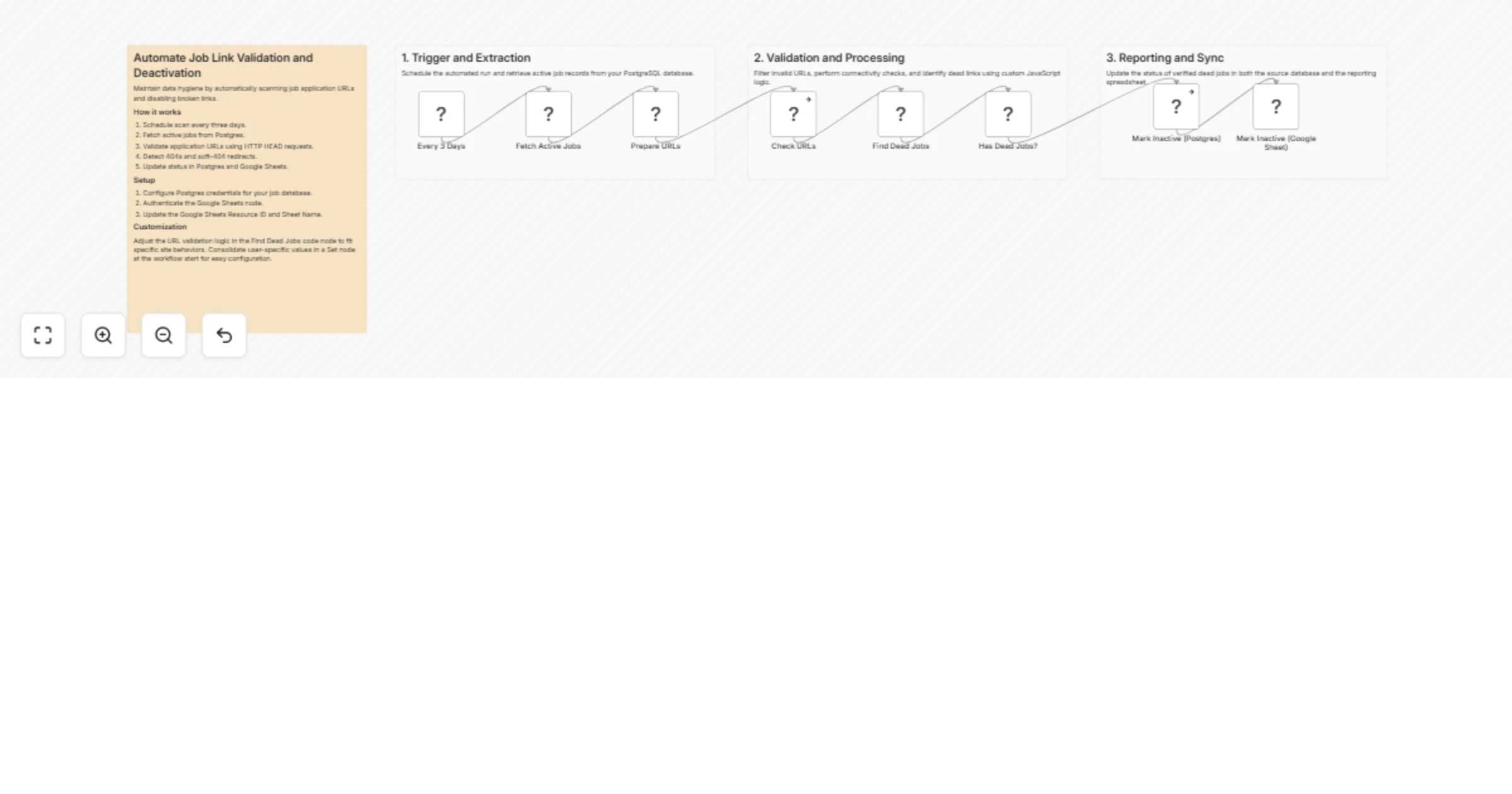
Keep your job listings database clean without manual checks. Every three days, this workflow fetches all active jobs from your Postgres database, runs each application URL through a validation check, identifies dead links via HTTP status codes and soft-404 redirect detection, then marks failed entries as inactive in both Supabase and Google Sheets simultaneously.

Who it's for

Teams running a job aggregator, career platform, or internal hiring tracker who store job listings in Postgres and want stale or broken apply links removed automatically — without waiting for user reports.

How it works

  1. A Schedule Trigger fires every 3 days
  2. All active jobs are fetched from your Postgres (Supabase) database via a SQL query
  3. A Prepare URLs node filters out any rows with missing, malformed, or non-HTTP URLs before they're checked
  4. An HTTP Request node sends a HEAD request to each apply_url
  5. A Find Dead Jobs code node analyzes each response and flags a job as dead if:
  • Status code is 404 or 410
  • DNS resolution fails (ENOTFOUND)
  • Connection is refused (ECONNREFUSED)
  • A 301/302/307 redirect points to a different path — indicating the job was removed and the ATS is silently redirecting (soft-404 detection)
  1. If dead jobs are found, an IF node routes them to both update nodes in parallel:
  • Supabase (Postgres) — status set to inactive via parameterized SQL
  • Google Sheets — row updated to reflect the new status
  1. If no dead jobs are detected, the workflow exits cleanly with no writes

Setup

  1. Connect your Postgres credentials and confirm the query in the Fetch Active Jobs node matches your table and column names (apply_url, job_hash, job_title)
  2. Connect your Google Sheets credentials and set the Resource ID and Sheet Name in the Mark Inactive node
  3. Confirm the inactive status value in the Postgres update query matches what your app expects
  4. (Optional) Adjust the soft-404 redirect detection logic in the Find Dead Jobs node if your ATS platforms use non-standard redirect patterns

Database columns expected

job_hash (unique identifier), apply_url, job_title, status

Requirements

  • Self-hosted or cloud n8n instance
  • Supabase (or any Postgres-compatible) database with an active jobs table
  • Google Sheets with a matching jobs log

1.2 Logical Blocks

This catalog entry is organized from the workflow JSON. The node-level section below shows the executable blocks available for review before importing the template.

2. Block-by-Block Analysis

Block 1 - Main Sticky

Type / Role
n8n-nodes-base.stickyNote - stickyNote
Config choices
Version 1

Block 2 - Every 3 Days

Type / Role
n8n-nodes-base.scheduleTrigger - scheduleTrigger
Config choices
Version 1.1

Block 3 - Fetch Active Jobs

Type / Role
n8n-nodes-base.postgres - postgres
Config choices
Version 2.5

Block 4 - Prepare URLs

Type / Role
n8n-nodes-base.code - code
Config choices
Version 2

Block 5 - Check URLs

Type / Role
n8n-nodes-base.httpRequest - httpRequest
Config choices
Version 4.2

Block 6 - Find Dead Jobs

Type / Role
n8n-nodes-base.code - code
Config choices
Version 2

Block 7 - Has Dead Jobs?

Type / Role
n8n-nodes-base.if - if
Config choices
Version 2

Block 8 - Mark Inactive (Postgres)

Type / Role
n8n-nodes-base.postgres - postgres
Config choices
Version 2.5

Block 9 - Mark Inactive (Google Sheet)

Type / Role
n8n-nodes-base.googleSheets - googleSheets
Config choices
Version 4

Block 10 - Section 1

Type / Role
n8n-nodes-base.stickyNote - stickyNote
Config choices
Version 1

Block 11 - Section 2

Type / Role
n8n-nodes-base.stickyNote - stickyNote
Config choices
Version 1

Block 12 - Section 3

Type / Role
n8n-nodes-base.stickyNote - stickyNote
Config choices
Version 1

3. Summary Table

Workflow Check and deactivate broken job apply URLs with Postgres and Google Sheets
Complexity intermediate
Nodes 12
Categories HR
Author Panth1823
Published 12 Apr 2026

4. Reproducing the Workflow from Scratch

  1. 1. Download the workflow JSON

    Use the JSON export at /data/workflows/14995/14995.json as the source template for this automation.

  2. 2. Import the template into n8n

    Open n8n, import the downloaded JSON, and review each node before activating the workflow.

  3. 3. Configure credentials and variables

    Replace placeholder credentials, API keys, webhook URLs, account IDs, and environment-specific values with your own settings.

  4. 4. Test with sample data

    Run the workflow manually or in a staging workspace, inspect node output, and confirm downstream systems receive the expected data.

  5. 5. Activate and monitor

    Enable the workflow only after testing, then monitor executions, errors, and rate limits during the first production runs.

5. General Notes & Resources

Review imported nodes carefully before activation. This catalog entry is intended to help you inspect the workflow structure, understand required services, and find related templates faster.

Node names, credentials, schedules, webhook paths, and external service limits may need adjustment for your workspace.

Frequently asked questions

What does Check and deactivate broken job apply URLs with Postgres and Google Sheets do?

Keep your job listings database clean without manual checks. Every three days, this workflow fetches all active jobs from your Postgres database, runs each application URL through a validation chec...

What do I need before importing this workflow?

Review the workflow JSON, configure any required credentials in n8n, and test the automation in a safe workspace before using it in production.

Can I customize this workflow?

Yes. Use the block-by-block analysis and the downloadable JSON to inspect each node, then adjust credentials, prompts, schedules, filters, or destinations for your HR use case.