Route Tally affiliate leads to Google Sheets and notify teams in Slack
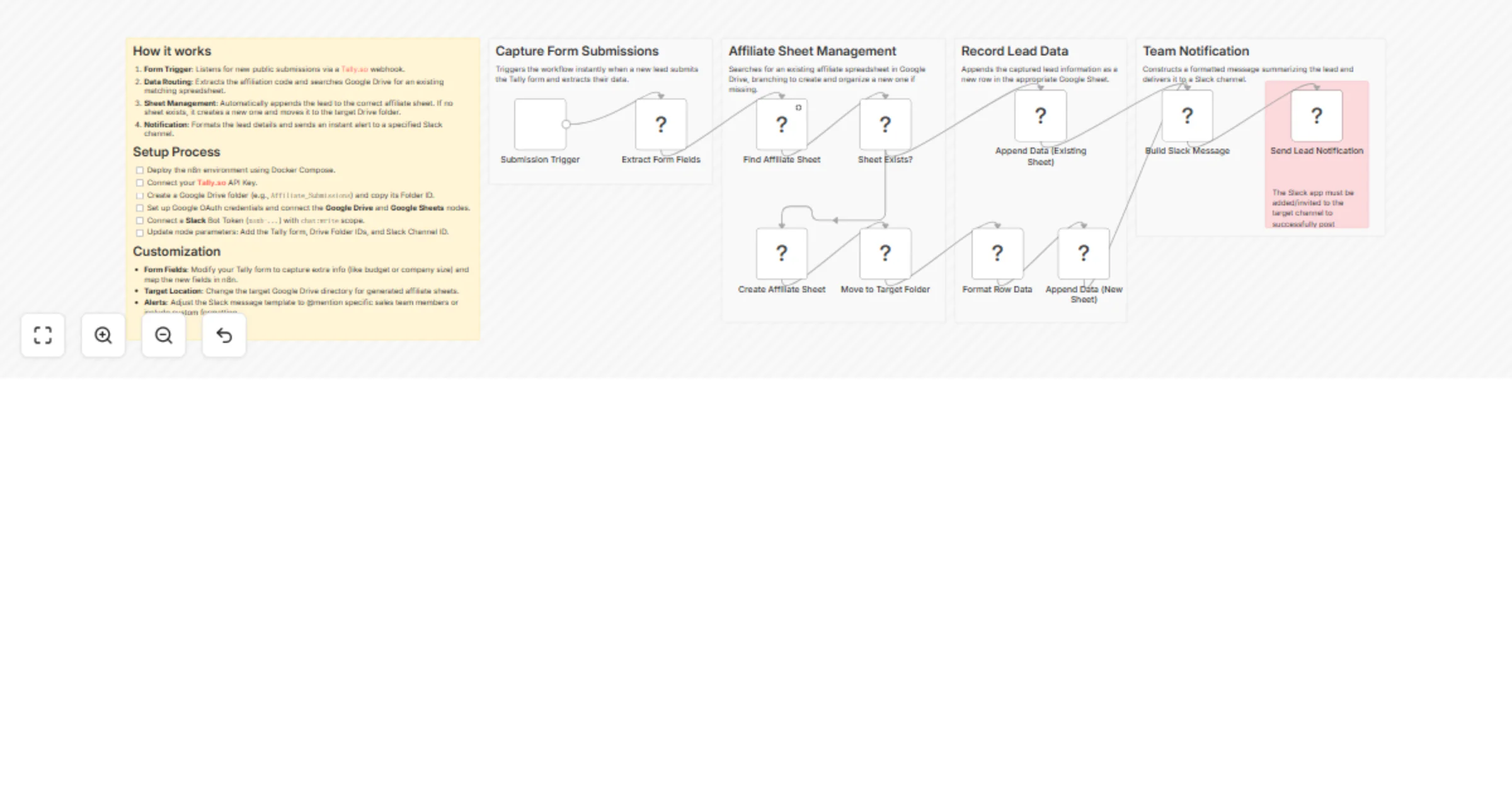
Workflow preview

$20/month : Unlimited workflows
2500 executions/month

THE #1 IN WEB SCRAPING
Scrape any website without limits
HOSTINGER  Early Deal
DISCOUNT 20% Try free
Early DealDISCOUNT 20%
Self-hosted n8n
Unlimited workflows - from $4.99/mo

#1 hub for scraping, AI & automation
6000+ actors - $5 credits/mo
Overview
Who’s it for
Affiliate managers, partner programs, and teams collecting leads via public forms who want automated, error-free routing to separate spreadsheets per affiliate — no more manual copying or sheet hunting.
What it does
This workflow captures new submissions from a Tally.so form, extracts the affiliate code, finds or creates the corresponding Google Sheet, appends the lead data, and sends a real-time Slack notification. New affiliates are handled automatically: if no sheet exists for the submitted code, the workflow creates one and places it in a designated Google Drive folder.
Key features
- 📝 Real-time Tally form capture (Name, Email, Affiliation Code, Phone)
- 🔍 Smart routing by affiliation code
- 📊 Auto-creates new affiliate sheets when needed
- 📁 Organized storage in a single Google Drive folder
- 🔔 Instant Slack notifications with full lead details
🔄 How it works
- Tally submission → Webhook trigger
- Extract fields: Name, Email Address, Phone Number, Affiliation Code
- Add current Submission Date and Submission Time
- Search Google Drive for sheet matching the Affiliation Code
- ✅ Found → Append row with all data
- ❌ Not found → Create new sheet → Move to folder → Append row
- Send formatted Slack alert with full lead info
📋 Requirements
- Tally.so form including Name, Email Address, Phone Number, and Affiliation Code fields
- Google Drive folder for storing affiliate sheets
- Google Sheets & Drive OAuth2 credentials (with Drive + Sheets APIs enabled)
- Slack bot token with
chat:writescope - Slack channel ID where notifications will be sent
⚙️ How to set up
- Import the workflow into n8n
- Create credentials:
- Tally API
- Google Sheets OAuth2
- Google Drive OAuth2
- Slack Bot
- Configure nodes:
- Select your Tally form in the webhook
- Set the parent Folder ID for affiliate sheets
- Enter your Slack Channel ID
- Activate the workflow and start receiving leads!
🛠️ How to customize
- Add extra fields: Capture additional data (e.g., UTM parameters, notes, referral source) by adding the fields to your Tally form, then map them in the webhook parsing and Google Sheets Append nodes.
- Change notification channels: Replace the Slack node with Discord Webhook, Send Email, Microsoft Teams, or any other notification node to fit your team’s preferred platform.
- Add validation & duplicate checks: Insert IF nodes or a Code node before the sheet append to validate data quality, reject incomplete entries, or check for duplicate emails/phone numbers.
- Support multiple programs or priority routing: Extend the routing logic with Switch nodes or additional Drive searches to handle different affiliate programs, tiers, or priority queues.