Qualify replies from Pipedrive persons with AI
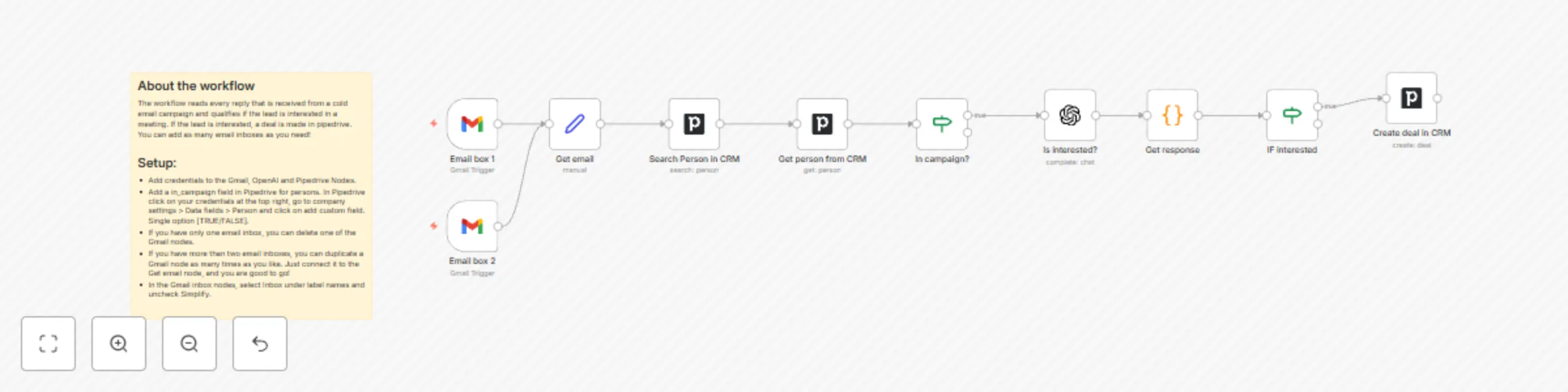
Workflow preview

$20/month : Unlimited workflows
2500 executions/month

THE #1 IN WEB SCRAPING
Scrape any website without limits
HOSTINGER  Early Deal
DISCOUNT 20% Try free
Early DealDISCOUNT 20%
Self-hosted n8n
Unlimited workflows - from $4.99/mo

#1 hub for scraping, AI & automation
6000+ actors - $5 credits/mo
Important notice
This workflow is provided as-is. Please review and test before using in production.
Overview
About the workflow
The workflow reads every reply that is received from a cold email campaign and qualifies if the lead is interested in a meeting. If the lead is interested, a deal is made in pipedrive. You can add as many email inboxes as you need!
Setup:
- Add credentials to the Gmail, OpenAI and Pipedrive Nodes.
- Add a in_campaign field in Pipedrive for persons. In Pipedrive click on your credentials at the top right, go to company settings > Data fields > Person and click on add custom field. Single option [TRUE/FALSE].
- If you have only one email inbox, you can delete one of the Gmail nodes.
- If you have more than two email inboxes, you can duplicate a Gmail node as many times as you like. Just connect it to the Get email node, and you are good to go!
- In the Gmail inbox nodes, select Inbox under label names and uncheck Simplify.