Message buffer system with Redis for efficient processing
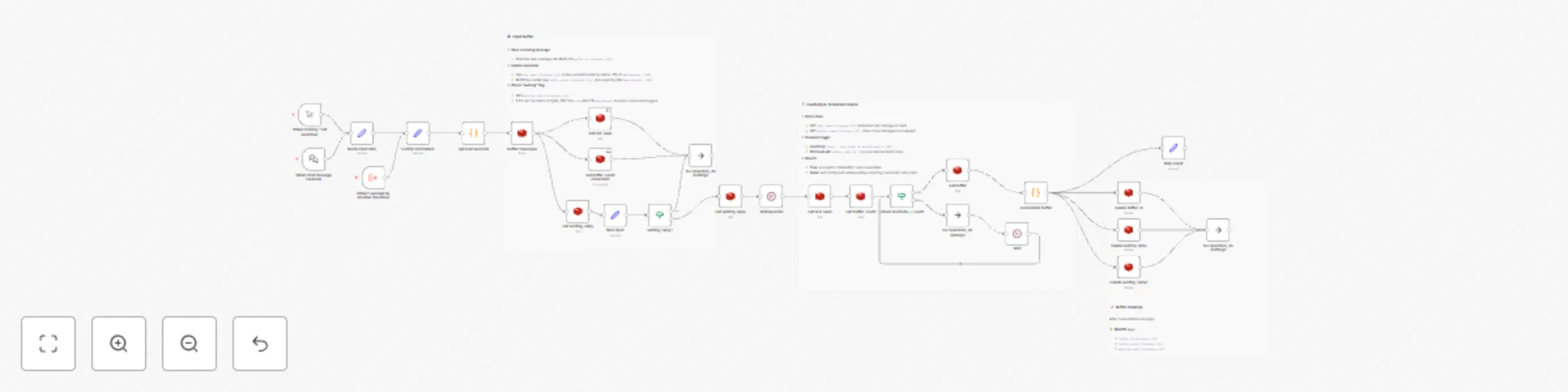
Workflow preview


 Early Deal
DISCOUNT 20%

Important notice
This workflow is provided as-is. Please review and test before using in production.
Overview
🚀 Message-Batching Buffer Workflow (n8n)
This workflow implements a lightweight message-batching buffer using Redis for temporary storage and a JavaScript consolidation function to merge messages. It collects incoming user messages per session, waits for a configurable inactivity window or batch size threshold, consolidates buffered messages via custom code, then clears the buffer and returns the combined response—all without external LLM calls.
🔑 Key Features
- Redis-backed buffer queues incoming messages per
context_id. - Centralized Config Parameters node to adjust thresholds and timeouts in one place.
- Dynamic wait time based on message length (configurable
minWords,waitLong,waitShort). - Batch trigger fires on inactivity timeout or when
buffer_count≥batchThreshold. - Zero-cost consolidation via built-in JavaScript Function (
consolidate buffer)—no GPT-4 or external API required.
⚙️ Setup Instructions
Extract Session & Message
- Trigger:
When chat message received(webhook) orWhen clicking ‘Test workflow’(manual). - Map inputs: set variables
context_idandmessageinto a Set node named Mock input data (for testing) or a proper mapping node in production.
- Trigger:
Config Parameters
Add a Set node Config Parameters with:
minWords: 3         # Word threshold
waitLong: 10        # Timeout (s) for long messages
waitShort: 20       # Timeout (s) for short messages
batchThreshold: 3   # Messages to trigger batch early
All downstream nodes reference these JSON values dynamically.
Determine Wait Time
Node: get wait seconds (Code)
JS code:
const msg = $json.message || '';
const wordCount = msg.split(/\s+/).filter(w => w).length;
const { minWords, waitLong, waitShort } = items[0].json;
const waitSeconds = wordCount < minWords ? waitShort : waitLong;
return [{ json: { context_id: $json.context_id, message: msg, waitSeconds } }];
Buffer Message in Redis
- Buffer messages:
LPUSH buffer_in:{{$json.context_id}}with payload{text, timestamp}. - Set buffer_count increment:
INCR buffer_count:{{$json.context_id}}with TTL{{$json.waitSeconds + 60}}. - Set last_seen: record
last_seen:{{$json.context_id}}timestamp with same TTL.
- Buffer messages:
Check & Set Waiting Flag
- Get waiting_reply: if null, Set waiting_reply to
truewith TTL{{$json.waitSeconds}}; else exit.
- Get waiting_reply: if null, Set waiting_reply to
Wait for Inactivity
- WaitSeconds (webhook): pauses for
{{$json.waitSeconds}}seconds before batch evaluation.
- WaitSeconds (webhook): pauses for
Check Batch Trigger
- Get last_seen and Get buffer_count.
- IF
(now - last_seen) ≥ waitSeconds * 1000ORbuffer_count ≥ batchThreshold, proceed; else use Wait node to retry.
Consolidate Buffer
consolidate buffer (Code):
const j = items[0].json;
const raw = Array.isArray(j.buffer) ? j.buffer : [];
const buffer = raw.map(x => {
  try { return typeof x === 'string' ? JSON.parse(x) : x;
  } catch { return null; }
}).filter(Boolean);
buffer.sort((a, b) => new Date(a.timestamp) - new Date(b.timestamp));
const texts = buffer.map(e => e.text?.trim()).filter(Boolean);
const unique = [...new Set(texts)];
const message = unique.join(' ');
return [{ json: { context_id: j.context_id, message } }];
Cleanup & Respond
- Delete Redis keys:
buffer_in,buffer_count,waiting_reply,last_seen(for thecontext_id). - Return consolidated
messageto the user via your chat integration.
- Delete Redis keys:
🛠 Customization Guidance
- Adjust thresholds by editing the Config Parameters node.
- Change concatenation (e.g., line breaks) by modifying the
joinseparator in the consolidation code. - Add filters (e.g., ignore empty or system messages) inside the consolidation Function.
- Monitor performance: for very high volume, consider sharding Redis keys by date or user segments.
© 2025 Innovatex • Automation & AI Solutions • innovatexiot.carrd.co • LinkedIn