Block 1 - When clicking ‘Test workflow’
- Type / Role
- n8n-nodes-base.manualTrigger - manualTrigger
- Config choices
- Version 1


 Early Deal
This workflow is provided as-is. Please review and test before using in production.
Message Batching Buffer Workflow (n8n) This workflow implements a lightweight message batching buffer using Redis for temporary storage and a JavaScript consolidation function to merge messages....
n8n-nodes-base.manualtrigger, n8n-nodes-base.noop, n8n-nodes-base.code, n8n-nodes-base.redis, n8n-nodes-base.set, n8n-nodes-base.if, @n8n/n8n-nodes-langchain.chattrigger, n8n-nodes-base.wait
This workflow is cataloged by N8N Workflows and links back to its original n8n.io source page by Edisson Garcia.
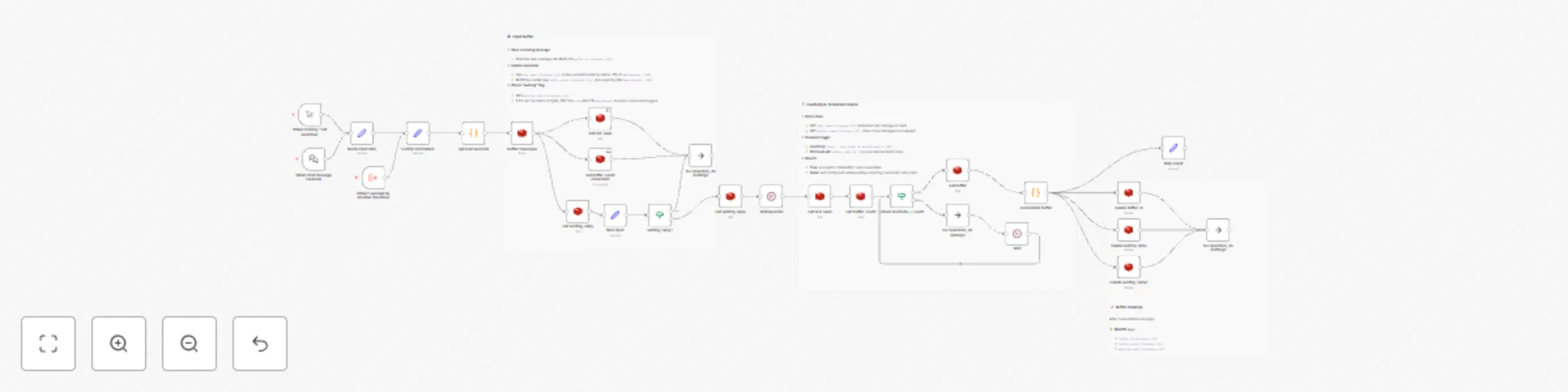
Original n8n.io sourceThis workflow implements a lightweight message-batching buffer using Redis for temporary storage and a JavaScript consolidation function to merge messages. It collects incoming user messages per session, waits for a configurable inactivity window or batch size threshold, consolidates buffered messages via custom code, then clears the buffer and returns the combined response—all without external LLM calls.
context_id.minWords, waitLong, waitShort).buffer_count ≥ batchThreshold.consolidate buffer)—no GPT-4 or external API required.Extract Session & Message
When chat message received (webhook) or When clicking ‘Test workflow’ (manual).context_id and message into a Set node named Mock input data (for testing) or a proper mapping node in production.Config Parameters
Add a Set node Config Parameters with:
minWords: 3         # Word threshold
waitLong: 10        # Timeout (s) for long messages
waitShort: 20       # Timeout (s) for short messages
batchThreshold: 3   # Messages to trigger batch early
All downstream nodes reference these JSON values dynamically.
Determine Wait Time
Node: get wait seconds (Code)
JS code:
const msg = $json.message || '';
const wordCount = msg.split(/\s+/).filter(w => w).length;
const { minWords, waitLong, waitShort } = items[0].json;
const waitSeconds = wordCount < minWords ? waitShort : waitLong;
return [{ json: { context_id: $json.context_id, message: msg, waitSeconds } }];
Buffer Message in Redis
LPUSH buffer_in:{{$json.context_id}} with payload {text, timestamp}.INCR buffer_count:{{$json.context_id}} with TTL {{$json.waitSeconds + 60}}.last_seen:{{$json.context_id}} timestamp with same TTL.Check & Set Waiting Flag
true with TTL {{$json.waitSeconds}}; else exit.Wait for Inactivity
{{$json.waitSeconds}} seconds before batch evaluation.Check Batch Trigger
(now - last_seen) ≥ waitSeconds * 1000 OR buffer_count ≥ batchThreshold, proceed; else use Wait node to retry.Consolidate Buffer
consolidate buffer (Code):
const j = items[0].json;
const raw = Array.isArray(j.buffer) ? j.buffer : [];
const buffer = raw.map(x => {
  try { return typeof x === 'string' ? JSON.parse(x) : x;
  } catch { return null; }
}).filter(Boolean);
buffer.sort((a, b) => new Date(a.timestamp) - new Date(b.timestamp));
const texts = buffer.map(e => e.text?.trim()).filter(Boolean);
const unique = [...new Set(texts)];
const message = unique.join(' ');
return [{ json: { context_id: j.context_id, message } }];
Cleanup & Respond
buffer_in, buffer_count, waiting_reply, last_seen (for the context_id).message to the user via your chat integration.join separator in the consolidation code.© 2025 Innovatex • Automation & AI Solutions • innovatexiot.carrd.co • LinkedIn
This catalog entry is organized from the workflow JSON. The node-level section below shows the executable blocks available for review before importing the template.
Showing the first 24 of 30 workflow blocks. Download the JSON for the full node graph.
| Workflow | Message buffer system with Redis for efficient processing |
|---|---|
| Complexity | advanced |
| Nodes | 30 |
| Categories | Support Chatbot, AI Summarization |
| Author | Edisson Garcia |
| Published | 02 May 2025 |
Use the JSON export at /data/workflows/3832/3832.json as the source template for this automation.
Open n8n, import the downloaded JSON, and review each node before activating the workflow.
Replace placeholder credentials, API keys, webhook URLs, account IDs, and environment-specific values with your own settings.
Run the workflow manually or in a staging workspace, inspect node output, and confirm downstream systems receive the expected data.
Enable the workflow only after testing, then monitor executions, errors, and rate limits during the first production runs.
Review imported nodes carefully before activation. This catalog entry is intended to help you inspect the workflow structure, understand required services, and find related templates faster.
Node names, credentials, schedules, webhook paths, and external service limits may need adjustment for your workspace.
Message Batching Buffer Workflow (n8n) This workflow implements a lightweight message batching buffer using Redis for temporary storage and a JavaScript consolidation function to merge messages....
Review the workflow JSON, configure any required credentials in n8n, and test the automation in a safe workspace before using it in production.
Yes. Use the block-by-block analysis and the downloadable JSON to inspect each node, then adjust credentials, prompts, schedules, filters, or destinations for your Support Chatbot, AI Summarization use case.