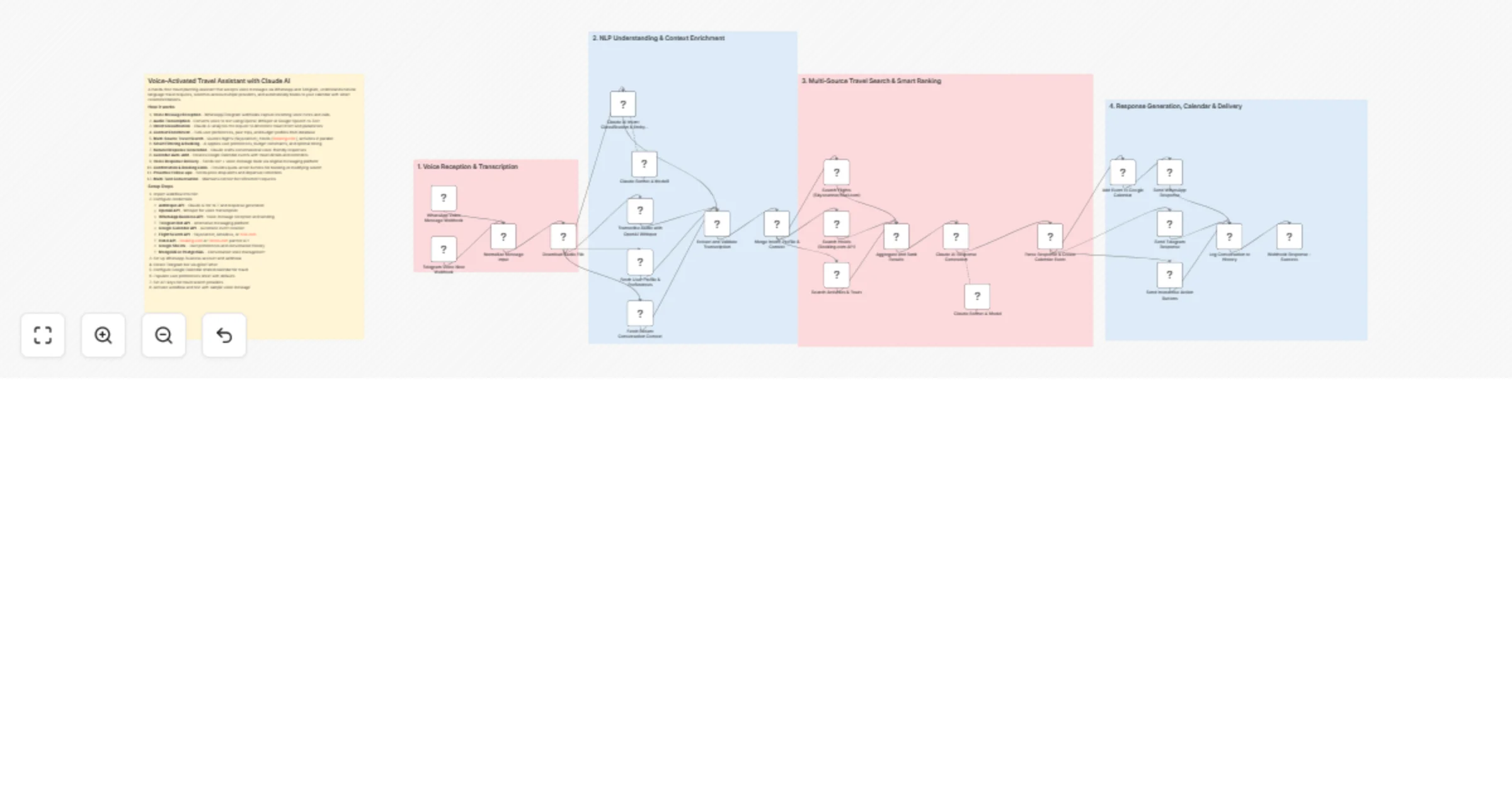
Plan voice-based travel and calendar bookings with Claude AI

Workflow preview

Workflow preview
100%
Plan voice-based travel and calendar bookings with Claude AI preview
Open on n8n.io

1. Workflow Overview

A hands free travel planning assistant that accepts voice messages via WhatsApp and Telegram, understands natural language travel requests, searches across multiple providers, and automatically boo...

Best for

  • Support Chatbot automation workflows
  • AI Chatbot automation workflows
  • advanced n8n builders looking for reusable templates

Tools used

n8n-nodes-base.stickynote, n8n-nodes-base.webhook, n8n-nodes-base.code, n8n-nodes-base.httprequest, @n8n/n8n-nodes-langchain.agent, @n8n/n8n-nodes-langchain.lmchatanthropic, n8n-nodes-base.googlesheets, n8n-nodes-base.googlecalendar

Source and attribution

This workflow is cataloged by N8N Workflows and links back to its original n8n.io source page by Oneclick AI Squad.

Original n8n.io source

1.1 Workflow description

Title
Plan voice-based travel and calendar bookings with Claude AI
Workflow name
Plan voice-based travel and calendar bookings with Claude AI

A hands-free travel planning assistant that accepts voice messages via WhatsApp and Telegram, understands natural language travel requests, searches across multiple providers, and automatically books to your calendar with smart recommendations.

How it works

  1. Voice Message Reception - WhatsApp/Telegram webhooks capture incoming voice notes and calls
  2. Audio Transcription - Converts voice to text using OpenAI Whisper or Google Speech-to-Text
  3. Intent Classification - Claude AI analyzes the request to determine travel intent and parameters
  4. Context Enrichment - Pulls user preferences, past trips, and budget profiles from database
  5. Multi-Source Travel Search - Queries flights (Skyscanner), hotels (Booking.com), activities in parallel
  6. Smart Filtering & Ranking - AI applies user preferences, budget constraints, and optimal timing
  7. Natural Response Generation - Claude crafts conversational voice-friendly responses
  8. Calendar Auto-Add - Creates Google Calendar events with travel details and reminders
  9. Voice Response Delivery - Sends text + voice message back via original messaging platform
  10. Confirmation & Booking Links - Provides quick-action buttons for booking or modifying search
  11. Proactive Follow-ups - Sends price drop alerts and departure reminders
  12. Multi-Turn Conversation - Maintains context for refinement requests

Setup Steps

  1. Import workflow into n8n
  2. Configure credentials:
  • Anthropic API - Claude AI for NLP and response generation
  • OpenAI API - Whisper for voice transcription
  • WhatsApp Business API - Voice message reception and sending
  • Telegram Bot API - Alternative messaging platform
  • Google Calendar API - Automatic event creation
  • Flight Search API - Skyscanner, Amadeus, or Kiwi.com
  • Hotel API - Booking.com or Hotels.com partner API
  • Google Sheets - User preferences and conversation history
  • MongoDB or PostgreSQL - Conversation state management
  1. Set up WhatsApp Business account and webhook
  2. Create Telegram bot via @BotFather
  3. Configure Google Calendar shared calendar for travel
  4. Populate user preferences sheet with defaults
  5. Set API keys for travel search providers
  6. Activate workflow and test with sample voice message

Sample Voice Requests

Simple Flight Search: "Hey, find me cheap flights to Paris next month"

Complex Multi-City: "I need to go to Tokyo in March for a week, then Bangkok for 3 days, budget is $2000 total"

Hotel Only: "Book a hotel in Barcelona for May 15th to 20th, somewhere near the beach under $150 per night"

Full Package: "Plan a romantic weekend in Santorini for our anniversary in June, nice hotel with sunset view, under $3000 for two people"

Activity Search: "What are the best things to do in Amsterdam for 3 days, we like museums and food tours"

Calendar Query: "When am I flying to London next month? And can you add a reminder 2 days before?"

Voice Message Webhook Payload

{
 "platform": "whatsapp",
 "messageId": "wamid.ABC123XYZ",
 "from": "+15551234567",
 "timestamp": 1735804800,
 "type": "audio",
 "audio": {
 "id": "audio_id_12345",
 "mimeType": "audio/ogg",
 "sha256": "abc123...",
 "duration": 15,
 "url": "https://media.whatsapp.com/audio/abc123"
 },
 "context": {
 "conversationId": "conv-user-001",
 "previousMessageId": null
 }
}

Enterprise Features

Voice Intelligence:

  • Multi-language transcription (30+ languages)
  • Accent-adaptive recognition
  • Background noise filtering
  • Speaker emotion detection for urgency

Smart Travel Search:

  • Multi-provider aggregation (flights, hotels, activities)
  • Real-time price comparison
  • Flexible date search (±3 days optimization)
  • Budget-aware filtering
  • Loyalty program integration

AI-Powered Personalization:

  • Learns from past bookings and preferences
  • Remembers dietary restrictions, seating preferences
  • Adapts to budget patterns
  • Suggests destinations based on season and interests

Proactive Assistance:

  • Price drop alerts for saved searches
  • Flight delay notifications
  • Weather warnings before departure
  • Packing list generation
  • Travel insurance reminders

Calendar Intelligence:

  • Conflict detection with existing events
  • Travel time buffer insertion
  • Timezone-aware scheduling
  • Shared calendar support for group trips
  • Automatic itinerary attachment

Security & Privacy:

  • End-to-end encryption for voice messages
  • PII redaction in logs
  • Secure credential storage
  • GDPR-compliant data handling
  • User data deletion on request

Multi-Platform Support:

  • WhatsApp Business
  • Telegram
  • Facebook Messenger
  • SMS fallback
  • Web widget integration

1.2 Logical Blocks

This catalog entry is organized from the workflow JSON. The node-level section below shows the executable blocks available for review before importing the template.

2. Block-by-Block Analysis

Block 1 - Main Documentation

Type / Role
n8n-nodes-base.stickyNote - stickyNote
Config choices
Version 1

Block 2 - Section 1 Header

Type / Role
n8n-nodes-base.stickyNote - stickyNote
Config choices
Version 1

Block 3 - Section 2 Header

Type / Role
n8n-nodes-base.stickyNote - stickyNote
Config choices
Version 1

Block 4 - Section 3 Header

Type / Role
n8n-nodes-base.stickyNote - stickyNote
Config choices
Version 1

Block 5 - Section 4 Header

Type / Role
n8n-nodes-base.stickyNote - stickyNote
Config choices
Version 1

Block 6 - WhatsApp Voice Message Webhook

Type / Role
n8n-nodes-base.webhook - webhook
Config choices
Version 2

Block 7 - Telegram Voice Note Webhook

Type / Role
n8n-nodes-base.webhook - webhook
Config choices
Version 2

Block 8 - Normalize Message Input

Type / Role
n8n-nodes-base.code - code
Config choices
Version 2

Block 9 - Download Audio File

Type / Role
n8n-nodes-base.httpRequest - httpRequest
Config choices
Version 4.2

Block 10 - Transcribe Audio with OpenAI Whisper

Type / Role
n8n-nodes-base.httpRequest - httpRequest
Config choices
Version 4.2

Block 11 - Extract and Validate Transcription

Type / Role
n8n-nodes-base.code - code
Config choices
Version 2

Block 12 - Claude AI Intent Classification & Entity Extraction

Type / Role
@n8n/n8n-nodes-langchain.agent - agent
Config choices
Version 1.6

Block 13 - Claude Sonnet 4 Model

Type / Role
@n8n/n8n-nodes-langchain.lmChatAnthropic - lmChatAnthropic
Config choices
Version 1

Block 14 - Fetch User Profile & Preferences

Type / Role
n8n-nodes-base.googleSheets - googleSheets
Config choices
Version 4.5

Block 15 - Fetch Recent Conversation Context

Type / Role
n8n-nodes-base.googleSheets - googleSheets
Config choices
Version 4.5

Block 16 - Merge Intent, Profile & Context

Type / Role
n8n-nodes-base.code - code
Config choices
Version 2

Block 17 - Search Flights (Skyscanner/Kiwi.com)

Type / Role
n8n-nodes-base.httpRequest - httpRequest
Config choices
Version 4.2

Block 18 - Search Hotels (Booking.com API)

Type / Role
n8n-nodes-base.httpRequest - httpRequest
Config choices
Version 4.2

Block 19 - Search Activities & Tours

Type / Role
n8n-nodes-base.httpRequest - httpRequest
Config choices
Version 4.2

Block 20 - Aggregate and Rank Results

Type / Role
n8n-nodes-base.code - code
Config choices
Version 2

Block 21 - Claude AI Response Generation

Type / Role
@n8n/n8n-nodes-langchain.agent - agent
Config choices
Version 1.6

Block 22 - Parse Response & Create Calendar Event

Type / Role
n8n-nodes-base.code - code
Config choices
Version 2

Block 23 - Add Event to Google Calendar

Type / Role
n8n-nodes-base.googleCalendar - googleCalendar
Config choices
Version 1.2

Block 24 - Send WhatsApp Response

Type / Role
n8n-nodes-base.httpRequest - httpRequest
Config choices
Version 4.2

Showing the first 24 of 29 workflow blocks. Download the JSON for the full node graph.

3. Summary Table

Workflow Plan voice-based travel and calendar bookings with Claude AI
Complexity advanced
Nodes 29
Categories Support Chatbot, AI Chatbot
Author Oneclick AI Squad
Published 08 Apr 2026

4. Reproducing the Workflow from Scratch

  1. 1. Download the workflow JSON

    Use the JSON export at /data/workflows/14914/14914.json as the source template for this automation.

  2. 2. Import the template into n8n

    Open n8n, import the downloaded JSON, and review each node before activating the workflow.

  3. 3. Configure credentials and variables

    Replace placeholder credentials, API keys, webhook URLs, account IDs, and environment-specific values with your own settings.

  4. 4. Test with sample data

    Run the workflow manually or in a staging workspace, inspect node output, and confirm downstream systems receive the expected data.

  5. 5. Activate and monitor

    Enable the workflow only after testing, then monitor executions, errors, and rate limits during the first production runs.

5. General Notes & Resources

Review imported nodes carefully before activation. This catalog entry is intended to help you inspect the workflow structure, understand required services, and find related templates faster.

Node names, credentials, schedules, webhook paths, and external service limits may need adjustment for your workspace.

Frequently asked questions

What does Plan voice-based travel and calendar bookings with Claude AI do?

A hands free travel planning assistant that accepts voice messages via WhatsApp and Telegram, understands natural language travel requests, searches across multiple providers, and automatically boo...

What do I need before importing this workflow?

Review the workflow JSON, configure any required credentials in n8n, and test the automation in a safe workspace before using it in production.

Can I customize this workflow?

Yes. Use the block-by-block analysis and the downloadable JSON to inspect each node, then adjust credentials, prompts, schedules, filters, or destinations for your Support Chatbot, AI Chatbot use case.