Lead qualification & auto-assignment with GPT-4 Mini: Google Sheets to ClickUp
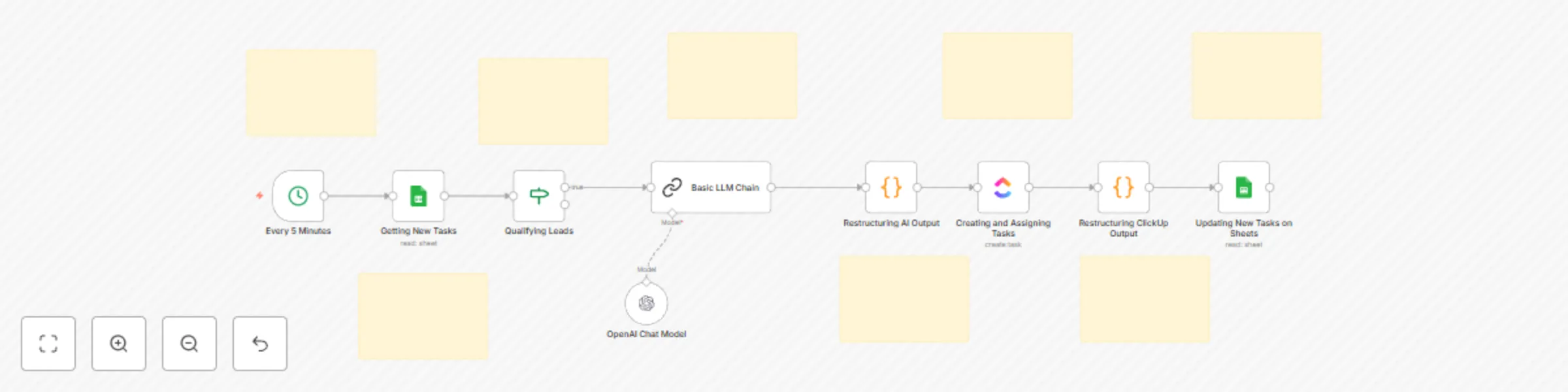
Workflow preview


 Early Deal
DISCOUNT 20%

Important notice
This workflow is provided as-is. Please review and test before using in production.
Overview
Description
Eliminate confusion in sales hand-offs with this ClickUp Task Assignment & Ownership automation! This workflow automatically creates and assigns ClickUp tasks whenever a lead’s status changes to “Qualified” or “Hot,” ensuring seamless ownership and accountability.
With AI-generated lead summaries, synchronized task details, and automatic updates between Google Sheets and ClickUp, your sales team gets crystal-clear context for every opportunity—without manual effort.
What This Template Does
📅 Runs every 5 minutes to check for new or updated leads 📋 Fetches lead records (status, contact, company info) from Google Sheets 🕒 Detects leads marked as “Qualified” or “Hot” for task creation 🤖 Generates AI summaries of company background + sales intent 📝 Creates ClickUp tasks with assignee, due date, and lead context 🔄 Updates Google Sheets with ClickUp task ID, owner, and status
Prerequisites
- Google Sheets with lead details (Name, Email, Status, Company)
- ClickUp API credentials
- OpenAI API key (for AI summaries)
- n8n instance (self-hosted or cloud)
- Step-by-Step Setup
- Prepare your Google Sheet with columns: Name, Email, Status, Company, Task ID.
- Connect Google Sheets to n8n and set up periodic checks (e.g., every 5 minutes).
- Add a conditional check for “Qualified” or “Hot” leads.
- Use the OpenAI API to generate a short AI summary for each lead.
- Create a new ClickUp task with:
- Title = Lead Name / Company
- Description = AI summary + lead details
- Assignee = Rep handling that lead
- Due date = Based on SLA
- Update the Google Sheet with ClickUp Task ID, Owner, Status.
Customization Ideas
- Add Slack/Telegram alerts for every new task created.
- Assign leads dynamically based on round-robin logic.
- Include priority tags (Hot, Warm, Cold) in ClickUp tasks.
- Extend workflow to CRM sync (HubSpot, Zoho, Salesforce).
Key Benefits ✅ Ensures every qualified lead gets a dedicated owner ✅ Provides AI-powered summaries for instant clarity ✅ Keeps ClickUp and Google Sheets in sync automatically ✅ Reduces missed follow-ups and speeds up hand-offs
Perfect For
- Sales Teams
- BDRs & SDRs
- Sales Managers ensuring accountability & ownership
- Businesses scaling lead hand-off processes