Extract emails from website HTMLs
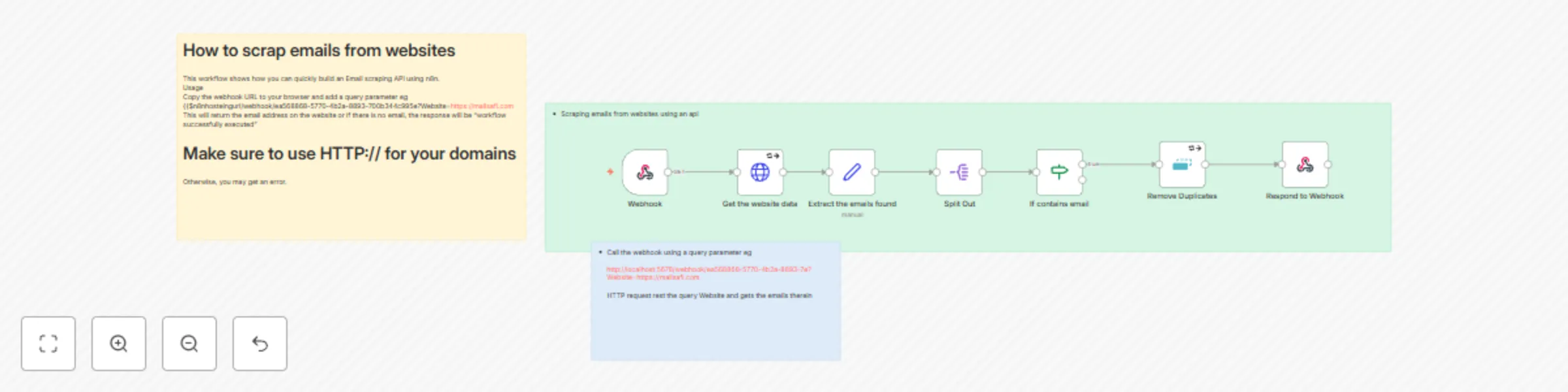
Workflow preview

$20/month : Unlimited workflows
2500 executions/month

THE #1 IN WEB SCRAPING
Scrape any website without limits
HOSTINGER  Early Deal
DISCOUNT 20% Try free
Early DealDISCOUNT 20%
Self-hosted n8n
Unlimited workflows - from $4.99/mo

#1 hub for scraping, AI & automation
6000+ actors - $5 credits/mo
Important notice
This workflow is provided as-is. Please review and test before using in production.
Overview
How to scrap emails from websites
This workflow shows how to quickly build an Email scraping API using n8n.
Email marketing is at the core of most marketing strategies, be it content marketing, sales, etc. As such, being able to find contacts in bulk for your business on a large scale is key. There are available tools available in the market that can do this, but most are premium; why not build a custom one with n8n?
Usage
The workflow gets the data from a website and performs an extraction based on the date around on the website
- Copy the webhook URL to your browser
- Add a query parameter eg ?Website=https://mailsafi.com . This should give you a URL like this {{$n8nhostingurl/webhook/ea568868-5770-4b2a-8893-700b344c995e?Website=https://mailsafi.com
- Click on the URL and wait for the extracted email to be displayed. This will return the email address on the website, or if there is no email, the response will be "workflow successfully executed."
Make sure to use HTTP:// for your domains
Otherwise, you may get an error.