Enrich and manage candidates data in Notion
Workflow preview

$20/month : Unlimited workflows
2500 executions/month

THE #1 IN WEB SCRAPING
Scrape any website without limits
HOSTINGER  Early Deal
DISCOUNT 20% Try free
Early DealDISCOUNT 20%
Self-hosted n8n
Unlimited workflows - from $4.99/mo

#1 hub for scraping, AI & automation
6000+ actors - $5 credits/mo
Important notice
This workflow is provided as-is. Please review and test before using in production.
Overview
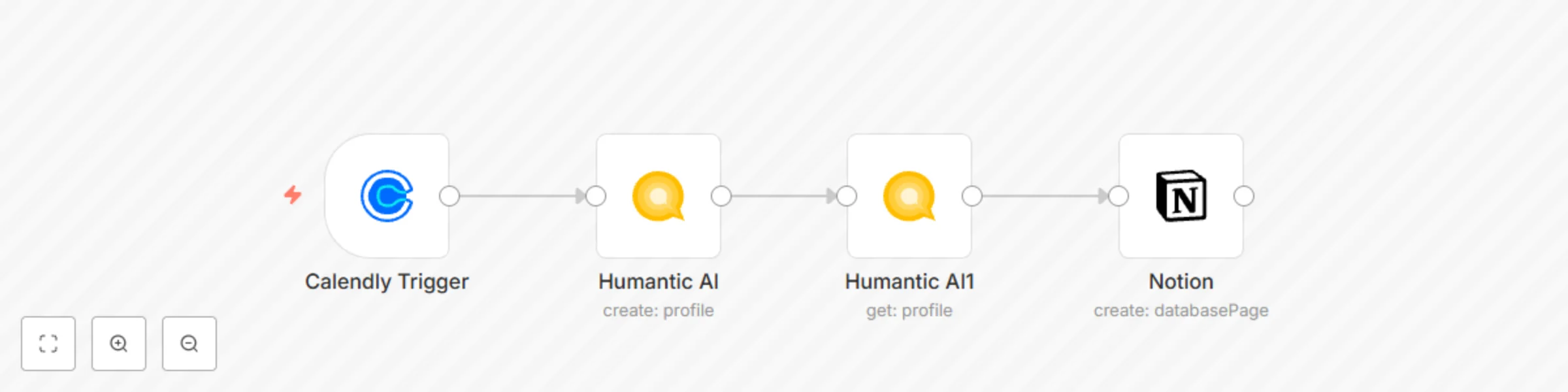
This workflow allows you to add candidates’ profile assessments to Notion before an interview.
Prerequisites
- Add an input field on your Calendly Invite page where the candidate can enter their LinkedIn URL.
- Create credentials for your Calendly account. Follow the steps mentioned in the documentation to learn how to do that.
- Create credentials for Humantic AI following the steps mentioned here.
- Create a page on Notion similar to this page.
- Create credentials for the Notion node by following the steps in the documentation.
Calendly Trigger node: This node will trigger the workflow when an interview gets scheduled. Make sure to add a field to collect the candidates' LinkedIn URL on your invite page.
Humantic AI: This node uses the LinkedIn URL received by the previous node to create a candidate profile in Humantic AI.
Humantic AI1: This node will analyze the candidates' profile.
Notion node: This node will create a new page in Notion using the information from the previous node.