Client FAQ bot with RAG using Google Drive PDFs & Azure GPT-4o-mini
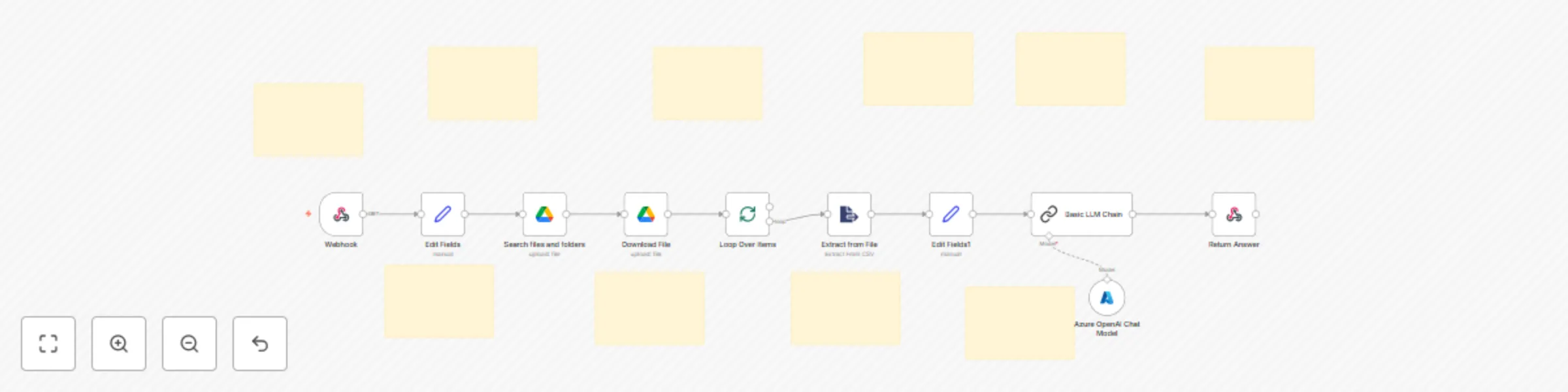
Workflow preview


 Early Deal
DISCOUNT 20%

Important notice
This workflow is provided as-is. Please review and test before using in production.
Overview
Description:
Build your own AI-powered Client FAQ system with Retrieval-Augmented Generation (RAG) — fully automated using n8n, Google Drive, and Azure OpenAI (GPT-4o-mini). This no-code automation enables your clients or team to ask questions through a webhook, and get precise answers sourced directly from a collection of PDF documents stored in Google Drive. Ideal for support teams, sales enablement, onboarding automation, and customer self-service — this RAG-powered bot ensures accurate, document-based answers with no hallucinations or AI guesses.
What This Template Does (Step-by-Step):
🌐 Webhook Trigger for Incoming Questions
- Accepts POST requests with a client’s question
- Triggers the entire FAQ automation on request
🗂️ Search Google Drive Folder for Source Documents
- Connects to a specific Google Drive folder (e.g., “Case Studies”)
- Fetches all PDFs to be used as the context source
📥 Downloads and Processes Each File
- Downloads all matched files
- Extracts clean text from each PDF file
🔄 Iterates Over Each File for Text Extraction
- Loops through multiple files
- Extracts relevant content from each file individually
🧠 Prepares Clean Context + Question for RAG
- Combines the extracted PDF text into a single context block
- Injects the user’s question into the RAG-ready prompt
💬 Azure OpenAI (GPT-4o-mini) RAG Prompt
- Generates an accurate answer ONLY from the extracted documents
- If the answer isn’t found, returns a fallback response
📤 Sends the Final Response Back via Webhook
- Returns the AI-generated answer directly to the client via HTTP response
Perfect For:
📞 Sales & client onboarding teams 📚 Knowledge base & internal SOP support 🧑💻 B2B SaaS customer success teams 🏢 Enterprises automating policy or document queries 💼 Agencies offering client-specific documentation portals
Built With:
- Webhook Trigger (n8n)
- Google Drive API (search + download)
- PDF Text Extractor
- Loop / Split Batches
- Azure OpenAI GPT-4o-mini via LangChain LLM
- Context-safe RAG prompt logic
- Webhook Response for real-time delivery
Key Benefits:
✅ Fast, context-aware answers from internal PDFs 🔒 No hallucinations — AI only responds using uploaded documents 📎 Works with any internal client folder in Google Drive 💬 Easily embed into any app, bot, or portal via Webhook 🧩 100% modular — extend with email, Slack, CRM, or ticketing tools