Block 1 - Download File
- Type / Role
- n8n-nodes-base.googleDrive - googleDrive
- Config choices
- Version 1


 Early Deal
This workflow is provided as-is. Please review and test before using in production.
Description: Build your own AI powered Client FAQ system with Retrieval Augmented Generation (RAG) — fully automated using n8n, Google Drive, and Azure OpenAI (GPT 4o mini). This no code automation...
n8n-nodes-base.googledrive, n8n-nodes-base.respondtowebhook, n8n-nodes-base.webhook, @n8n/n8n-nodes-langchain.chainllm, @n8n/n8n-nodes-langchain.lmchatazureopenai, n8n-nodes-base.set, n8n-nodes-base.extractfromfile, n8n-nodes-base.splitinbatches
This workflow is cataloged by N8N Workflows and links back to its original n8n.io source page by Rahul Joshi.
Original n8n.io sourceDescription:
Build your own AI-powered Client FAQ system with Retrieval-Augmented Generation (RAG) — fully automated using n8n, Google Drive, and Azure OpenAI (GPT-4o-mini). This no-code automation enables your clients or team to ask questions through a webhook, and get precise answers sourced directly from a collection of PDF documents stored in Google Drive. Ideal for support teams, sales enablement, onboarding automation, and customer self-service — this RAG-powered bot ensures accurate, document-based answers with no hallucinations or AI guesses.
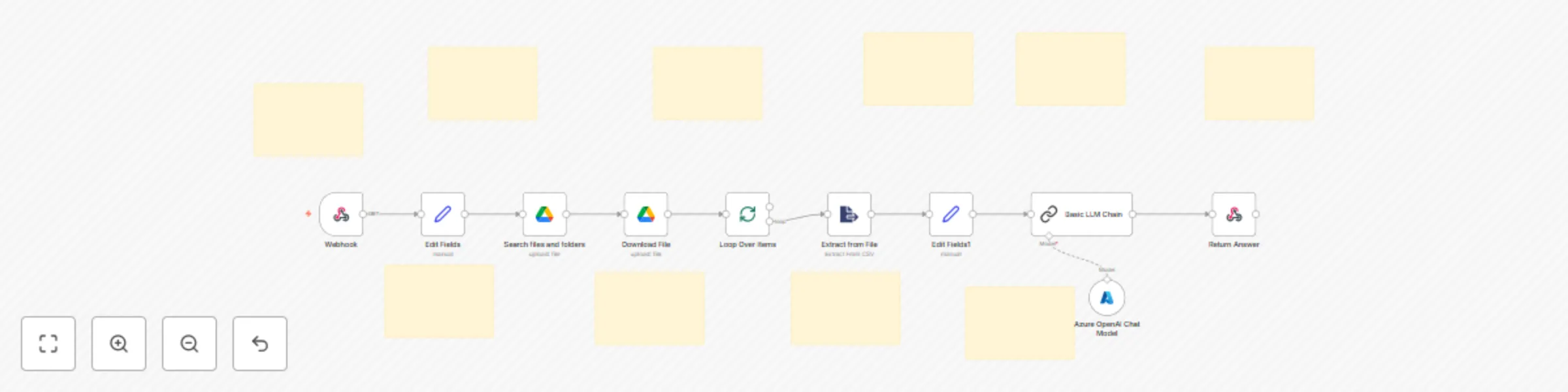
What This Template Does (Step-by-Step):
🌐 Webhook Trigger for Incoming Questions
🗂️ Search Google Drive Folder for Source Documents
📥 Downloads and Processes Each File
🔄 Iterates Over Each File for Text Extraction
🧠 Prepares Clean Context + Question for RAG
💬 Azure OpenAI (GPT-4o-mini) RAG Prompt
📤 Sends the Final Response Back via Webhook
Perfect For:
📞 Sales & client onboarding teams 📚 Knowledge base & internal SOP support 🧑💻 B2B SaaS customer success teams 🏢 Enterprises automating policy or document queries 💼 Agencies offering client-specific documentation portals
Built With:
Key Benefits:
✅ Fast, context-aware answers from internal PDFs 🔒 No hallucinations — AI only responds using uploaded documents 📎 Works with any internal client folder in Google Drive 💬 Easily embed into any app, bot, or portal via Webhook 🧩 100% modular — extend with email, Slack, CRM, or ticketing tools
This catalog entry is organized from the workflow JSON. The node-level section below shows the executable blocks available for review before importing the template.
| Workflow | Client FAQ bot with RAG using Google Drive PDFs & Azure GPT-4o-mini |
|---|---|
| Complexity | advanced |
| Nodes | 20 |
| Categories | Support Chatbot, AI RAG |
| Author | Rahul Joshi |
| Published | 06 Aug 2025 |
Use the JSON export at /data/workflows/7052/7052.json as the source template for this automation.
Open n8n, import the downloaded JSON, and review each node before activating the workflow.
Replace placeholder credentials, API keys, webhook URLs, account IDs, and environment-specific values with your own settings.
Run the workflow manually or in a staging workspace, inspect node output, and confirm downstream systems receive the expected data.
Enable the workflow only after testing, then monitor executions, errors, and rate limits during the first production runs.
Review imported nodes carefully before activation. This catalog entry is intended to help you inspect the workflow structure, understand required services, and find related templates faster.
Node names, credentials, schedules, webhook paths, and external service limits may need adjustment for your workspace.
Description: Build your own AI powered Client FAQ system with Retrieval Augmented Generation (RAG) — fully automated using n8n, Google Drive, and Azure OpenAI (GPT 4o mini). This no code automation...
Review the workflow JSON, configure any required credentials in n8n, and test the automation in a safe workspace before using it in production.
Yes. Use the block-by-block analysis and the downloadable JSON to inspect each node, then adjust credentials, prompts, schedules, filters, or destinations for your Support Chatbot, AI RAG use case.