Automated Shopify abandoned cart recovery with WhatsApp messages & Google Sheets
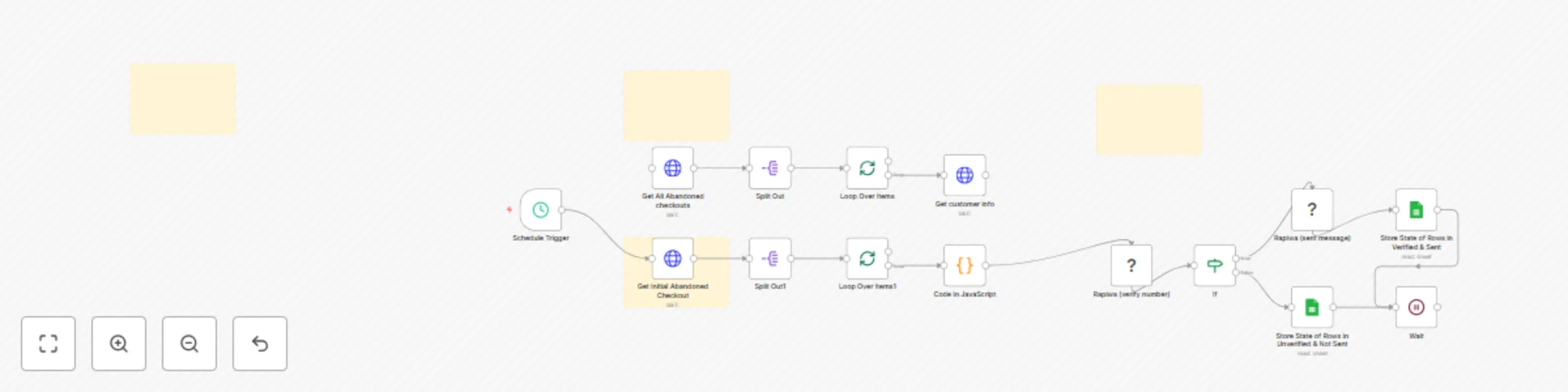
Workflow preview

$20/month : Unlimited workflows
2500 executions/month

THE #1 IN WEB SCRAPING
Scrape any website without limits
HOSTINGER  Early Deal
DISCOUNT 20% Try free
Early DealDISCOUNT 20%
Self-hosted n8n
Unlimited workflows - from $4.99/mo

#1 hub for scraping, AI & automation
6000+ actors - $5 credits/mo
Important notice
This workflow is provided as-is. Please review and test before using in production.
Overview
Who Is This For?
This workflow is perfect for e-commerce store owners using Shopify who want to automatically recover abandoned carts through personalized WhatsApp messages. It's ideal for businesses looking to increase conversion rates without manual outreach efforts.
What This Workflow Does
- Automated Cart Recovery: Runs on a schedule to check for abandoned checkouts
- Data Extraction: Retrieves abandoned checkout data from Shopify using both GraphQL and REST APIs
- Customer Data Processing:
- Fetches detailed customer information including name, email, and phone number
- Formats customer data for WhatsApp messaging
- Creates personalized messages with recovery links and discount codes
- WhatsApp number Verifies if customer phone numbers are registered on WhatsApp using Rapiwa API
- Targeted Messaging:
- Sends personalized WhatsApp messages to verified numbers
- Includes a 5% discount code (REOXXER5) to incentivize completion
- Also send direct recovery links
- Data Tracking:
- Stores all outreach attempts in Google Sheets
- Tracks which numbers were verified and which messages were
sentotherwisenot-sent - Save on sheet for verified and unverified contacts
Requirements
- Shopify Admin API Access (to retrieve checkout and customer data)
- Google Sheets OAuth2 (for tracking outreach)
- Rapiwa API (for WhatsApp verification and messaging)
How to Use — Step-by-Step Setup
1. Set Up Credentials in n8n
- Add your Shopify Admin API credentials with access to customer and checkout data
- Add Google Sheets OAuth2 credentials (named "Google Sheets")
- Add Rapiwa API credentials (named "Rapiwa account 2")
2. Prepare Your Google Sheet
Google sheet: Example
3. Customize the Workflow
- Modify the Schedule
- Change the discount code from "REOXXXXR5" to your offer
Useful Links
- Shopify Admin API: API Documentation
- Rapiwa: Get your WhatsApp API credentials
- Google Sheets API: Developer Documentation
Support & Help
- WhatsApp: Chat on WhatsApp
- Discord: SpaGreen Community
- Facebook Group: SpaGreen Support
- Website: https://spagreen.net
- Developer Portfolio: Codecanyon SpaGreen