Send 10-day post-purchase WhatsApp offers with Odoo, OpenAI and Evolution API

Workflow preview

Workflow preview
100%
Send 10-day post-purchase WhatsApp offers with Odoo, OpenAI and Evolution API preview
Open on n8n.io

1. Workflow Overview

What Problem Does It Solve? Generic, automated retention messages often feel like spam and fail to engage returning customers. Manually tracking which customers ordered exactly 10 days ago to send ...

Best for

  • Lead Nurturing automation workflows
  • AI Chatbot automation workflows
  • intermediate n8n builders looking for reusable templates

Tools used

n8n-nodes-base.scheduletrigger, n8n-nodes-base.odoo, n8n-nodes-base.httprequest, n8n-nodes-base.splitinbatches, @n8n/n8n-nodes-langchain.openai, n8n-nodes-base.wait, n8n-nodes-base.stickynote

Source and attribution

This workflow is cataloged by N8N Workflows and links back to its original n8n.io source page by khaled yasser.

Original n8n.io source

1.1 Workflow description

Title
Send 10-day post-purchase WhatsApp offers with Odoo, OpenAI and Evolution API
Workflow name
Send 10-day post-purchase WhatsApp offers with Odoo, OpenAI and Evolution API

What Problem Does It Solve?

  • Generic, automated retention messages often feel like spam and fail to engage returning customers.
  • Manually tracking which customers ordered exactly 10 days ago to send them tailored offers is extremely time-consuming.
  • Sending bulk promotional WhatsApp messages too quickly can result in phone number bans.
  • This workflow solves these issues by:
  • Automatically fetching customers from Odoo whose invoices are exactly 10 days old.
  • Using an AI Agent (OpenAI) to generate a highly personalized, warm Egyptian Arabic message for each customer.
  • Offering a targeted 10% extra discount to encourage repeat purchases via social media platforms.
  • Implementing a 1-minute "Wait" mechanism between messages to protect your WhatsApp account from being flagged.

How to Configure It

  • Odoo Setup
  • Connect your Odoo credentials in n8n.
  • The workflow fetches invoices starting from April 2026. Adjust the date filter in the "Fetch 10-Day Old Invoices" node if needed.
  • OpenAI Setup
  • Add your OpenAI API key to the "Generate AI Message" node.
  • You can tweak the system prompt to match your specific brand voice or adjust the discount offer.
  • WhatsApp API Setup
  • This workflow uses the Evolution API. Update the URL and "apikey" in the "Send WhatsApp Discount" node with your specific instance details.

How It Works

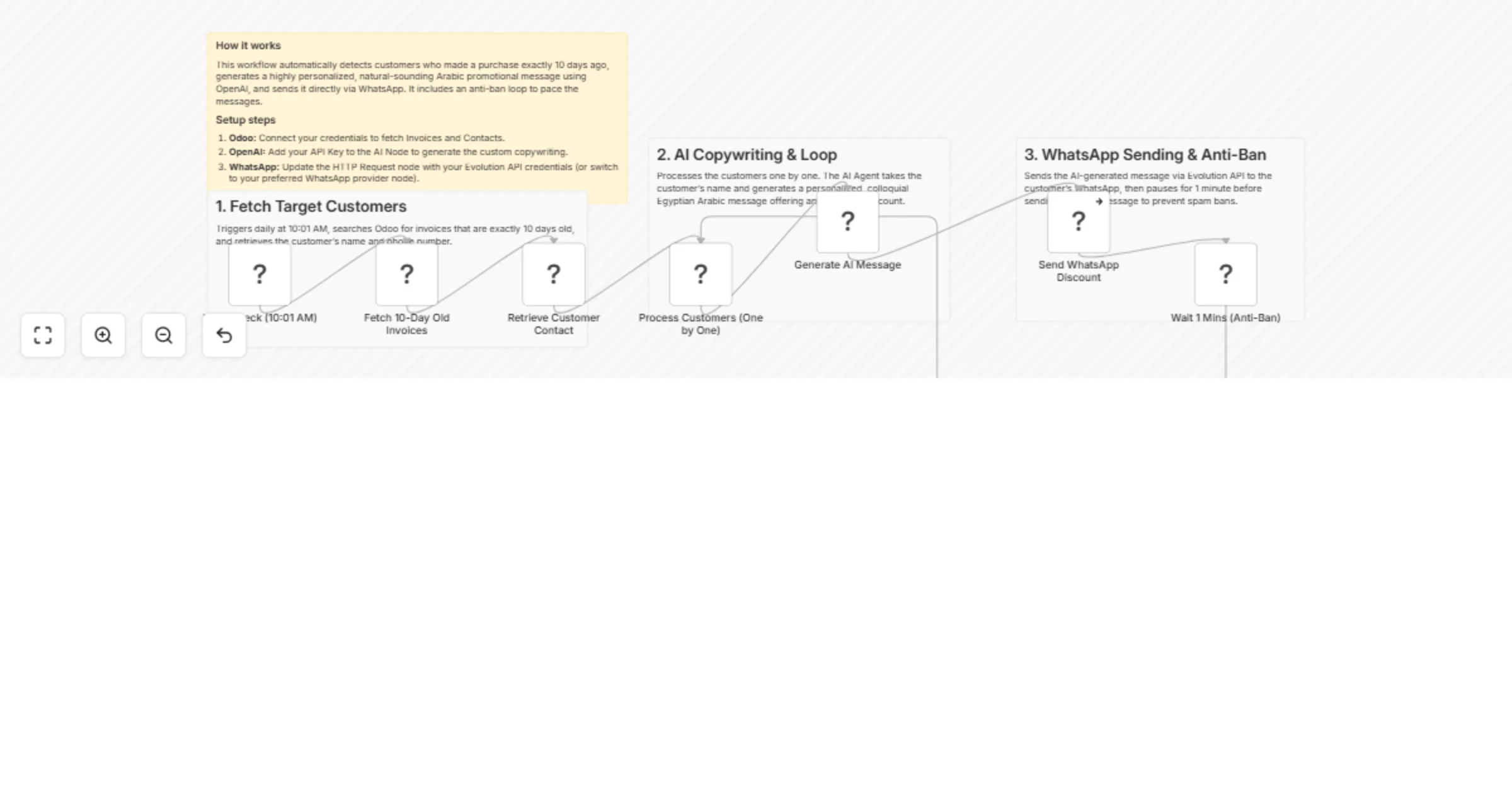
  • Every day at 10:01 AM, the schedule node triggers the workflow automatically.
  • It queries Odoo for all posted invoices exactly 10 days old and retrieves the corresponding customer contact details (Name and Phone).
  • It processes the customers one by one through a loop (Split In Batches).
  • For each customer, OpenAI generates a unique, friendly colloquial Arabic message calling them by their first name and offering a 10% discount.
  • The message explicitly directs the customer to claim the offer via social media messages, completely avoiding formal "terms & conditions" jargon.
  • The workflow sends the AI-generated text via WhatsApp and then pauses for 1 minute before processing the next customer.

Customization Ideas

  • Change the AI prompt to offer different discounts based on the total amount the customer spent in their last order.
  • Add a condition to skip customers who have already made a new purchase within the last 10 days.
  • Switch the AI model to Claude or Gemini depending on your preference for Arabic copywriting.

For more info Contact Me

1.2 Logical Blocks

This catalog entry is organized from the workflow JSON. The node-level section below shows the executable blocks available for review before importing the template.

2. Block-by-Block Analysis

Block 1 - Daily Check (10:01 AM)

Type / Role
n8n-nodes-base.scheduleTrigger - scheduleTrigger
Config choices
Version 1.3

Block 2 - Fetch 10-Day Old Invoices

Type / Role
n8n-nodes-base.odoo - odoo
Config choices
Version 1

Block 3 - Retrieve Customer Contact

Type / Role
n8n-nodes-base.odoo - odoo
Config choices
Version 1

Block 4 - Send WhatsApp Discount

Type / Role
n8n-nodes-base.httpRequest - httpRequest
Config choices
Version 4.3

Block 5 - Process Customers (One by One)

Type / Role
n8n-nodes-base.splitInBatches - splitInBatches
Config choices
Version 3

Block 6 - Generate AI Message

Type / Role
@n8n/n8n-nodes-langchain.openAi - openAi
Config choices
Version 2.1

Block 7 - Wait 1 Mins (Anti-Ban)

Type / Role
n8n-nodes-base.wait - wait
Config choices
Version 1.1

Block 8 - Sticky Note

Type / Role
n8n-nodes-base.stickyNote - stickyNote
Config choices
Version 1

Block 9 - Sticky Note 1

Type / Role
n8n-nodes-base.stickyNote - stickyNote
Config choices
Version 1

Block 10 - Sticky Note 2

Type / Role
n8n-nodes-base.stickyNote - stickyNote
Config choices
Version 1

Block 11 - Sticky Note 3

Type / Role
n8n-nodes-base.stickyNote - stickyNote
Config choices
Version 1

3. Summary Table

Workflow Send 10-day post-purchase WhatsApp offers with Odoo, OpenAI and Evolution API
Complexity intermediate
Nodes 11
Categories Lead Nurturing, AI Chatbot
Author khaled yasser
Published 06 Apr 2026

4. Reproducing the Workflow from Scratch

  1. 1. Download the workflow JSON

    Use the JSON export at /data/workflows/14829/14829.json as the source template for this automation.

  2. 2. Import the template into n8n

    Open n8n, import the downloaded JSON, and review each node before activating the workflow.

  3. 3. Configure credentials and variables

    Replace placeholder credentials, API keys, webhook URLs, account IDs, and environment-specific values with your own settings.

  4. 4. Test with sample data

    Run the workflow manually or in a staging workspace, inspect node output, and confirm downstream systems receive the expected data.

  5. 5. Activate and monitor

    Enable the workflow only after testing, then monitor executions, errors, and rate limits during the first production runs.

5. General Notes & Resources

Review imported nodes carefully before activation. This catalog entry is intended to help you inspect the workflow structure, understand required services, and find related templates faster.

Node names, credentials, schedules, webhook paths, and external service limits may need adjustment for your workspace.

Frequently asked questions

What does Send 10-day post-purchase WhatsApp offers with Odoo, OpenAI and Evolution API do?

What Problem Does It Solve? Generic, automated retention messages often feel like spam and fail to engage returning customers. Manually tracking which customers ordered exactly 10 days ago to send ...

What do I need before importing this workflow?

Review the workflow JSON, configure any required credentials in n8n, and test the automation in a safe workspace before using it in production.

Can I customize this workflow?

Yes. Use the block-by-block analysis and the downloadable JSON to inspect each node, then adjust credentials, prompts, schedules, filters, or destinations for your Lead Nurturing, AI Chatbot use case.