Automated B2B lead generation: Google Maps to Sheets with BrowserAct & Telegram
Workflow preview

$20/month : Unlimited workflows
2500 executions/month

THE #1 IN WEB SCRAPING
Scrape any website without limits
HOSTINGER  Early Deal
DISCOUNT 20% Try free
Early DealDISCOUNT 20%
Self-hosted n8n
Unlimited workflows - from $4.99/mo

#1 hub for scraping, AI & automation
6000+ actors - $5 credits/mo
Important notice
This workflow is provided as-is. Please review and test before using in production.
Overview

Automated B2B Lead Generation from Google Maps to Google Sheets using BrowserAct
This n8n template automates local lead generation by scraping Google Maps for businesses, saving them to Google Sheets, and notifying you in real-time via Telegram.
This workflow is perfect for sales teams, marketing agencies, and local B2B services looking to build targeted lead lists automatically.
Self-Hosted Only
This Workflow uses a community contribution and is designed and tested for self-hosted n8n instances only.
How it works
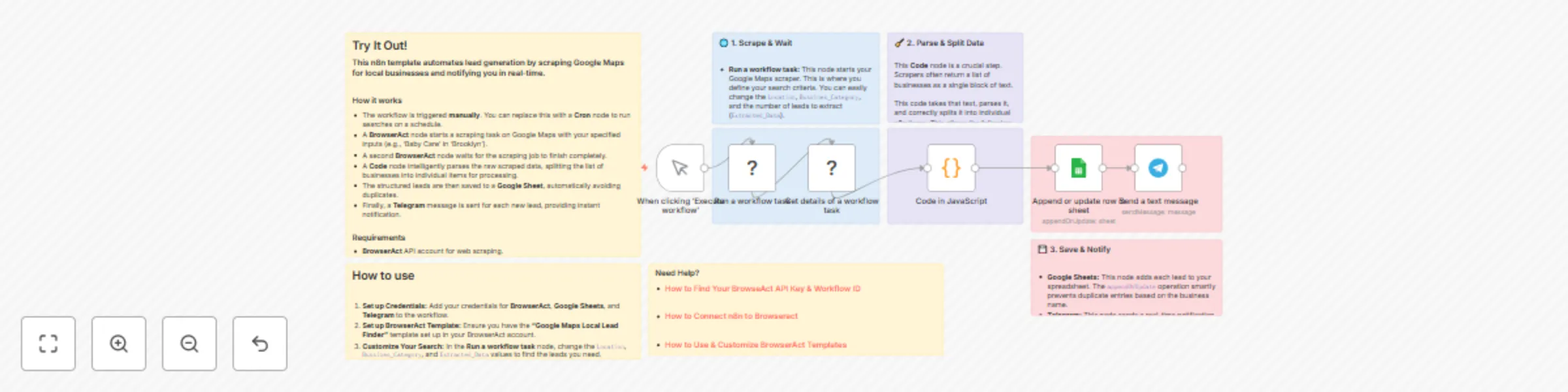
- The workflow is triggered manually. You can set the
Location,Bussines_Category, and number of leads (Extracted_Data) in the first BrowserAct node. - A BrowserAct node ("Run a workflow task") initiates the scraping job on Google Maps using your specified criteria.
- A second BrowserAct node ("Get details of a workflow task") pauses the workflow and waits for the scraping task to be 100% complete.
- A Code node takes the raw JSON string output from the scraper and correctly parses it, splitting the data into individual items (one for each business).
- A Google Sheets node appends or updates each lead into your spreadsheet, matching on the "Name" column to prevent duplicate entries.
- Finally, a Telegram node sends a message with the new lead's details to your specified chat, providing instant notification.
Requirements
- BrowserAct API account for web scraping
- BrowserAct "Google Maps Local Lead Finder" Template
- BrowserAct n8n Community Node -> (n8n Nodes BrowserAct)
- Google Sheets credentials for saving leads
- Telegram credentials for sending notifications
Need Help?
How to Find Your BrowseAct API Key & Workflow ID
How to Connect n8n to Browseract
How to Use & Customize BrowserAct Templates
How to Use the BrowserAct N8N Community Node