Automate post-interview feedback reminders using Google Sheets, Slack, and Gmail
Workflow preview

$20/month : Unlimited workflows
2500 executions/month

THE #1 IN WEB SCRAPING
Scrape any website without limits
HOSTINGER  Early Deal
DISCOUNT 20% Try free
Early DealDISCOUNT 20%
Self-hosted n8n
Unlimited workflows - from $4.99/mo

#1 hub for scraping, AI & automation
6000+ actors - $5 credits/mo
Important notice
This workflow is provided as-is. Please review and test before using in production.
Overview
Send Post‑Interview Feedback Nudges from Google Sheets to Slack (with Email Fallback)
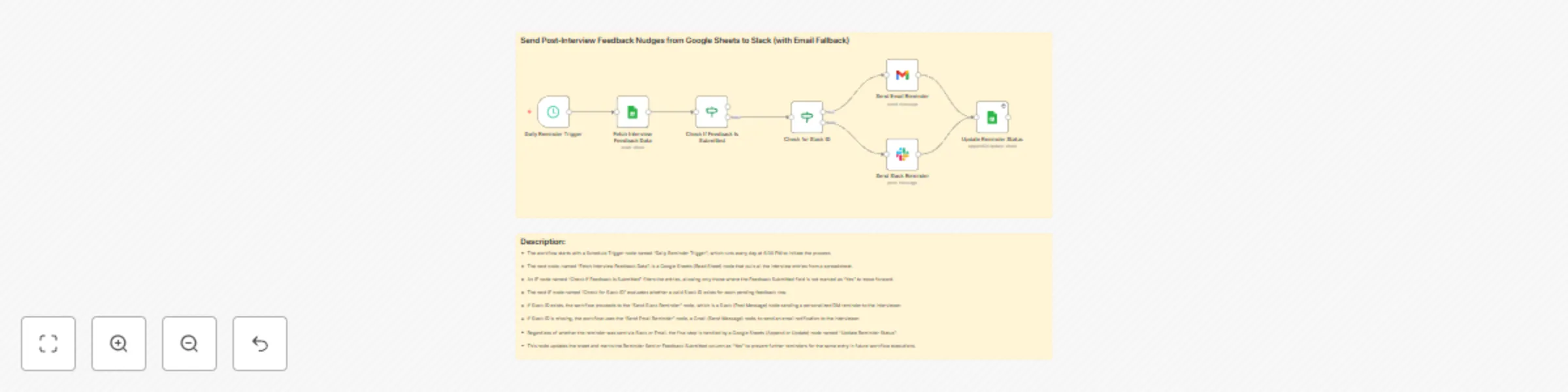
This n8n workflow automates the process of sending post-interview feedback reminders to interviewers. It checks a Google Sheet daily for pending feedback entries and sends personalized Slack DMs or email nudges based on the availability of Slack IDs. It ensures consistent follow-ups and eliminates manual tracking.
Who’s it for
- HR and Talent Acquisition teams
- Recruitment coordinators
- Engineering/Design/Product team leads conducting interviews
- Anyone managing interview feedback collection using Google Sheets and Slack
How it works
- Trigger: The workflow starts every day at 6:00 PM using the Schedule Trigger.
- Fetch Data: It reads a Google Sheet with interview entries via the Google Sheets (Read Sheet) node.
- Check Feedback Submission: An IF node filters entries where feedback has not been marked as “Yes.”
- Slack Check: Another IF node checks if a valid Slack ID is present.
- If Slack ID exists: Sends a Slack DM reminder.
- If Slack ID is missing: Sends a fallback reminder via email using Gmail.
- Update Status: Updates the sheet to mark the reminder as sent, avoiding future duplicates.
How to set up
- Prepare a Google Sheet with columns:
candidate_email,interviewer_email,feedback_submitted,slack_id,reminder_sent. - Connect your Google Sheets, Slack, and Gmail accounts in n8n.
- Set the Schedule Trigger to your preferred time (e.g., 6:00 PM).
- Map the correct columns in each node.
- Deploy and test the workflow.
Requirements
- A working n8n instance.
- Google Sheets with structured feedback data.
- Slack workspace and bot token with DM permissions.
- Gmail account connected to n8n for fallback reminders.
- Interviewers listed with either Slack ID or valid email.
How to customize
- Change the schedule (e.g., run hourly or on specific days).
- Customize Slack or Email message templates.
- Add conditional formatting for different interview types or roles.
- Integrate additional columns for logging timestamps or retries.
- Expand to MS Teams or other email providers.
Add‑ons
- Google Sheets Timestamping: Log the exact time when reminders were sent.
- Multi-language Reminder Support: Based on interviewer’s preferred language.
- Feedback Form Auto-linking: Embed Google Form links dynamically in messages.
- Notion or Airtable Integration: Extend tracking to other platforms.
Use Case Examples
- A recruiter managing 10+ interviews daily ensures feedback is collected within 24 hours.
- An engineering manager automates reminders for panelists to fill candidate scorecards.
- HR teams use it during hiring surges to eliminate feedback bottlenecks.
Common Troubleshooting
| Issue | Possible Cause | Solution |
|---|---|---|
| Reminders not sending | Schedule Trigger not firing | Check cron expression or timezone settings |
| Slack messages not delivered | Slack ID missing or invalid | Ensure Slack IDs are mapped correctly in the Sheet |
| Emails not sent | Gmail node not authorized | Reconnect Gmail credentials in n8n |
| Entries repeatedly reminded | Sheet not updating after reminder | Confirm Update node is marking reminder_sent as “Yes” |
| Slack bot errors | Insufficient permissions | Ensure bot has permission to send DMs |
Need Help?
Need a hand setting this up or want to customize it further for your recruitment workflow? Just drop a message to our n8n automation team at WeblineIndia — we’re here to help streamline your hiring feedback process!