Automate JotForm submissions to Google Sheets
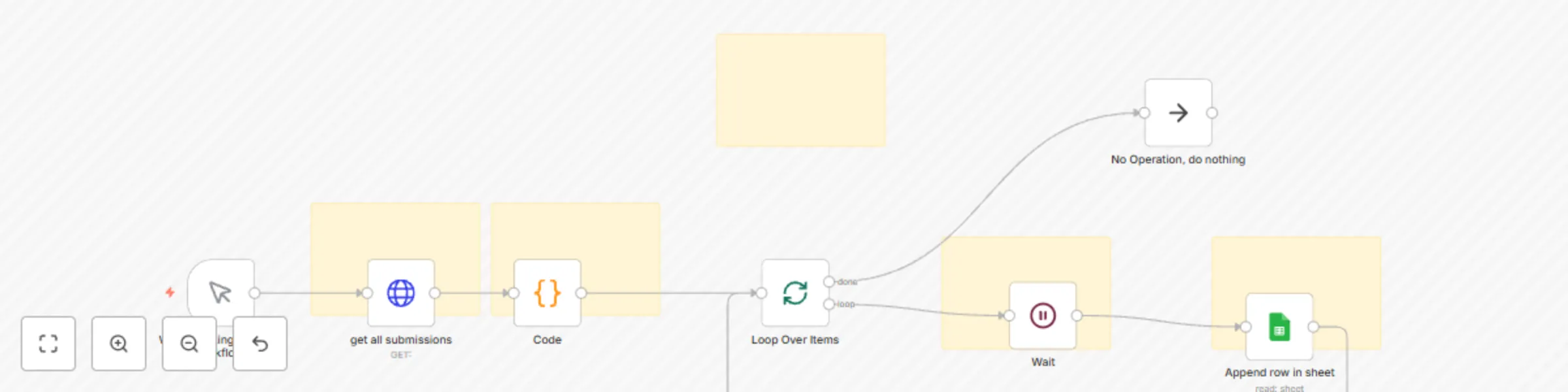
Workflow preview


 Early Deal
DISCOUNT 20%

Important notice
This workflow is provided as-is. Please review and test before using in production.
Overview
This workflow is a simple example showing how to fetch submissions from JotForm using its API and then use that data in another service — in this case, Google Sheets.
It demonstrates the basics of:
Connecting to an API
Parsing the response
Looping through results
Sending processed data to another app
How It Works
Manual Trigger Starts the workflow manually. (Can be replaced with a schedule or webhook trigger for automation.)
HTTP Request – Get Submissions from JotForm Fetches all submissions for a specific form from the JotForm API.
Code Node – Parse API Response Converts the API’s JSON response into individual submission items.
Split In Batches – Loop Through Each Submission Processes submissions one at a time to avoid hitting API rate limits.
Wait Node Adds a short delay before sending data to the next API.
Google Sheets – Append Submission Data Sends the selected fields from each JotForm submission into a Google Sheet:
Adaptations
You can modify this workflow to:
Send JotForm results to CRM systems like HubSpot or Pipedrive
Trigger email or Slack notifications for each new submission
Store submissions in a database for reporting and analytics