M

moosa

10
Workflows

Workflows by moosa

Workflow preview: Automate Resume Analysis & Candidate Screening with JotForm, Azure OCR, GPT-4.1, Zoho CRM
Free advanced

Automate Resume Analysis & Candidate Screening with JotForm, Azure OCR, GPT-4.1, Zoho CRM

## Who’s It For This workflow is ideal for HR professionals, recruiters, and small businesses looking to streamline resume screening with AI-powered analysis and CRM integration. ## What It Does This template automates resume processing by: - Capturing resume submissions (name, email, PDF) via JotForm. - Converting PDFs to images using PDF.co API. - Extracting text with Azure Vision OCR. - Analyzing resumes with GPT-4.1 for strengths, improvements, and a score (1–100). - Storing submission data in PostgreSQL. - Adding high-scoring resumes (>85) to Zoho CRM and sending congratulatory emails. - Sending feedback emails for lower-scoring resumes. ## How to Set Up 1. **Configure JotForm Trigger**: Add your JotForm API key and form ID (e.g., 252434958811059). 2. **Set Up PostgreSQL**: Create a `resume` table with columns: `id` (SERIAL PRIMARY KEY), `given_name` (VARCHAR), `given_email` (VARCHAR), `resume_loc` (VARCHAR). 3. **Add Credentials**: Store API keys for PDF.co, Azure Vision OCR, OpenAI, Zoho CRM, and Gmail in n8n’s credential system. 4. **Test the Workflow**: Submit a test resume via JotForm and verify data flow through each node. ## Requirements - n8n instance (cloud or self-hosted). - Accounts with JotForm, PDF.co, Azure Vision, OpenAI, Zoho CRM, and Gmail. - PostgreSQL database. ## How to Customize - Adjust the GPT-4.1 prompt for specific job roles. - Modify the score threshold (currently 85) in the "if score > 58?" node. - Update email templates for personalized messaging. ## PostgreSQL Table Structure > Node to create table included in workflow.

m
moosa
HR
13 Oct 2025
103
0
Workflow preview: Create AI-curated tech news digests with GPT-4.1 Mini and Notion Database
Free advanced

Create AI-curated tech news digests with GPT-4.1 Mini and Notion Database

# Daily Tech & Startup Digest: Notion-Powered News Curation ## Description This n8n workflow automates the curation of a daily tech and startup news digest from articles stored in a Notion database. It filters articles from the past 24 hours, refines them using keyword matching and LLM classification, aggregates them into a single Markdown digest with categorized summaries, and publishes the result as a Notion page. Designed for manual testing or daily scheduled runs, it includes sticky notes (as required by the n8n creator page) to document each step clearly. This original workflow is for educational purposes, showcasing Notion integration, AI classification, and Markdown-to-Notion conversion. ## Data in Notion ![www.notion.so_TechStartupDailyDigest2025091627079f2b185181e08239e126f04a296b.png](fileId:2641) ## Workflow Overview ### Triggers - **Manual Trigger**: Tests the workflow (`When clicking ‘Execute workflow’`). - **Schedule Trigger**: Runs daily at 8 PM (`Schedule Trigger`, disabled by default). ### Article Filtering - **Fetch Articles**: Queries the Notion database (`Get many database pages`) for articles from the last 24 hours using a date filter. - **Keyword Filtering**: JavaScript code (`Code in JavaScript`) filters articles containing tech/startup keywords (e.g., "tech," "AI," "startup") in title, summary, or full text. - **LLM Classification**: Uses OpenAI’s `gpt-4.1-mini` (`OpenAI Chat Model`) with a text classifier (`Text Classifier`) to categorize articles as "Tech/Startup" or "Other," keeping only relevant ones. ### Digest Creation - **Aggregate Articles**: Combines filtered articles into a single object (`Code in JavaScript1`) for processing. - **Generate Digest**: An AI agent (`AI Agent`) with OpenAI’s `gpt-4.1-mini` (`OpenAI Chat Model1`) creates a Markdown digest with an intro paragraph, categorized article summaries (e.g., AI & Developer Tools, Startups & Funding), clickable links, and a closing note. ### Notion Publishing - **Format for Notion**: JavaScript code (`Code in JavaScript2`) converts the Markdown digest into a Notion-compatible JSON payload, supporting headings, bulleted lists, and links, with a title like “Tech & Startup Daily Digest – YYYY-MM-DD”. - **Create Notion Page**: Sends the payload via HTTP request (`HTTP Request`) to the Notion API to create a new page. ### Credentials - Uses Notion API and OpenAI API credentials. ## Notes - This workflow is for educational purposes, demonstrating Notion database querying, AI classification, and Markdown-to-Notion publishing. - Enable and adjust the schedule trigger (e.g., 8 PM daily) for production use to create daily digests. - Set up Notion and OpenAI API credentials in n8n before running. - The date filter can be modified (e.g., hours instead of days) to adjust the article selection window.

m
moosa
AI Summarization
17 Sep 2025
352
0
Workflow preview: Tech news aggregator: The Verge & TechCrunch RSS to Notion with GPT-4 summaries
Free advanced

Tech news aggregator: The Verge & TechCrunch RSS to Notion with GPT-4 summaries

This n8n workflow automates the process of fetching, processing, and storing tech news articles from RSS feeds into a Notion database. It retrieves articles from The Verge and TechCrunch, processes them to avoid duplicates, extracts full article content, generates summaries using an LLM, and stores the data in Notion. The workflow is designed to run on a schedule or manually for testing, with sticky notes providing clear documentation for each step. **Data in notion** ![image.png](fileId:2632) ## Workflow Overview - **Triggers**: - **Manual Trigger**: Used for testing the workflow (`When clicking ‘Execute workflow’`). - **Schedule Trigger**: Runs daily at 11 AM to fetch new articles (`Schedule Trigger`, disabled). - **Fetch Feeds**: - Pulls RSS feeds from The Verge (`The Verge`) and TechCrunch (`TechCrunch`). - **Hash Creation**: - Generates a SHA256 hash of each article’s URL (`Crypto`, `Crypto1`) to identify unique articles efficiently. - **Loop Over Articles**: - Processes articles in batches (`Loop Over Items`, `Loop Over Items1`) to handle multiple articles from each feed. - **Duplicate Check**: - Queries the Notion database (`Get many database pages`, `Get many database pages1`) to check if an article’s hash exists. If it does, the article is skipped (`If`, `If1`). - **Fetch Full Article**: - If the article is new, retrieves the full article content via HTTP request (`HTTP Request`, `HTTP Request1`). - **Extract Content**: - Extracts paragraph content from the article HTML (`HTML`, `HTML1`) using specific CSS selectors (`.duet--article--article-body-component p` for The Verge, `.entry-content p` for TechCrunch). - **Clean Data**: - JavaScript code (`Code in JavaScript`, `Code in JavaScript1`) processes the extracted content by removing empty paragraphs, links, and excessive whitespace, then joins paragraphs into a single string. - **Summarize Article**: - Uses an OpenAI model (`OpenAI Chat Model`, `OpenAI Chat Model1`) with a LangChain node (`Basic LLM Chain`, `Basic LLM Chain1`) to generate a concise summary (max 1500 characters) in plain text, focusing on main arguments or updates. - **Store in Notion**: - Creates a new page in a Notion database (`Create a database page`, `Create a database page1`) with fields for title, summary, date, hash, URL, source, digest status, and full article text. - **Credentials**: - Uses Notion API and OpenAI API credentials, ensuring no hardcoded API keys in HTTP nodes. ## Notes - This workflow is for learning purpose only.

m
moosa
Market Research
15 Sep 2025
1016
0
Workflow preview: Daily Gmail inbox digest to Discord with GPT-4.1-mini and PDF conversion
Free advanced

Daily Gmail inbox digest to Discord with GPT-4.1-mini and PDF conversion

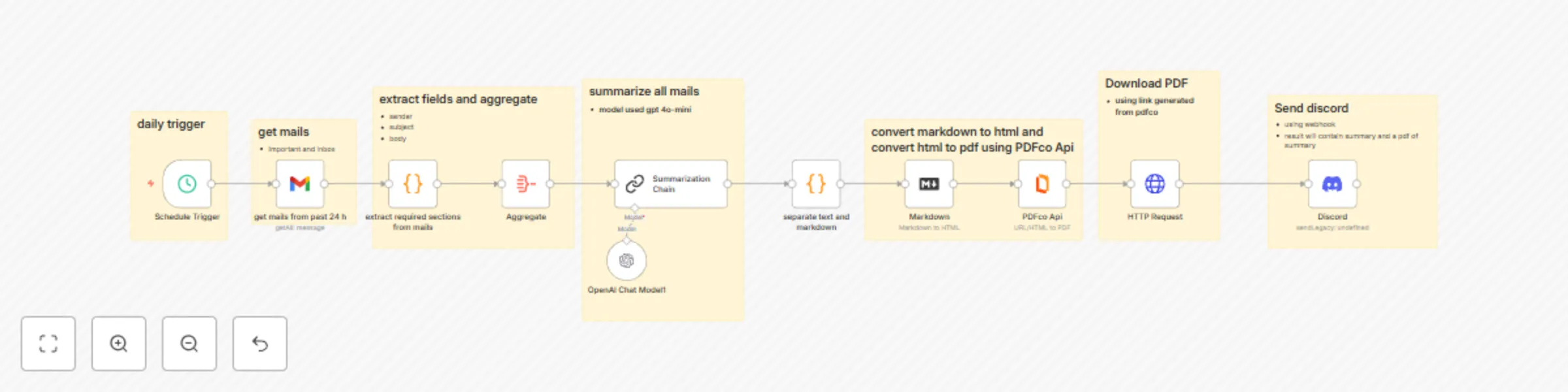
*This workflow contains community nodes that are only compatible with the self-hosted version of n8n.* ## Overview Automate your email management with this n8n workflow that fetches, summarizes, and shares critical emails from your Gmail inbox. Designed for busy professionals, this workflow runs daily to extract important emails from the past 24 hours, summarizes key details (like credentials, OTPs, deadlines, and action items), converts the summary into a PDF, and sends it to your Discord channel for quick access. ## Key Features - **Scheduled Automation**: Triggers daily at 8 PM to process emails from the last 24 hours. - **Gmail Integration**: Retrieves emails labeled "INBOX" and "IMPORTANT" using secure OAuth2 authentication (no hardcoded API keys). - **Smart Email Parsing**: Extracts essential fields (subject, sender, and plain text) while cleaning up URLs, extra lines, and formatting for clarity. - **AI-Powered Summarization**: Uses OpenAI's GPT-4.1-mini to create concise plain text and markdown summaries, highlighting urgent actions with "[Action Required]". - **PDF Conversion**: Converts the markdown summary into a professional PDF using PDF.co API. - **Discord Notifications**: Shares the PDF via a Discord webhook for seamless team communication. ## Why Use This Workflow? - Save time by automating email triage and focusing on what matters. - Stay organized with clear, actionable summaries delivered to Discord. - Securely handle sensitive data with proper credential management. - Perfect for teams, freelancers, or anyone managing high email volumes. ## Setup Instructions 1. Configure Gmail OAuth2 credentials for secure access. 2. Set up PDF.co API and Discord webhook credentials. 3. Customize the schedule or filters as needed. 4. Activate and let the workflow handle your daily email summaries!

m
moosa
AI Summarization
8 Sep 2025
220
0
Workflow preview: Automate JotForm submissions via HTTP without API keys
Free beginner

Automate JotForm submissions via HTTP without API keys

This guide explains how to send form data from **n8n** to a **JotForm** form submission endpoint using the **HTTP Request** node. It avoids the need for API keys and works with standard `multipart/form-data`. --- ## 📌 Overview With this workflow, you can automatically submit data from any source (Google Sheets, databases, webhooks, etc.) directly into JotForm. ✅ Useful for: * Pushing information into a form without manual entry. * Avoiding API authentication. * Syncing external data into JotForm. --- ## 🛠 Requirements * A [JotForm account](https://www.jotform.com/signup/). * An existing [JotForm form](https://www.jotform.com/myforms/). * Access to the form’s **direct link**. * Basic understanding of JotForm’s **field naming convention**. --- ## ⚙️ Setup Instructions ### 1. Get the JotForm Submission URL 1. Open your form in JotForm. 2. Go to **Publish → Quick Share → Copy Link**. Example form URL: [sample form](https://form.jotform.com/252217969519065) 3. Convert it into a submission endpoint by replacing `form` with `submit`: Example: [submit url](https://submit.jotform.com/submit/252217969519065) --- ### 2. Identify Field Names Each JotForm field has a unique identifier like `q3_name[first]` or `q4_email`. Steps to find them: * Right-click a field in your [published form](https://www.jotform.com/help/401-how-to-find-field-ids-and-names/) → choose **Inspect**. * Locate the `name` attribute in the `<input>` tag. * Copy those values into the HTTP Request node in n8n. **Example mappings:** * First Name → `q3_name[first]` * Last Name → `q3_name[last]` * Email → `q4_email` --- ### 3. Configure HTTP Request Node in n8n * **Method:** `POST` * **URL:** Your JotForm submission URL (from Step 1). * **Content Type:** `multipart/form-data` * **Body Parameters:** Add field names and values. **Example Body Parameters:** ```json { "q3_name[first]": "John", "q3_name[last]": "Doe", "q4_email": "[email protected]" } ``` --- ### 4. Test the Workflow 1. Trigger the workflow (manually or with a trigger node). 2. Submit test data. 3. Check **JotForm → Submissions** to confirm the entry appears. --- ## 🚀 Use Cases * Automating lead capture from CRMs or websites into JotForm. * Syncing data from Google Sheets, Airtable, or databases. * Eliminating manual data entry when collecting responses. --- ## 🎛 Customization Tips * Replace placeholder values (`John`, `Doe`, `[email protected]`) with dynamic values. * Add more fields by following the same naming convention. * Use n8n expressions (`{{$json.fieldName}}`) to pass values dynamically.

m
moosa
Lead Generation
16 Aug 2025
244
0
Workflow preview: Automate JotForm submissions to Google Sheets
Free intermediate

Automate JotForm submissions to Google Sheets

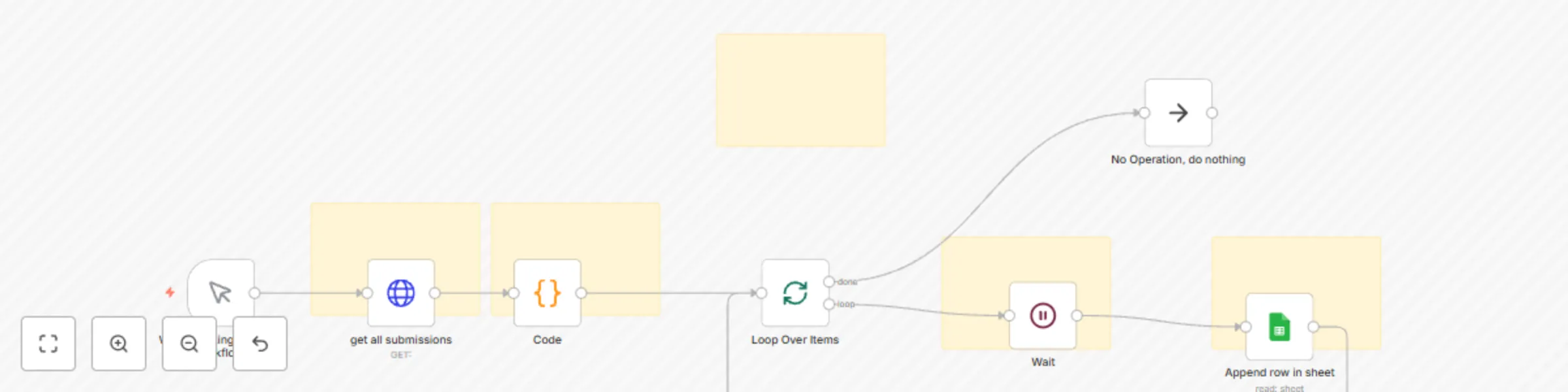
This workflow is a simple example showing how to fetch submissions from JotForm using its API and then use that data in another service — in this case, Google Sheets. ## It demonstrates the basics of: - Connecting to an API - Parsing the response - Looping through results - Sending processed data to another app ## How It Works 1. Manual Trigger Starts the workflow manually. (Can be replaced with a schedule or webhook trigger for automation.) 2. HTTP Request – Get Submissions from JotForm Fetches all submissions for a specific form from the JotForm API. 3. Code Node – Parse API Response Converts the API’s JSON response into individual submission items. 4. Split In Batches – Loop Through Each Submission Processes submissions one at a time to avoid hitting API rate limits. 5. Wait Node Adds a short delay before sending data to the next API. 6. Google Sheets – Append Submission Data Sends the selected fields from each JotForm submission into a Google Sheet: ## Adaptations You can modify this workflow to: Send JotForm results to CRM systems like HubSpot or Pipedrive Trigger email or Slack notifications for each new submission Store submissions in a database for reporting and analytics

m
moosa
Lead Generation
12 Aug 2025
33
0
Workflow preview: Track Shopify orders in Google Sheets and send Discord notifications
Free intermediate

Track Shopify orders in Google Sheets and send Discord notifications

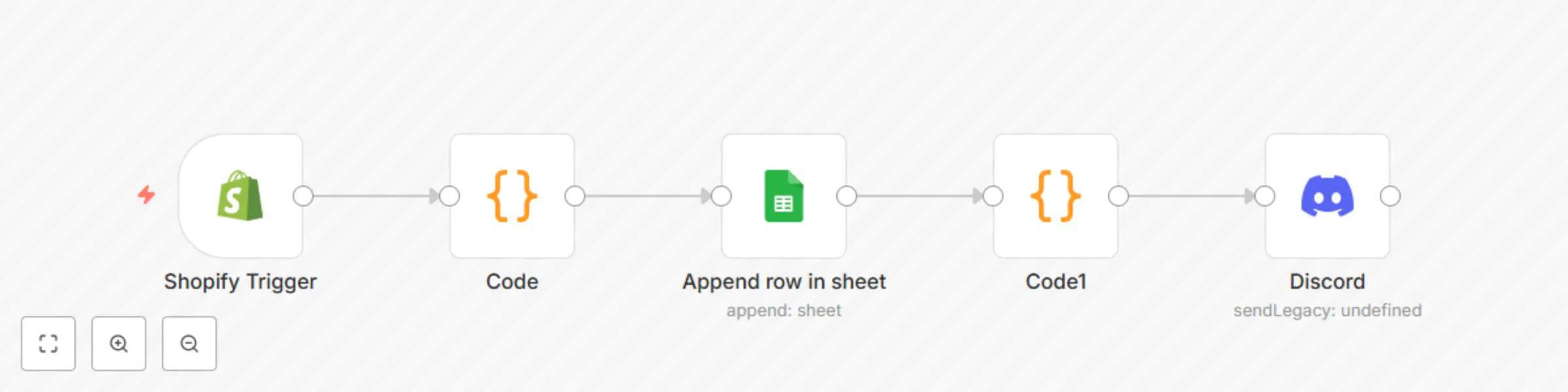
This workflow tracks new Shopify orders in real-time and logs them to a Google Sheet, while also sending a structured order summary to a Discord channel. Perfect for keeping your team and records updated without checking your Shopify admin manually. ### ✅ Features: - **Trigger**: Listens to `orders/create` event via the **Shopify Trigger** node - **Authentication**: Uses **Shopify Access Token**, generated via a [custom/private Shopify app](https://docs.n8n.io/integrations/builtin/credentials/shopify/#using-access-token) - **Google Sheets Logging**: Automatically appends order details to a sheet with the following columns: - `Order Number` - `Customer Email` - `Customer Name` - `City` - `Country` - `Order Total` - `Currency` - `Subtotal` - `Tax` - `Financial Status` - `Payment Gateway` - `Order Date` - `Line Item Titles` - `Line Item Prices` - `Order Link` - **Discord Alerts**: Sends a clean and formatted summary to your Discord server - **Line Item Extraction**: Breaks down item titles and prices into readable format using code - **Multi-currency Compatible**: Displays currency type dynamically (not hardcoded) --- ### 🧩 Nodes Used: - Shopify Trigger (Access Token) - Code — extract `line_item_titles` and `line_item_prices` - Google Sheets — Append row - Code (JavaScript) — Format Discord message - Discord — Send message --- 📒 **Sticky Notes**: - 🛠️ _Use your own Google Sheet link and Discord webhook_ - 🔄 _You can duplicate and adapt this for `orders/updated` or `refunds/create` events_ - 🔐 _No hardcoded API keys — credentials managed via UI_ --- ### 🖼️ **Sample Outputs** #### 📄 Google Sheet Entry | Order Number | Customer Email | Customer Name | City | Country | Order Total | Currency | Subtotal | Tax | Financial Status | Payment Gateway | Order Date | Line Item Titles | Line Item Prices | Order Link | |--------------|------------------|----------------|-----------|----------|--------------|----------|----------|--------|-------------------|------------------|------------------------------|----------------------------------------------------------------------------------------------------|----------------------------------|------------| | 1003 | [email protected] | test name | test city | Pakistan | 2522.77 | PKR | 2174.8 | 347.97 | paid | bogus | 2025-07-31T13:45:35-04:00 | Selling Plans Ski Wax, The Complete Snowboard, The Complete Snowboard, The Collection Snowboard: Liquid | 24.95, 699.95, 699.95, 749.95 | [View Order](https://test101-1q.myshopify.com/76700090592/orders/b439505f12f06c44d61aa466d2d7a77e/authenticate?key=bc87db8d3b0213fcd5eac32177fac310) | #### 💬 Discord Message Preview ![image.png](fileId:1930) --- > _Tested with Shopify's "Bogus" gateway — works without real card info in a development store._

m
moosa
CRM
1 Aug 2025
666
0
Workflow preview: Dynamic website assistant with DeepSeek AI, Pinecone Vectorstore & site-based routing
Free advanced

Dynamic website assistant with DeepSeek AI, Pinecone Vectorstore & site-based routing

*This workflow contains community nodes that are only compatible with the self-hosted version of n8n.* ## 🚀 Overview This workflow enables a powerful AI-driven virtual assistant that dynamically responds to website queries using **webhook input**, **Pinecone vector search**, and **OpenAI agents** — all smartly routed based on the source website. ## 🔧 How It Works 1. **Webhook Trigger** The workflow starts with a `Webhook` node that receives query parameters: - `query`: The user's question - `userId`: Unique user identifier - `site`: Website identifier (e.g., test_site) - `page`: Page identifier (e.g., homepage, pricing) 2. **Smart Routing** A `Switch` node directs the request to the correct AI agent based on the `site` value. Each AI agent uses: - OpenAI GPT-4/3.5 model - Pinecone vector store for context-aware answers - SQL-based memory for consistent multi-turn conversation 3. **Contextual AI Agent** Each agent is customized per website using: - Site-specific Pinecone namespaces - Predefined system prompts to stay in scope - Webhook context including `page`, `site`, and `userId` 4. **Final Response** The response is sent back to the originating website using the `Respond to Webhook` node. ## 🧠 Use Case Ideal for multi-site platforms that want to serve **tailored AI chat experiences** per domain or page — whether it’s support, content discovery, or interactive agents. ## ✅ Highlights - 🧠 Vector search using Pinecone for contextual responses - 🔀 Website-aware logic with `Switch` node routing - 🔐 No hardcoded API keys - 🧩 Modular agents for scalable multi-site support

m
moosa
Support Chatbot
23 Jul 2025
548
0
Workflow preview: Competitor price monitoring with web scraping, Google Sheets & Discord alerts
Free advanced

Competitor price monitoring with web scraping, Google Sheets & Discord alerts

This workflow monitors product prices from [BooksToScrape](https://books.toscrape.com) and sends alerts to a Discord channel via webhook when competitor's prices are lower than our prices. ## 🧩 Nodes Used - Schedule (for daily or required schedule) - If nodes (to check if checked or unchecked data exists) - HTTP Request (for fetching product page ) - Extract HTML (for extracting poduct price) - Code(to clean and extract just the price number) - Discord Webhook (send discord allerts) - Sheets (extract and update) ## 🚀 How to Use 1. Replace the Discord webhook URL with your own. 2. Customize the scraping URL if you're monitoring a different site.([Sheet i used](https://docs.google.com/spreadsheets/d/16-hEaIl8Tng5SB5jbpu26kT7G-g1cFM5_w2AILwT3Pc/edit?usp=sharing)) 3. Run the workflow manually or on a schedule. ## ⚠️ Important - Do not use this for commercial scraping without permission. - Ensure the site allows scraping (this example is for learning only).

m
moosa
Market Research
20 Jul 2025
498
0
Workflow preview: Multi-department support bot with slash commands, Pinecone & Telegram
Free advanced

Multi-department support bot with slash commands, Pinecone & Telegram

## My Telegram bot provides specialized support through dedicated slash commands for different departments. Users can directly access the right support team using: - /billing - For payment and invoice questions - /tech-support - For technical assistance - /return-policy - For returns and refunds ## **Key Features:** - Command-based routing - Direct department access via slash commands ## State management - Tracks active conversations in PostgreSQL ## Knowledge base integration - Pinecone vector stores for each department ## Auto-updating - New Google Drive documents automatically populate the knowledge base - Context-aware - Maintains department choice

m
moosa
Support Chatbot
15 Jul 2025
455
0