Automate job post expiry reminders with Google Sheets, HTTP checks & Gmail
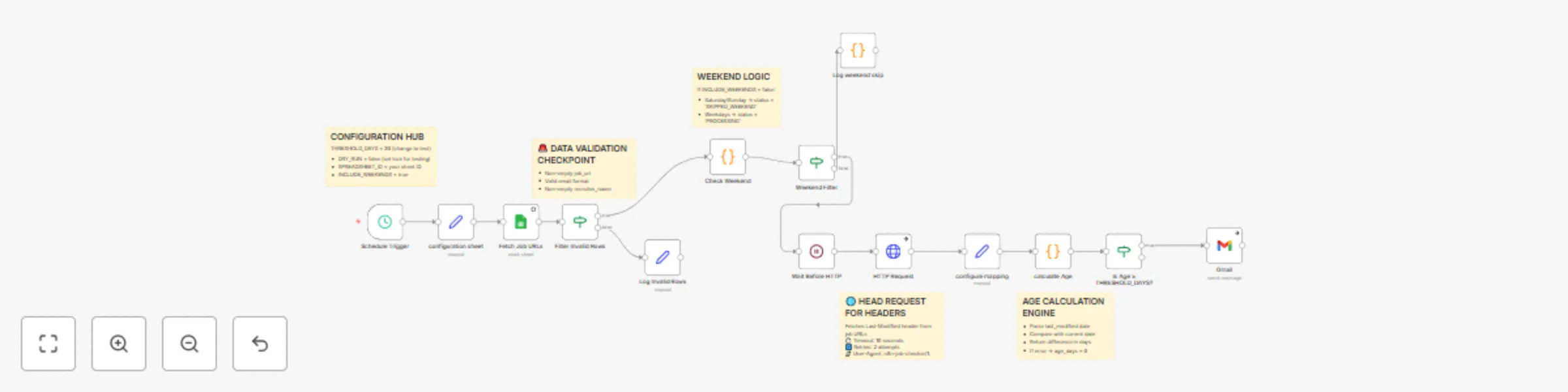
Workflow preview


 Early Deal
DISCOUNT 20%

Important notice
This workflow is provided as-is. Please review and test before using in production.
Overview
Job post expiry & refresh reminders from Google Sheets using HTTP Last‑Modified checks
This workflow checks each job URL in your Google Sheet and identifies listings that look stale based on the page’s Last‑Modified date. At 10:00 Asia/Kolkata every day, it requests each URL (HEAD, then GET if needed), calculates the age in days, and sends a polite email reminder to the recruiter when age ≥ a configurable threshold (default 30 days). It includes a DRY_RUN mode to preview who would be emailed, and conservative rate limits for both HTTP requests and email sends.
Who’s it for
- Recruitment teams maintaining job links on external boards/career sites.
- Coordinators who want a daily, hands‑off nudge to refresh or unlist outdated posts.
- Teams using Google Sheets to store job URLs and owner contacts.
How it works
- Cron (10:00 IST) triggers daily.
- Google Sheets reads the
Job Poststab (job_url, recruiter_name, recruiter_email). - Validate rows (URL + email format, weekend rule via config).
- HTTP HEAD to fetch headers; if
Last-Modifiedmissing, HTTP GET and parse common meta tags (article:modified_time,og:updated_time,lastmod,dateModified). - Compute age (days since last modified in your configured timezone). If
age_days ≥ THRESHOLD_DAYS, prepare a personalized email using templates. - DRY_RUN? If true, output a preview; if false, rate‑limit and send emails via SMTP.
How to set up
- Create the Sheet
- Tab name:
Job Posts - Columns:
job_url, recruiter_name, recruiter_email
- Tab name:
- Credentials in n8n
- Google Sheets (OAuth)
- SMTP (Gmail) (use an app password if 2FA)
- Open “Set: Config” and set:
SPREADSHEET_ID= your Sheet IDSOURCE_SHEET=Job PostsTIMEZONE=Asia/KolkataTHRESHOLD_DAYS=30(change if needed)USER_AGENT=n8n-job-checker/1.0HTTP_TIMEOUT_SECONDS=10HTTP_RETRIES=2RATE_LIMIT_HTTP_SECONDS=5RATE_LIMIT_EMAIL_SECONDS=2SMTP_FROM= sender email (e.g.,[email protected])SUBJECT_TEMPLATE,HTML_TEMPLATE,TEXT_TEMPLATE(placeholders:{{recruiter_name}},{{job_url}},{{age_days}},{{last_modified}})INCLUDE_WEEKENDS=trueDRY_RUN=false(settrueto preview)
- Activate the workflow.
Requirements
- Google Sheet with
Job Poststab and required columns. - SMTP (Gmail) account to send emails.
- n8n (cloud or self‑hosted) with Google Sheets + SMTP credentials.
How to customize
- Threshold: Change
THRESHOLD_DAYS(e.g., 15, 45). - Schedule: Adjust the Cron time from 10:00 IST to your preferred hour.
- Templates: Edit
SUBJECT_TEMPLATE,HTML_TEMPLATE, andTEXT_TEMPLATE. - Rate limits: Tune
RATE_LIMIT_HTTP_SECONDSandRATE_LIMIT_EMAIL_SECONDSfor your environment. - Weekend behavior: Toggle
INCLUDE_WEEKENDS. - Preview runs: Use
DRY_RUN=trueto check recipients before real sends.
Add‑ons
- Helper columns: Write back
last_modified_http,age_days,reminder_sent_at,last_checked_at,notesto the sheet. - Per‑row override: Add
threshold_dayscolumn to override the global threshold per job. - Slack notifications: DM the recruiter or a channel in addition to (or instead of) email.
- One‑time reminders: Email only once until the page updates (track
reminder_sent_at). - Robots/backoff: Respect robots.txt or add exponential backoff for high‑traffic sites.
Use Case Examples
- Career site posts that haven’t been updated in 30+ days. Remind owners to refresh copy or close the listing.
- Third‑party boards (e.g., niche communities) where Last‑Modified is available — automate hygiene checks.
- Agency partnership links — ensure outdated roles aren’t left live, protecting brand experience.
Common troubleshooting
| Issue | Possible Cause | Solution |
|---|---|---|
| No emails sent | DRY_RUN is true |
Set DRY_RUN=false to actually send. |
| Rows skipped | Invalid/missing job_url or recruiter_email |
Fix the row values; ensure valid URL and email. |
| “Stale” not detected | Page has no Last-Modified header and no recognizable meta tags |
Add manual review; consider the Helper columns add‑on to log missing dates, or track first_seen_at. |
| Wrong time math | Timezone mismatch | Confirm TIMEZONE=Asia/Kolkata (or your TZ) in Set: Config. |
| Too many requests | Sites rate‑limit frequent checks | Increase RATE_LIMIT_HTTP_SECONDS; consider running less frequently. |
| Emails fail to send | SMTP auth or quota issues | Verify SMTP credentials, sender address, and provider limits; try a different sender or schedule. |
Need Help?
If you’d like help tailoring the templates, adding Slack notifications or writing back helper columns for audit, just message us at WeblineIndia and we will be happy to help you get this running smoothly.