Block 1 - Schedule Trigger
- Type / Role
- n8n-nodes-base.scheduleTrigger - scheduleTrigger
- Config choices
- Version 1.2


 Early Deal
This workflow is provided as-is. Please review and test before using in production.
Job post expiry & refresh reminders from Google Sheets using HTTP Last‑Modified checks This workflow checks each job URL in your Google Sheet and identifies listings that look stale based on the pa...
n8n-nodes-base.scheduletrigger, n8n-nodes-base.googlesheets, n8n-nodes-base.if, n8n-nodes-base.httprequest, n8n-nodes-base.wait, n8n-nodes-base.gmail, n8n-nodes-base.code, n8n-nodes-base.set
This workflow is cataloged by N8N Workflows and links back to its original n8n.io source page by WeblineIndia.
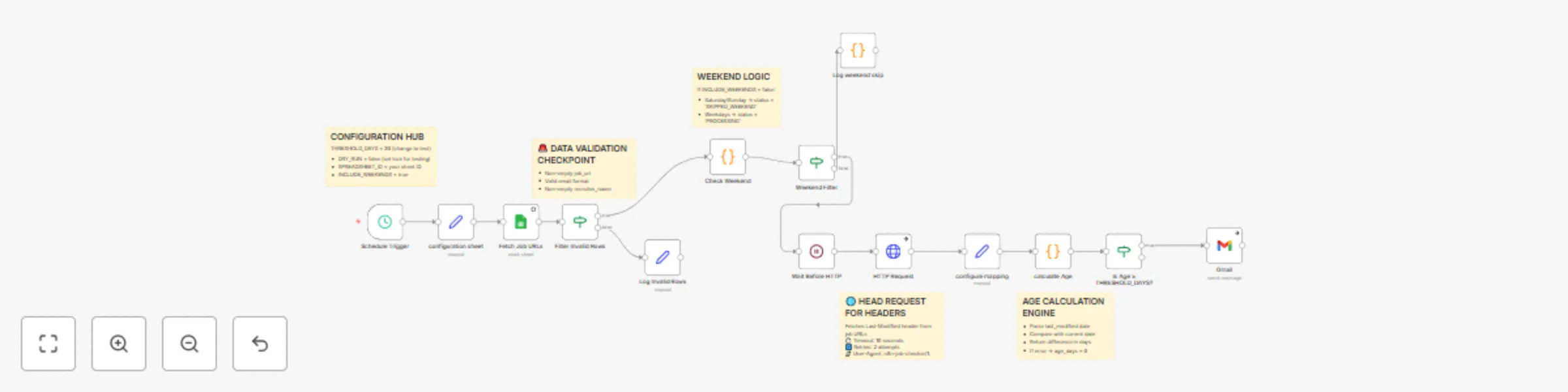
Original n8n.io sourceThis workflow checks each job URL in your Google Sheet and identifies listings that look stale based on the page’s Last‑Modified date. At 10:00 Asia/Kolkata every day, it requests each URL (HEAD, then GET if needed), calculates the age in days, and sends a polite email reminder to the recruiter when age ≥ a configurable threshold (default 30 days). It includes a DRY_RUN mode to preview who would be emailed, and conservative rate limits for both HTTP requests and email sends.
Job Posts tab (job_url, recruiter_name, recruiter_email).Last-Modified missing, HTTP GET and parse common meta tags (article:modified_time, og:updated_time, lastmod, dateModified).age_days ≥ THRESHOLD_DAYS, prepare a personalized email using templates.Job Postsjob_url, recruiter_name, recruiter_emailSPREADSHEET_ID = your Sheet IDSOURCE_SHEET = Job PostsTIMEZONE = Asia/KolkataTHRESHOLD_DAYS = 30 (change if needed)USER_AGENT = n8n-job-checker/1.0HTTP_TIMEOUT_SECONDS = 10HTTP_RETRIES = 2RATE_LIMIT_HTTP_SECONDS = 5RATE_LIMIT_EMAIL_SECONDS = 2SMTP_FROM = sender email (e.g., [email protected])SUBJECT_TEMPLATE, HTML_TEMPLATE, TEXT_TEMPLATE (placeholders: {{recruiter_name}}, {{job_url}}, {{age_days}}, {{last_modified}})INCLUDE_WEEKENDS = trueDRY_RUN = false (set true to preview)Job Posts tab and required columns.THRESHOLD_DAYS (e.g., 15, 45).SUBJECT_TEMPLATE, HTML_TEMPLATE, and TEXT_TEMPLATE.RATE_LIMIT_HTTP_SECONDS and RATE_LIMIT_EMAIL_SECONDS for your environment.INCLUDE_WEEKENDS.DRY_RUN=true to check recipients before real sends.last_modified_http, age_days, reminder_sent_at, last_checked_at, notes to the sheet.threshold_days column to override the global threshold per job.reminder_sent_at).| Issue | Possible Cause | Solution |
|---|---|---|
| No emails sent | DRY_RUN is true |
Set DRY_RUN=false to actually send. |
| Rows skipped | Invalid/missing job_url or recruiter_email |
Fix the row values; ensure valid URL and email. |
| “Stale” not detected | Page has no Last-Modified header and no recognizable meta tags |
Add manual review; consider the Helper columns add‑on to log missing dates, or track first_seen_at. |
| Wrong time math | Timezone mismatch | Confirm TIMEZONE=Asia/Kolkata (or your TZ) in Set: Config. |
| Too many requests | Sites rate‑limit frequent checks | Increase RATE_LIMIT_HTTP_SECONDS; consider running less frequently. |
| Emails fail to send | SMTP auth or quota issues | Verify SMTP credentials, sender address, and provider limits; try a different sender or schedule. |
If you’d like help tailoring the templates, adding Slack notifications or writing back helper columns for audit, just message us at WeblineIndia and we will be happy to help you get this running smoothly.
This catalog entry is organized from the workflow JSON. The node-level section below shows the executable blocks available for review before importing the template.
| Workflow | Automate job post expiry reminders with Google Sheets, HTTP checks & Gmail |
|---|---|
| Complexity | advanced |
| Nodes | 19 |
| Categories | HR |
| Author | WeblineIndia |
| Published | 08 Sept 2025 |
Use the JSON export at /data/workflows/8390/8390.json as the source template for this automation.
Open n8n, import the downloaded JSON, and review each node before activating the workflow.
Replace placeholder credentials, API keys, webhook URLs, account IDs, and environment-specific values with your own settings.
Run the workflow manually or in a staging workspace, inspect node output, and confirm downstream systems receive the expected data.
Enable the workflow only after testing, then monitor executions, errors, and rate limits during the first production runs.
Review imported nodes carefully before activation. This catalog entry is intended to help you inspect the workflow structure, understand required services, and find related templates faster.
Node names, credentials, schedules, webhook paths, and external service limits may need adjustment for your workspace.
Job post expiry & refresh reminders from Google Sheets using HTTP Last‑Modified checks This workflow checks each job URL in your Google Sheet and identifies listings that look stale based on the pa...
Review the workflow JSON, configure any required credentials in n8n, and test the automation in a safe workspace before using it in production.
Yes. Use the block-by-block analysis and the downloadable JSON to inspect each node, then adjust credentials, prompts, schedules, filters, or destinations for your HR use case.