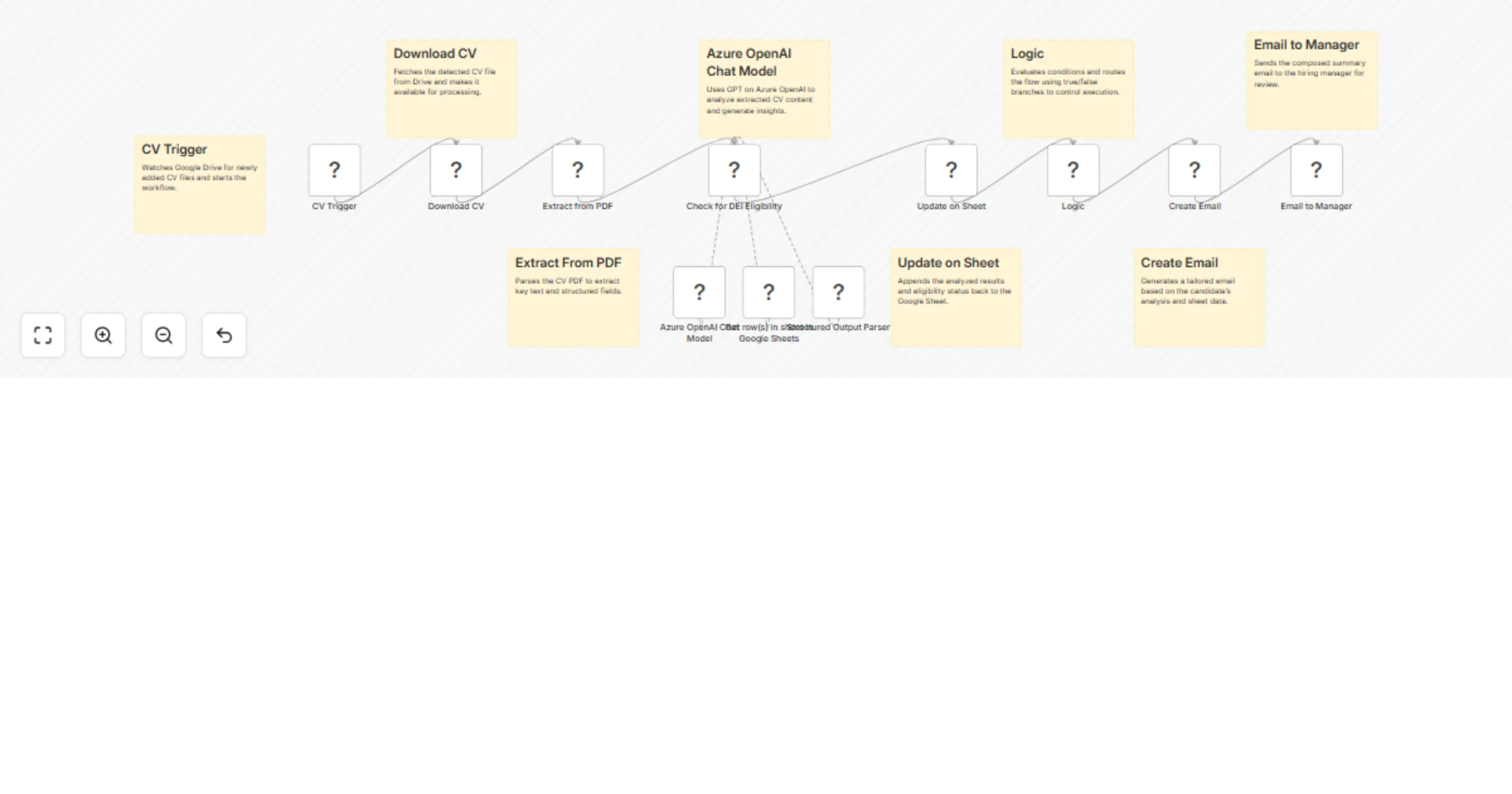
Automate DEI eligibility screening with Azure GPT-4o, Google Drive and Sheets

Workflow preview

Workflow preview
100%
Automate DEI eligibility screening with Azure GPT-4o, Google Drive and Sheets preview
Open on n8n.io

Important notice

This workflow is provided as-is. Please review and test before using in production.

1. Workflow Overview

Description This workflow is designed to evaluate newly added CVs for Diversity, Equity, and Inclusion (DEI) eligibility. It automatically ingests CVs from Google Drive, extracts key fields, analyz...

Best for

  • HR automation workflows
  • AI Summarization automation workflows
  • advanced n8n builders looking for reusable templates

Tools used

@n8n/n8n-nodes-langchain.lmchatazureopenai, @n8n/n8n-nodes-langchain.outputparserstructured, n8n-nodes-base.googlesheetstool, n8n-nodes-base.googledrivetrigger, n8n-nodes-base.googledrive, n8n-nodes-base.extractfromfile, @n8n/n8n-nodes-langchain.agent, n8n-nodes-base.googlesheets

Source and attribution

This workflow is cataloged by N8N Workflows and links back to its original n8n.io source page by Rahul Joshi.

Original n8n.io source

1.1 Workflow description

Title
Automate DEI eligibility screening with Azure GPT-4o, Google Drive and Sheets
Workflow name
Automate DEI eligibility screening with Azure GPT-4o, Google Drive and Sheets

Description

This workflow is designed to evaluate newly added CVs for Diversity, Equity, and Inclusion (DEI) eligibility. It automatically ingests CVs from Google Drive, extracts key fields, analyzes them with Azure OpenAI, logs structured DEI outcomes in Google Sheets, and sends a concise DEI-focused summary email to the hiring manager. The entire flow prioritizes consistent, auditable DEI checks and controlled logic paths.

What This Template Does

  • Watches Google Drive for new CV files to trigger DEI evaluation.
  • Downloads and extracts text/structured fields from PDF CVs.
  • Assesses DEI eligibility using Azure OpenAI, following defined criteria and prompts.
  • Appends DEI results (eligible/not eligible, rationale, confidence) to Google Sheets for tracking.
  • Generates and sends a DEI-focused summary email to the hiring manager for review.

Key Benefits

  • Standardized DEI screening to support equitable hiring decisions.
  • Centralized, structured logging in Sheets for transparency and audits.
  • Automated DEI summaries for faster, consistent manager review.
  • Reliable routing with true/false logic to enforce DEI evaluation steps.

Features

  • Google Drive trigger (fileCreated) for CV intake tied to DEI checks.
  • PDF extraction mapped to fields relevant for DEI evaluation.
  • Azure OpenAI Chat Model prompts tuned for DEI criteria and rationale.
  • Google Sheets append with eligibility status, notes, and timestamps.
  • Email node that delivers DEI summaries and next-step guidance.
  • Logic branching (true/false) to control DEI evaluation and notifications.

Requirements

  • n8n instance (cloud or self-hosted).
  • Google Drive access to the CV intake folder.
  • Google Sheets access for DEI results logging.
  • Azure OpenAI access and configured prompts reflecting DEI criteria.
  • Email node credentials to send DEI summaries to managers.

Step-by-Step Setup Instructions

  • Connect Google Drive and select the CV folder for the fileCreated trigger.
  • Configure the Download CV and Extract From PDF nodes to capture fields needed for DEI checks.
  • Add Azure OpenAI credentials and set DEI-specific prompts (criteria, rationale, confidence).
  • Connect Google Sheets and select the target sheet; map columns for status, rationale, and timestamps.
  • Configure the Email to Manager node with a DEI-focused subject and template.
  • Test with sample CVs, verify sheet entries and email content, then enable the workflow.

DEI-Focused Best Practices

  • Clarify DEI criteria and document them in your prompt and sheet schema.
  • Avoid including sensitive PII in emails; store only necessary fields for DEI decisions.
  • Use n8n Credentials; never hardcode API keys or private data.
  • Maintain an audit trail (timestamps, model version, prompt version, decision rationale).
  • Periodically review prompts and sheet schema to align with policy updates.

1.2 Logical Blocks

This catalog entry is organized from the workflow JSON. The node-level section below shows the executable blocks available for review before importing the template.

2. Block-by-Block Analysis

Block 1 - Azure OpenAI Chat Model

Type / Role
@n8n/n8n-nodes-langchain.lmChatAzureOpenAi - lmChatAzureOpenAi
Config choices
Version 1

Block 2 - Structured Output Parser

Type / Role
@n8n/n8n-nodes-langchain.outputParserStructured - outputParserStructured
Config choices
Version 1.3

Block 3 - Get row(s) in sheet in Google Sheets

Type / Role
n8n-nodes-base.googleSheetsTool - googleSheetsTool
Config choices
Version 4.7

Block 4 - CV Trigger

Type / Role
n8n-nodes-base.googleDriveTrigger - googleDriveTrigger
Config choices
Version 1

Block 5 - Download CV

Type / Role
n8n-nodes-base.googleDrive - googleDrive
Config choices
Version 3

Block 6 - Extract from PDF

Type / Role
n8n-nodes-base.extractFromFile - extractFromFile
Config choices
Version 1

Block 7 - Check for DEI Eligibility

Type / Role
@n8n/n8n-nodes-langchain.agent - agent
Config choices
Version 2.2

Block 8 - Update on Sheet

Type / Role
n8n-nodes-base.googleSheets - googleSheets
Config choices
Version 4.7

Block 9 - Logic

Type / Role
n8n-nodes-base.if - if
Config choices
Version 2.2

Block 10 - Create Email

Type / Role
n8n-nodes-base.code - code
Config choices
Version 2

Block 11 - Email to Manager

Type / Role
n8n-nodes-base.gmail - gmail
Config choices
Version 2.1

Block 12 - Sticky Note

Type / Role
n8n-nodes-base.stickyNote - stickyNote
Config choices
Version 1

Block 13 - Sticky Note1

Type / Role
n8n-nodes-base.stickyNote - stickyNote
Config choices
Version 1

Block 14 - Sticky Note2

Type / Role
n8n-nodes-base.stickyNote - stickyNote
Config choices
Version 1

Block 15 - Sticky Note3

Type / Role
n8n-nodes-base.stickyNote - stickyNote
Config choices
Version 1

Block 16 - Sticky Note4

Type / Role
n8n-nodes-base.stickyNote - stickyNote
Config choices
Version 1

Block 17 - Sticky Note5

Type / Role
n8n-nodes-base.stickyNote - stickyNote
Config choices
Version 1

Block 18 - Sticky Note6

Type / Role
n8n-nodes-base.stickyNote - stickyNote
Config choices
Version 1

Block 19 - Sticky Note7

Type / Role
n8n-nodes-base.stickyNote - stickyNote
Config choices
Version 1

3. Summary Table

Workflow Automate DEI eligibility screening with Azure GPT-4o, Google Drive and Sheets
Complexity advanced
Nodes 19
Categories HR, AI Summarization
Author Rahul Joshi
Published 03 Oct 2025

4. Reproducing the Workflow from Scratch

  1. 1. Download the workflow JSON

    Use the JSON export at /data/workflows/9226/9226.json as the source template for this automation.

  2. 2. Import the template into n8n

    Open n8n, import the downloaded JSON, and review each node before activating the workflow.

  3. 3. Configure credentials and variables

    Replace placeholder credentials, API keys, webhook URLs, account IDs, and environment-specific values with your own settings.

  4. 4. Test with sample data

    Run the workflow manually or in a staging workspace, inspect node output, and confirm downstream systems receive the expected data.

  5. 5. Activate and monitor

    Enable the workflow only after testing, then monitor executions, errors, and rate limits during the first production runs.

5. General Notes & Resources

Review imported nodes carefully before activation. This catalog entry is intended to help you inspect the workflow structure, understand required services, and find related templates faster.

Node names, credentials, schedules, webhook paths, and external service limits may need adjustment for your workspace.

Frequently asked questions

What does Automate DEI eligibility screening with Azure GPT-4o, Google Drive and Sheets do?

Description This workflow is designed to evaluate newly added CVs for Diversity, Equity, and Inclusion (DEI) eligibility. It automatically ingests CVs from Google Drive, extracts key fields, analyz...

What do I need before importing this workflow?

Review the workflow JSON, configure any required credentials in n8n, and test the automation in a safe workspace before using it in production.

Can I customize this workflow?

Yes. Use the block-by-block analysis and the downloadable JSON to inspect each node, then adjust credentials, prompts, schedules, filters, or destinations for your HR, AI Summarization use case.