Audit Confluence space permissions and public links for compliance
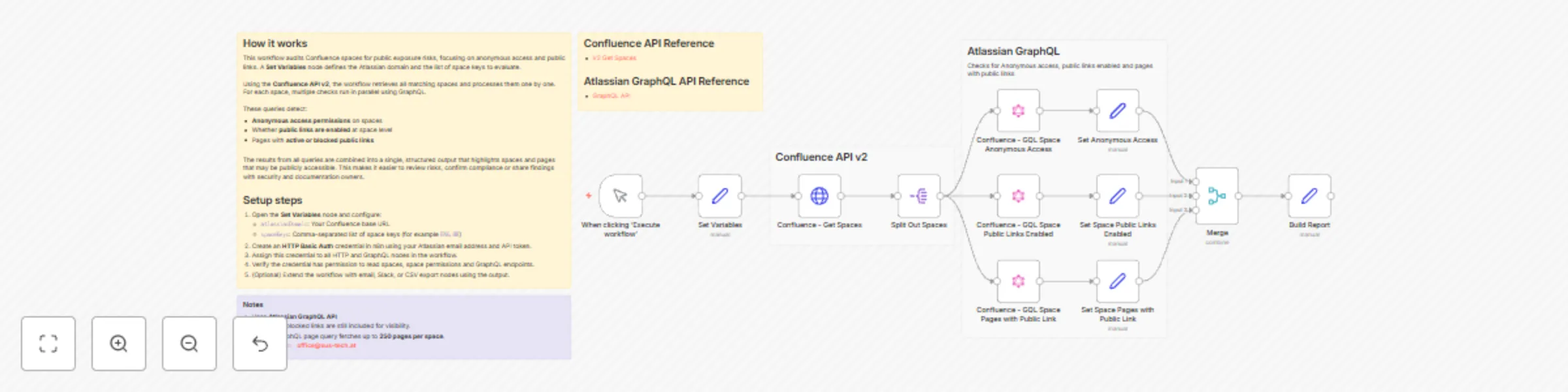
Workflow preview

$20/month : Unlimited workflows
2500 executions/month

THE #1 IN WEB SCRAPING
Scrape any website without limits
HOSTINGER  Early Deal
DISCOUNT 20% Try free
Early DealDISCOUNT 20%
Self-hosted n8n
Unlimited workflows - from $4.99/mo

#1 hub for scraping, AI & automation
6000+ actors - $5 credits/mo
Important notice
This workflow is provided as-is. Please review and test before using in production.
Overview
Audit permissions in Confluence to ensure compliance
This workflow scans selected Confluence spaces for public exposure risks, helping teams identify unintended access and potential data leakage.
What it does
- Detects public exposure risks in Confluence spaces, including:
- Anonymous access permissions at space level
- Whether public links are enabled
- Pages with active or blocked public links
- Uses Confluence REST API v2 together with the Atlassian GraphQL API.
- Produces a consolidated per-space report containing:
- Anonymous access permissions
- Public link status
- Pages with public links (title, status, URL, enabled-by user)
- Ideal for security audits, compliance reviews, and data leakage prevention.
How it works
- The workflow starts via a Manual Trigger.
- A Set Variables node defines:
atlassianDomainspaceKeys(comma-separated)
- Get Spaces (v2) retrieves matching spaces and splits them into individual items.
- For each space, three GraphQL queries run in parallel:
- Retrieve anonymous access permissions
- Check public link feature status at space level
- Fetch pages with public links (ON / BLOCKED)
- Results from all three queries are merged and normalized into a single per-space report.
Setup
- Configure the Set Variables node:
atlassianDomain→ your Confluence base URLspaceKeys→ comma-separated list (e.g.ENG, HR)
- Create an HTTP Basic Auth credential for Atlassian:
- Email + API token
- Assign it to all HTTP and GraphQL nodes
- Ensure the credential has permission to:
- Read spaces
- Read space permissions
- Access GraphQL endpoints
- Execute the workflow manually to generate the report.
Notes
- Uses the Atlassian GraphQL API, which exposes permission and public-link data not fully available via REST.
- Pages with blocked public links are included for visibility.
- The GraphQL page query fetches up to 250 pages per space.