A

Alexander Schnabl

6
Workflows

Workflows by Alexander Schnabl
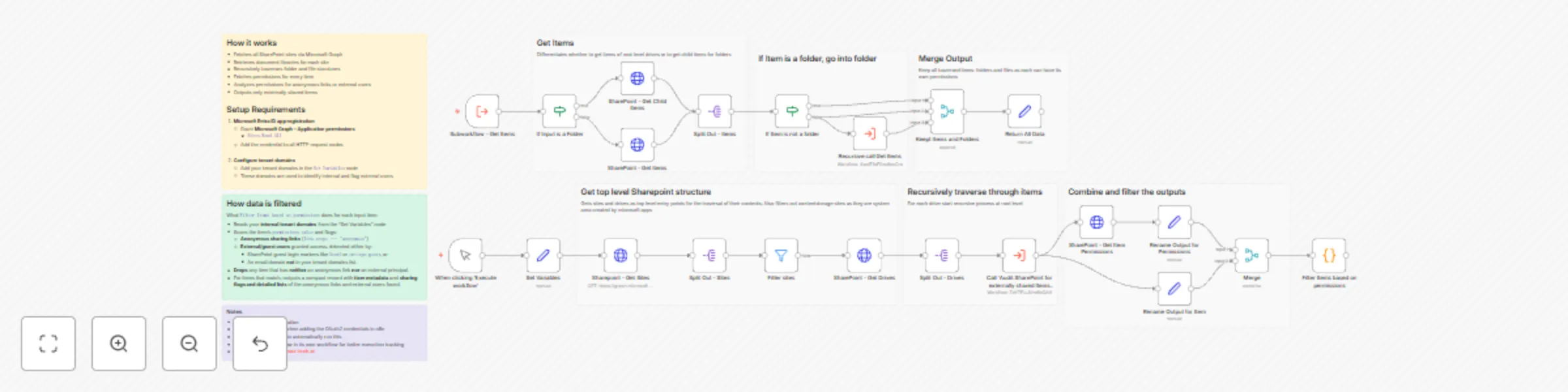
Workflow preview: Audit SharePoint Online external sharing and anonymous links with Microsoft Graph
Free advanced

Audit SharePoint Online external sharing and anonymous links with Microsoft Graph

## Audit external sharing in SharePoint to ensure compliance This workflow audits your **SharePoint Online** environment for **external sharing risks** by identifying files and folders that are shared with **anonymous links** or **external/guest users**. It is designed to **traverse SharePoint recursively**, giving you full visibility into sharing across all sites, document libraries, folders and files. ### What it does * Scans **all SharePoint sites** in the tenant. * **Traverses SharePoint recursively** through every folder and file, starting at the root of each drive. * Fetches **permissions for every item** (files and folders). * Detects and flags: * **Anonymous sharing links** (anyone links) * **External or guest users**, identified by: * SharePoint guest login markers (`#ext#`, `urn:spo:guest`) * Email domains not matching your internal tenant domains * Outputs **only items that are externally shared**, including detailed metadata and permission evidence. ### How it works * In the **Set Variables** node you define your internal `tenantDomains`, used to distinguish internal users from external ones. * **Microsoft Graph** is used to: * Fetch all SharePoint sites * Retrieve drives (document libraries) per site * Each drive triggers a **recursive subworkflow** that: * Starts at the root level * Determines whether an item is a folder or a file * If a folder, drills down into its children * Keeps both folders and files, since both can have unique permissions * For every discovered item: * Permissions are retrieved via Microsoft Graph * Item metadata and permissions are merged * A custom **filtering step** analyzes permissions and: * Flags anonymous links and external principals * Drops items with no external exposure * The final output is a clean, normalized list of **externally shared SharePoint items**, enriched with: * Item name, type, URL and last modified date * Site, drive, and parent identifiers * Detailed lists of anonymous links and external users found ### Setup * Create a **Microsoft Entra ID (Azure AD) App Registration**. * Grant **Microsoft Graph – Application permissions**: * `Sites.Read.All` * Configure an **OAuth2 Client Credentials** credential in n8n and assign it to all HTTP Request nodes. * Update the **Set Variables** node: * Add all internal tenant domains (e.g. `yourDomain.onmicrosoft.com`, `yourDomain.com`) * Run the workflow manually or attach a **Schedule Trigger** for recurring audits. ### Notes * The workflow **traverses SharePoint recursively**, ensuring no nested folder or file is missed. * Both folders and files are included because **permissions can be broken at any level**. * External users are detected defensively using **both login-name patterns and email domain checks**.

A
Alexander Schnabl
Document Extraction
6 Jan 2026
2
0
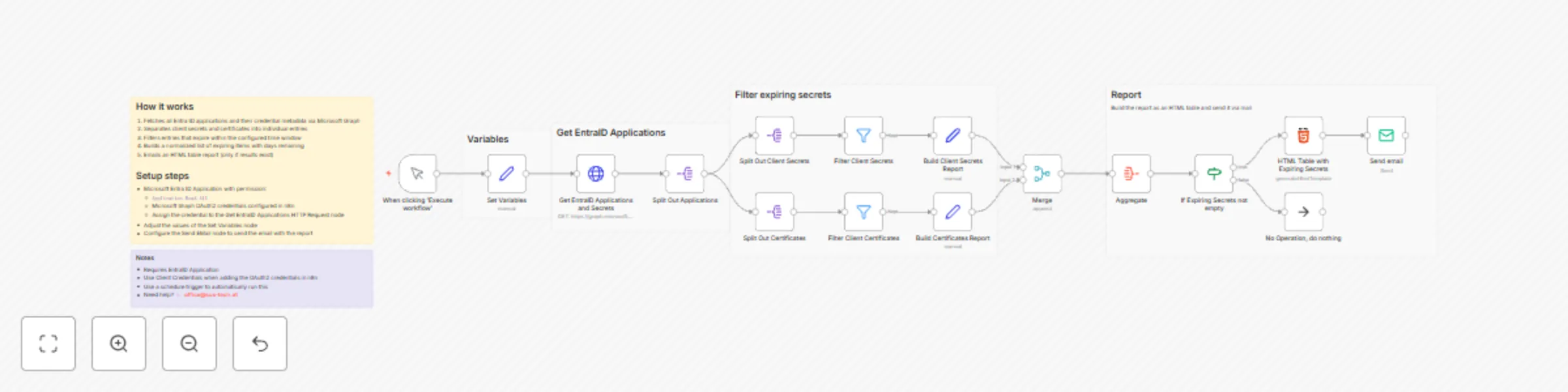
Workflow preview: Email reports on expiring Microsoft Entra ID app secrets and certificates with Microsoft Graph
Free advanced

Email reports on expiring Microsoft Entra ID app secrets and certificates with Microsoft Graph

## Monitor expiring EntraID application secrets and notify responsible Stay ahead of credential expirations by automatically detecting Entra ID application client secrets and certificates that are about to expire, and sending a neatly formatted email report. ### What this workflow solves Expired client secrets and certificates are a common cause of unexpected outages and failed integrations. Manually checking expiration dates across many Entra ID applications is tedious and easy to miss. This workflow automates the discovery and reporting of credentials that will expire within a configurable time window. ### Key features - Fetches all **Microsoft Entra ID applications** along with: - **Client secrets** (`passwordCredentials`) - **Certificates** (`keyCredentials`) - Splits credentials into individual entries for easier processing - Filters credentials expiring **within the next _N_ days** (configurable) - Normalizes results into a consistent structure including: - Application name - App ID - Credential type (Client Secret / Certificate) - Credential name + ID - Days remaining until expiration - Generates an **HTML table report**, sorted by application name - Sends an email **only when expiring items are found** (otherwise does nothing) ### How it works 1. Fetches all Entra ID applications and their credential metadata via Microsoft Graph 2. Separates client secrets and certificates into individual entries 3. Filters entries that expire within the configured time window 4. Builds a normalized list of expiring items with days remaining 5. Emails an HTML table report (only if results exist) ### Setup requirements - **Microsoft Entra ID app registration** with Microsoft Graph **Application permissions**: - `Application.Read.All` - In n8n: - Create **Microsoft Graph OAuth2** credentials (Client Credentials flow recommended) - Assign those credentials to the **Get EntraID Applications and Secrets** HTTP Request node - Update the **Set Variables** node: - `notificationEmail`: where to send the report - `daysBeforeExpiry`: alert window in days (e.g., 14) ### Notes - The email table highlights soon-to-expire credentials more prominently (based on remaining days). - For automation, replace the manual trigger with a **Schedule Trigger** (e.g., daily/weekly). - The workflow accesses **metadata only** (names/IDs/expiry), not secret values.

A
Alexander Schnabl
DevOps
2 Jan 2026
117
0
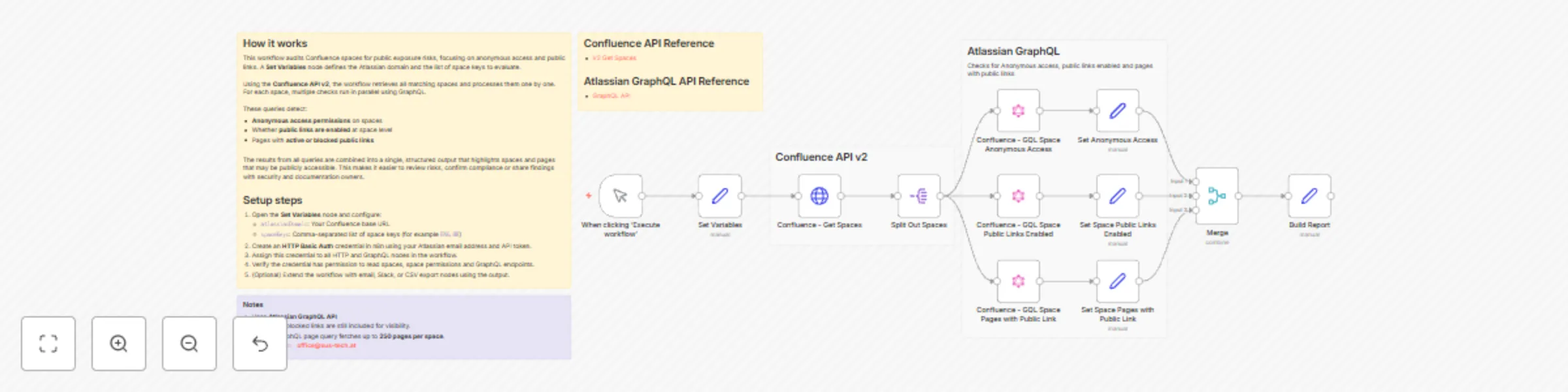
Workflow preview: Audit Confluence space permissions and public links for compliance
Free advanced

Audit Confluence space permissions and public links for compliance

## Audit permissions in Confluence to ensure compliance This workflow scans selected **Confluence spaces** for **public exposure risks**, helping teams identify unintended access and potential data leakage. ### What it does - Detects public exposure risks in Confluence spaces, including: - **Anonymous access permissions** at space level - Whether **public links are enabled** - Pages with **active or blocked public links** - Uses **Confluence REST API v2** together with the **Atlassian GraphQL API**. - Produces a consolidated per-space report containing: - Anonymous access permissions - Public link status - Pages with public links (title, status, URL, enabled-by user) - Ideal for **security audits**, **compliance reviews**, and **data leakage prevention**. ### How it works - The workflow starts via a **Manual Trigger**. - A **Set Variables** node defines: - `atlassianDomain` - `spaceKeys` (comma-separated) - **Get Spaces (v2)** retrieves matching spaces and splits them into individual items. - For each space, three **GraphQL queries** run in parallel: - Retrieve **anonymous access permissions** - Check **public link feature status** at space level - Fetch **pages with public links** (ON / BLOCKED) - Results from all three queries are merged and normalized into a single per-space report. ### Setup - Configure the **Set Variables** node: - `atlassianDomain` → your Confluence base URL - `spaceKeys` → comma-separated list (e.g. `ENG, HR`) - Create an **HTTP Basic Auth** credential for Atlassian: - Email + API token - Assign it to all HTTP and GraphQL nodes - Ensure the credential has permission to: - Read spaces - Read space permissions - Access GraphQL endpoints - Execute the workflow manually to generate the report. ### Notes - Uses the **Atlassian GraphQL API**, which exposes permission and public-link data not fully available via REST. - Pages with blocked public links are included for visibility. - The GraphQL page query fetches up to **250 pages per space**.

A
Alexander Schnabl
SecOps
28 Dec 2025
7
0
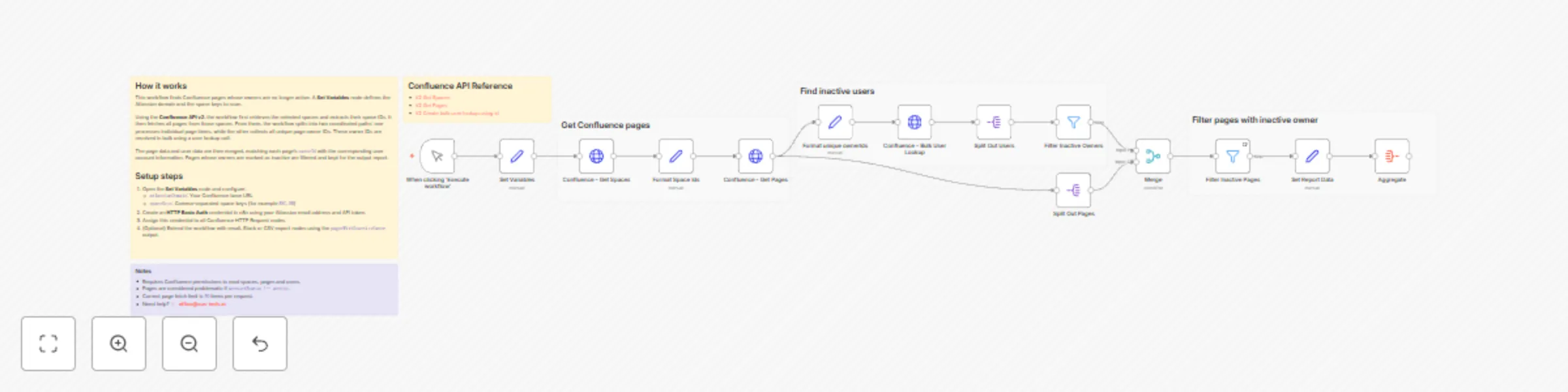
Workflow preview: Scan Confluence pages with the REST API for inactive page owners
Free advanced

Scan Confluence pages with the REST API for inactive page owners

## Scan Confluence pages for inactive page owners This workflow scans selected **Confluence spaces**, resolves page ownership and **filters pages with inactive owners**, helping teams maintain clear ownership and prevent orphaned documentation. ### What it does - Scans Confluence pages across selected spaces. - **Resolves page owners and checks their account status**. - **Filters pages where the owner is inactive** (`owner.accountStatus !== active`). - Uses **Confluence REST API v2** to fetch spaces, pages, and user data. - Resolves page owners efficiently via the **users-bulk API**. - Produces a consolidated report containing: - Page title - Owner email - Owner account status - Last updated date - Direct page URL - Useful for **documentation governance**, ownership audits, and cleanup initiatives. ### How it works - A **Set Variables** node defines: - Atlassian domain - Space keys to scan - **Get Spaces (v2)** retrieves matching spaces and extracts their IDs. - **Get Pages (v2)** fetches all pages from the selected spaces. - Unique page `ownerId`s are collected and resolved using **Bulk User Lookup (v2)**. - Page metadata is **merged with user account data** (`ownerId` ↔ `accountId`). - Pages are **filtered to include only those with inactive owners**. ### Setup - Configure the **Set Variables** node: - `atlassianDomain` → your Confluence base URL - `spaceKeys` → comma-separated list of space keys (e.g. `ENG, HR`) - Create an **HTTP Basic Auth credential**: - Atlassian email + API token - Assign it to all HTTP Request nodes - Optional enhancements: - Add pagination if spaces contain many pages. - Extend the workflow with email notifications, Slack alerts, or CSV export. ### Notes - Requires permission to read Confluence spaces, pages, and users. - Pages are flagged when `owner.accountStatus !== active`. - Current page fetch limit is **50 items per request**.

A
Alexander Schnabl
Document Extraction
28 Dec 2025
5
0
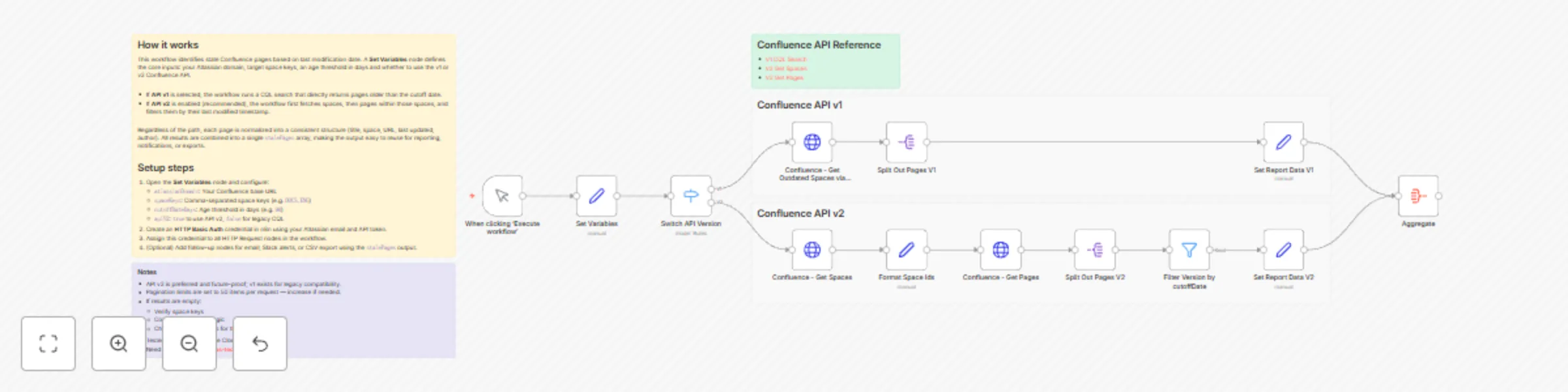
Workflow preview: Generate stale page reports for Confluence spaces with REST API v1 and v2
Free advanced

Generate stale page reports for Confluence spaces with REST API v1 and v2

## Report stale pages in Confluence This workflow generates a **stale page report** for Confluence spaces, helping teams keep documentation accurate, relevant, and actively maintained. ### What it does - Identifies Confluence pages **not updated within a defined cutoff period** (in days). - Supports both: - **Confluence REST API v1 (CQL search)**, and - **Confluence REST API v2** (spaces + pages). - Produces a clean, aggregated report including: - Page title - Page status - Last updated date - Days overdue - Direct page URL - Ideal for **content audits**, **documentation hygiene**, and **ownership reviews**. ### How it works - The workflow starts via a **Manual Trigger**. - A **Set Variables** node defines: - Atlassian domain - Space keys to scan - Cutoff age (in days) - API version toggle (v1 or v2) - Two execution paths are supported: - **API v1**: Uses CQL search to fetch outdated pages directly. - **API v2**: Fetches spaces → pages → filters pages by last modified date. - All pages are normalized into a consistent format. - Results are **aggregated into a single `stalePages` array** for easy reuse in downstream steps. ### Setup - Configure the **Set Variables** node: - `atlassianDomain` → your Confluence base URL - `spaceKeys` → comma-separated space keys (e.g. `DOCS, ENG`) - `cutoffDateDays` → age threshold (e.g. `90`) - `apiV2` → `true` (recommended) or `false` for legacy CQL - Create an **HTTP Basic Auth credential**: - Atlassian email + API token - Assign it to all HTTP Request nodes - Optional: - Extend the workflow with email notifications, Slack alerts, or CSV exports. ### Notes - **API v2 is recommended** and future-proof; API v1 is included for legacy compatibility. - Pagination limits are set to **50 items per request** — increase if your spaces contain many pages. - If no results are returned: - Verify space keys - Check cutoff logic - Confirm API permissions for the token - Tested against **Confluence Cloud**.

A
Alexander Schnabl
Document Extraction
28 Dec 2025
4
0

Workflow preview: Collect star rating feedback with self-contained HTML forms and data tables
Free advanced

Collect star rating feedback with self-contained HTML forms and data tables

## Customer Feedback Survey This n8n template lets you collect lightweight customer feedback through a responsive HTML form with a mandatory 1–5 star rating and an optional message. Submissions are stored in an n8n Data Table (including any query-string context like `userId` or `source`) and the user is redirected to a branded “Thank you” page. ### How it works * **Form page** (`/feedback`): Renders a styled HTML form (stars + message) with configurable text, colors, and button labels. * **POST handler** (`/feedback`): Receives form data, saves `rating`, `message`, and serialized query params to a Data Table. * **Confirmation page**: Returns a clean success screen after a valid submission. * **No external services**: Runs fully on n8n nodes (Webhook, HTML, Data Table, Set, Respond to Webhook). ### Use cases * Capture quick CSAT/NPS-style ratings after support chats or trials. * Embed lightweight feedback on landing pages or in-product prompts. * Attribute feedback to campaigns by passing URL parameters (e.g., `?plan=pro&source=email`). ### Setup 1. Import the template and **publish** the two webhooks (`GET /feedback` for the form, `POST /feedback` for submissions). 2. Open **Form Configuration** and adjust title, copy, button labels and make sure the POST URL is set correctly. 3. (Optional) Edit **Theme Configuration** to match your brand (colors, radius, shadow, max width). 4. Verify the **Data Table** mapping or point it to your own table. 5. Visit the form URL, submit test feedback, and confirm rows appear in the Data Table. ### Requirements * Works entirely within n8n — **no external credentials needed**. ### Privacy notes * Only the fields you submit are stored. * If you include URL query parameters, they are saved as JSON for attribution or debugging. ### Screenshots ![Screenshot 20251016 164423.png](fileId:2987)![Screenshot 20251016 164442.png](fileId:2985)![Screenshot 20251016 164503.png](fileId:2986)

A
Alexander Schnabl
Support Chatbot
16 Oct 2025
238
0