Audit SharePoint Online external sharing and anonymous links with Microsoft Graph

Workflow preview

Workflow preview
100%
Audit SharePoint Online external sharing and anonymous links with Microsoft Graph preview
Open on n8n.io

Important notice

This workflow is provided as-is. Please review and test before using in production.

1. Workflow Overview

Audit external sharing in SharePoint to ensure compliance This workflow audits your SharePoint Online environment for external sharing risks by identifying files and folders that are shared with an...

Best for

  • Document Extraction automation workflows
  • AI Summarization automation workflows
  • advanced n8n builders looking for reusable templates

Tools used

n8n-nodes-base.manualtrigger, n8n-nodes-base.httprequest, n8n-nodes-base.splitout, n8n-nodes-base.code, n8n-nodes-base.if, n8n-nodes-base.executeworkflow, n8n-nodes-base.executeworkflowtrigger, n8n-nodes-base.set

Source and attribution

This workflow is cataloged by N8N Workflows and links back to its original n8n.io source page by Alexander Schnabl.

Original n8n.io source

1.1 Workflow description

Title
Audit SharePoint Online external sharing and anonymous links with Microsoft Graph
Workflow name
Audit SharePoint Online external sharing and anonymous links with Microsoft Graph

Audit external sharing in SharePoint to ensure compliance

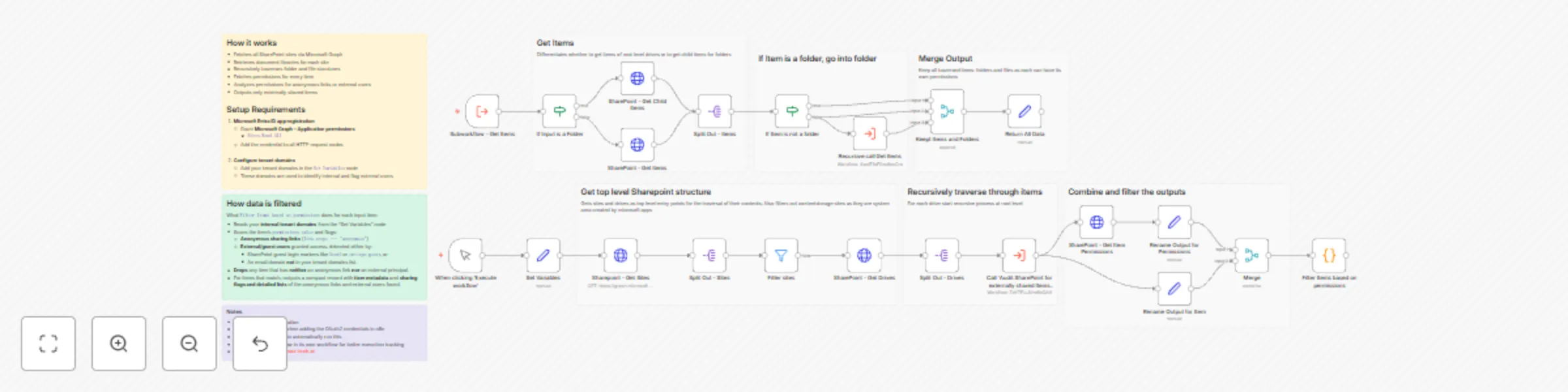
This workflow audits your SharePoint Online environment for external sharing risks by identifying files and folders that are shared with anonymous links or external/guest users. It is designed to traverse SharePoint recursively, giving you full visibility into sharing across all sites, document libraries, folders and files.

What it does

  • Scans all SharePoint sites in the tenant.

  • Traverses SharePoint recursively through every folder and file, starting at the root of each drive.

  • Fetches permissions for every item (files and folders).

  • Detects and flags:

    • Anonymous sharing links (anyone links)

    • External or guest users, identified by:

      • SharePoint guest login markers (#ext#, urn:spo:guest)
      • Email domains not matching your internal tenant domains
  • Outputs only items that are externally shared, including detailed metadata and permission evidence.

How it works

  • In the Set Variables node you define your internal tenantDomains, used to distinguish internal users from external ones.

  • Microsoft Graph is used to:

    • Fetch all SharePoint sites
    • Retrieve drives (document libraries) per site
  • Each drive triggers a recursive subworkflow that:

    • Starts at the root level
    • Determines whether an item is a folder or a file
    • If a folder, drills down into its children
    • Keeps both folders and files, since both can have unique permissions
  • For every discovered item:

    • Permissions are retrieved via Microsoft Graph
    • Item metadata and permissions are merged
  • A custom filtering step analyzes permissions and:

    • Flags anonymous links and external principals
    • Drops items with no external exposure
  • The final output is a clean, normalized list of externally shared SharePoint items, enriched with:

    • Item name, type, URL and last modified date
    • Site, drive, and parent identifiers
    • Detailed lists of anonymous links and external users found

Setup

  • Create a Microsoft Entra ID (Azure AD) App Registration.

  • Grant Microsoft Graph – Application permissions:

    • Sites.Read.All
  • Configure an OAuth2 Client Credentials credential in n8n and assign it to all HTTP Request nodes.

  • Update the Set Variables node:

    • Add all internal tenant domains (e.g. yourDomain.onmicrosoft.com, yourDomain.com)
  • Run the workflow manually or attach a Schedule Trigger for recurring audits.

Notes

  • The workflow traverses SharePoint recursively, ensuring no nested folder or file is missed.
  • Both folders and files are included because permissions can be broken at any level.
  • External users are detected defensively using both login-name patterns and email domain checks.

1.2 Logical Blocks

This catalog entry is organized from the workflow JSON. The node-level section below shows the executable blocks available for review before importing the template.

2. Block-by-Block Analysis

Block 1 - When clicking ‘Execute workflow’

Type / Role
n8n-nodes-base.manualTrigger - manualTrigger
Config choices
Version 1

Block 2 - Sharepoint - Get Sites

Type / Role
n8n-nodes-base.httpRequest - httpRequest
Config choices
Version 4.3

Block 3 - Split Out - Sites

Type / Role
n8n-nodes-base.splitOut - splitOut
Config choices
Version 1

Block 4 - SharePoint - Get Drives

Type / Role
n8n-nodes-base.httpRequest - httpRequest
Config choices
Version 4.3

Block 5 - Split Out - Drives

Type / Role
n8n-nodes-base.splitOut - splitOut
Config choices
Version 1

Block 6 - SharePoint - Get Item Permissions

Type / Role
n8n-nodes-base.httpRequest - httpRequest
Config choices
Version 4.3

Block 7 - Filter Items based on permissions

Type / Role
n8n-nodes-base.code - code
Config choices
Version 2

Block 8 - SharePoint - Get Items

Type / Role
n8n-nodes-base.httpRequest - httpRequest
Config choices
Version 4.3

Block 9 - Split Out - Items

Type / Role
n8n-nodes-base.splitOut - splitOut
Config choices
Version 1

Block 10 - If Item is not a folder

Type / Role
n8n-nodes-base.if - if
Config choices
Version 2.3

Block 11 - If Input is a Folder

Type / Role
n8n-nodes-base.if - if
Config choices
Version 2.3

Block 12 - SharePoint - Get Child Items

Type / Role
n8n-nodes-base.httpRequest - httpRequest
Config choices
Version 4.3

Block 13 - Call 'Audit SharePoint for externally shared Items and anonymous permissions'

Type / Role
n8n-nodes-base.executeWorkflow - executeWorkflow
Config choices
Version 1.3

Block 14 - Subworkflow - Get Items

Type / Role
n8n-nodes-base.executeWorkflowTrigger - executeWorkflowTrigger
Config choices
Version 1.1

Block 15 - Recursive call Get Items

Type / Role
n8n-nodes-base.executeWorkflow - executeWorkflow
Config choices
Version 1.3

Block 16 - Return All Data

Type / Role
n8n-nodes-base.set - set
Config choices
Version 3.4

Block 17 - Keept Items and Folders

Type / Role
n8n-nodes-base.merge - merge
Config choices
Version 3.2

Block 18 - Merge

Type / Role
n8n-nodes-base.merge - merge
Config choices
Version 3.2

Block 19 - Rename Output for Permissions

Type / Role
n8n-nodes-base.set - set
Config choices
Version 3.4

Block 20 - Rename Output for Item

Type / Role
n8n-nodes-base.set - set
Config choices
Version 3.4

Block 21 - Set Variables

Type / Role
n8n-nodes-base.set - set
Config choices
Version 3.4

Block 22 - Sticky Note

Type / Role
n8n-nodes-base.stickyNote - stickyNote
Config choices
Version 1

Block 23 - Sticky Note6

Type / Role
n8n-nodes-base.stickyNote - stickyNote
Config choices
Version 1

Block 24 - Sticky Note1

Type / Role
n8n-nodes-base.stickyNote - stickyNote
Config choices
Version 1

Showing the first 24 of 31 workflow blocks. Download the JSON for the full node graph.

3. Summary Table

Workflow Audit SharePoint Online external sharing and anonymous links with Microsoft Graph
Complexity advanced
Nodes 31
Categories Document Extraction, AI Summarization
Author Alexander Schnabl
Published 05 Jan 2026

4. Reproducing the Workflow from Scratch

  1. 1. Download the workflow JSON

    Use the JSON export at /data/workflows/12495/12495.json as the source template for this automation.

  2. 2. Import the template into n8n

    Open n8n, import the downloaded JSON, and review each node before activating the workflow.

  3. 3. Configure credentials and variables

    Replace placeholder credentials, API keys, webhook URLs, account IDs, and environment-specific values with your own settings.

  4. 4. Test with sample data

    Run the workflow manually or in a staging workspace, inspect node output, and confirm downstream systems receive the expected data.

  5. 5. Activate and monitor

    Enable the workflow only after testing, then monitor executions, errors, and rate limits during the first production runs.

5. General Notes & Resources

Review imported nodes carefully before activation. This catalog entry is intended to help you inspect the workflow structure, understand required services, and find related templates faster.

Node names, credentials, schedules, webhook paths, and external service limits may need adjustment for your workspace.

Frequently asked questions

What does Audit SharePoint Online external sharing and anonymous links with Microsoft Graph do?

Audit external sharing in SharePoint to ensure compliance This workflow audits your SharePoint Online environment for external sharing risks by identifying files and folders that are shared with an...

What do I need before importing this workflow?

Review the workflow JSON, configure any required credentials in n8n, and test the automation in a safe workspace before using it in production.

Can I customize this workflow?

Yes. Use the block-by-block analysis and the downloadable JSON to inspect each node, then adjust credentials, prompts, schedules, filters, or destinations for your Document Extraction, AI Summarization use case.