Generate stale page reports for Confluence spaces with REST API v1 and v2

Workflow preview

Workflow preview
100%
Generate stale page reports for Confluence spaces with REST API v1 and v2 preview
Open on n8n.io

Important notice

This workflow is provided as-is. Please review and test before using in production.

1. Workflow Overview

Report stale pages in Confluence This workflow generates a stale page report for Confluence spaces, helping teams keep documentation accurate, relevant, and actively maintained. What it does Identi...

Best for

  • Document Extraction automation workflows
  • advanced n8n builders looking for reusable templates

Tools used

n8n-nodes-base.manualtrigger, n8n-nodes-base.set, n8n-nodes-base.httprequest, n8n-nodes-base.stickynote, n8n-nodes-base.filter, n8n-nodes-base.switch, n8n-nodes-base.splitout, n8n-nodes-base.aggregate

Source and attribution

This workflow is cataloged by N8N Workflows and links back to its original n8n.io source page by Alexander Schnabl.

Original n8n.io source

1.1 Workflow description

Title
Generate stale page reports for Confluence spaces with REST API v1 and v2
Workflow name
Generate stale page reports for Confluence spaces with REST API v1 and v2

Report stale pages in Confluence

This workflow generates a stale page report for Confluence spaces, helping teams keep documentation accurate, relevant, and actively maintained.

What it does

  • Identifies Confluence pages not updated within a defined cutoff period (in days).
  • Supports both:
    • Confluence REST API v1 (CQL search), and
    • Confluence REST API v2 (spaces + pages).
  • Produces a clean, aggregated report including:
    • Page title
    • Page status
    • Last updated date
    • Days overdue
    • Direct page URL
  • Ideal for content audits, documentation hygiene, and ownership reviews.

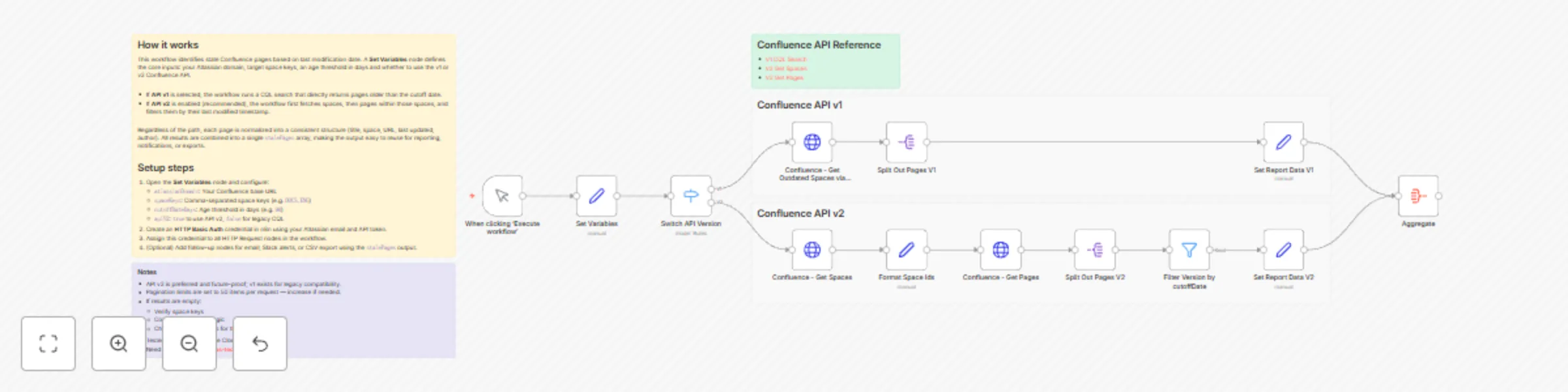
How it works

  • The workflow starts via a Manual Trigger.
  • A Set Variables node defines:
    • Atlassian domain
    • Space keys to scan
    • Cutoff age (in days)
    • API version toggle (v1 or v2)
  • Two execution paths are supported:
    • API v1: Uses CQL search to fetch outdated pages directly.
    • API v2: Fetches spaces → pages → filters pages by last modified date.
  • All pages are normalized into a consistent format.
  • Results are aggregated into a single stalePages array for easy reuse in downstream steps.

Setup

  • Configure the Set Variables node:
    • atlassianDomain → your Confluence base URL
    • spaceKeys → comma-separated space keys (e.g. DOCS, ENG)
    • cutoffDateDays → age threshold (e.g. 90)
    • apiV2true (recommended) or false for legacy CQL
  • Create an HTTP Basic Auth credential:
    • Atlassian email + API token
    • Assign it to all HTTP Request nodes
  • Optional:
    • Extend the workflow with email notifications, Slack alerts, or CSV exports.

Notes

  • API v2 is recommended and future-proof; API v1 is included for legacy compatibility.
  • Pagination limits are set to 50 items per request — increase if your spaces contain many pages.
  • If no results are returned:
    • Verify space keys
    • Check cutoff logic
    • Confirm API permissions for the token
  • Tested against Confluence Cloud.

1.2 Logical Blocks

This catalog entry is organized from the workflow JSON. The node-level section below shows the executable blocks available for review before importing the template.

2. Block-by-Block Analysis

Block 1 - When clicking ‘Execute workflow’

Type / Role
n8n-nodes-base.manualTrigger - manualTrigger
Config choices
Version 1

Block 2 - Set Variables

Type / Role
n8n-nodes-base.set - set
Config choices
Version 3.4

Block 3 - Confluence - Get Spaces

Type / Role
n8n-nodes-base.httpRequest - httpRequest
Config choices
Version 4.3

Block 4 - Format Space Ids

Type / Role
n8n-nodes-base.set - set
Config choices
Version 3.4

Block 5 - Sticky Note

Type / Role
n8n-nodes-base.stickyNote - stickyNote
Config choices
Version 1

Block 6 - Sticky Note1

Type / Role
n8n-nodes-base.stickyNote - stickyNote
Config choices
Version 1

Block 7 - Confluence - Get Outdated Spaces via CQL

Type / Role
n8n-nodes-base.httpRequest - httpRequest
Config choices
Version 4.3

Block 8 - Sticky Note2

Type / Role
n8n-nodes-base.stickyNote - stickyNote
Config choices
Version 1

Block 9 - Filter Version by cutoffDate

Type / Role
n8n-nodes-base.filter - filter
Config choices
Version 2.3

Block 10 - Switch API Version

Type / Role
n8n-nodes-base.switch - switch
Config choices
Version 3.4

Block 11 - Set Report Data V2

Type / Role
n8n-nodes-base.set - set
Config choices
Version 3.4

Block 12 - Set Report Data V1

Type / Role
n8n-nodes-base.set - set
Config choices
Version 3.4

Block 13 - Split Out Pages V1

Type / Role
n8n-nodes-base.splitOut - splitOut
Config choices
Version 1

Block 14 - Split Out Pages V2

Type / Role
n8n-nodes-base.splitOut - splitOut
Config choices
Version 1

Block 15 - Aggregate

Type / Role
n8n-nodes-base.aggregate - aggregate
Config choices
Version 1

Block 16 - Confluence - Get Pages

Type / Role
n8n-nodes-base.httpRequest - httpRequest
Config choices
Version 4.3

Block 17 - Sticky Note6

Type / Role
n8n-nodes-base.stickyNote - stickyNote
Config choices
Version 1

Block 18 - Sticky Note7

Type / Role
n8n-nodes-base.stickyNote - stickyNote
Config choices
Version 1

3. Summary Table

Workflow Generate stale page reports for Confluence spaces with REST API v1 and v2
Complexity advanced
Nodes 18
Categories Document Extraction
Author Alexander Schnabl
Published 28 Dec 2025

4. Reproducing the Workflow from Scratch

  1. 1. Download the workflow JSON

    Use the JSON export at /data/workflows/12237/12237.json as the source template for this automation.

  2. 2. Import the template into n8n

    Open n8n, import the downloaded JSON, and review each node before activating the workflow.

  3. 3. Configure credentials and variables

    Replace placeholder credentials, API keys, webhook URLs, account IDs, and environment-specific values with your own settings.

  4. 4. Test with sample data

    Run the workflow manually or in a staging workspace, inspect node output, and confirm downstream systems receive the expected data.

  5. 5. Activate and monitor

    Enable the workflow only after testing, then monitor executions, errors, and rate limits during the first production runs.

5. General Notes & Resources

Review imported nodes carefully before activation. This catalog entry is intended to help you inspect the workflow structure, understand required services, and find related templates faster.

Node names, credentials, schedules, webhook paths, and external service limits may need adjustment for your workspace.

Frequently asked questions

What does Generate stale page reports for Confluence spaces with REST API v1 and v2 do?

Report stale pages in Confluence This workflow generates a stale page report for Confluence spaces, helping teams keep documentation accurate, relevant, and actively maintained. What it does Identi...

What do I need before importing this workflow?

Review the workflow JSON, configure any required credentials in n8n, and test the automation in a safe workspace before using it in production.

Can I customize this workflow?

Yes. Use the block-by-block analysis and the downloadable JSON to inspect each node, then adjust credentials, prompts, schedules, filters, or destinations for your Document Extraction use case.