Block 1 - When clicking ‘Execute workflow’
- Type / Role
- n8n-nodes-base.manualTrigger - manualTrigger
- Config choices
- Version 1


 Early Deal
This workflow is provided as-is. Please review and test before using in production.
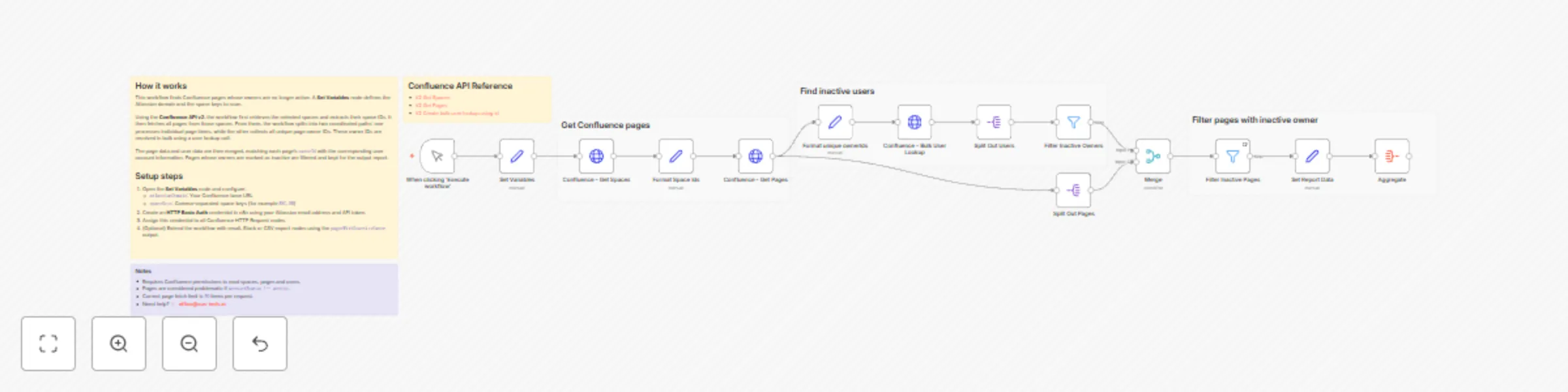
Scan Confluence pages for inactive page owners This workflow scans selected Confluence spaces , resolves page ownership and filters pages with inactive owners , helping teams maintain clear ownersh...
n8n-nodes-base.manualtrigger, n8n-nodes-base.set, n8n-nodes-base.httprequest, n8n-nodes-base.stickynote, n8n-nodes-base.merge, n8n-nodes-base.filter, n8n-nodes-base.splitout, n8n-nodes-base.aggregate
This workflow is cataloged by N8N Workflows and links back to its original n8n.io source page by Alexander Schnabl.
Original n8n.io sourceThis workflow scans selected Confluence spaces, resolves page ownership and filters pages with inactive owners, helping teams maintain clear ownership and prevent orphaned documentation.
Scans Confluence pages across selected spaces.
Resolves page owners and checks their account status.
Filters pages where the owner is inactive (owner.accountStatus !== active).
Uses Confluence REST API v2 to fetch spaces, pages, and user data.
Resolves page owners efficiently via the users-bulk API.
Produces a consolidated report containing:
Page title
Owner email
Owner account status
Last updated date
Direct page URL
Useful for documentation governance, ownership audits, and cleanup initiatives.
A Set Variables node defines:
Atlassian domain
Space keys to scan
Get Spaces (v2) retrieves matching spaces and extracts their IDs.
Get Pages (v2) fetches all pages from the selected spaces.
Unique page ownerIds are collected and resolved using Bulk User Lookup (v2).
Page metadata is merged with user account data (ownerId ↔ accountId).
Pages are filtered to include only those with inactive owners.
Configure the Set Variables node:
atlassianDomain → your Confluence base URL
spaceKeys → comma-separated list of space keys (e.g. ENG, HR)
Create an HTTP Basic Auth credential:
Atlassian email + API token
Assign it to all HTTP Request nodes
Optional enhancements:
Add pagination if spaces contain many pages.
Extend the workflow with email notifications, Slack alerts, or CSV export.
Requires permission to read Confluence spaces, pages, and users.
Pages are flagged when owner.accountStatus !== active.
Current page fetch limit is 50 items per request.
This catalog entry is organized from the workflow JSON. The node-level section below shows the executable blocks available for review before importing the template.
| Workflow | Scan Confluence pages with the REST API for inactive page owners |
|---|---|
| Complexity | advanced |
| Nodes | 20 |
| Categories | Document Extraction |
| Author | Alexander Schnabl |
| Published | 28 Dec 2025 |
Use the JSON export at /data/workflows/12238/12238.json as the source template for this automation.
Open n8n, import the downloaded JSON, and review each node before activating the workflow.
Replace placeholder credentials, API keys, webhook URLs, account IDs, and environment-specific values with your own settings.
Run the workflow manually or in a staging workspace, inspect node output, and confirm downstream systems receive the expected data.
Enable the workflow only after testing, then monitor executions, errors, and rate limits during the first production runs.
Review imported nodes carefully before activation. This catalog entry is intended to help you inspect the workflow structure, understand required services, and find related templates faster.
Node names, credentials, schedules, webhook paths, and external service limits may need adjustment for your workspace.
Scan Confluence pages for inactive page owners This workflow scans selected Confluence spaces , resolves page ownership and filters pages with inactive owners , helping teams maintain clear ownersh...
Review the workflow JSON, configure any required credentials in n8n, and test the automation in a safe workspace before using it in production.
Yes. Use the block-by-block analysis and the downloadable JSON to inspect each node, then adjust credentials, prompts, schedules, filters, or destinations for your Document Extraction use case.