Block 1 - When clicking ‘Execute workflow’
- Type / Role
- n8n-nodes-base.manualTrigger - manualTrigger
- Config choices
- Version 1


 Early Deal
This workflow is provided as-is. Please review and test before using in production.
Monitor expiring EntraID application secrets and notify responsible Stay ahead of credential expirations by automatically detecting Entra ID application client secrets and certificates that are abo...
n8n-nodes-base.manualtrigger, n8n-nodes-base.splitout, n8n-nodes-base.set, n8n-nodes-base.merge, n8n-nodes-base.filter, n8n-nodes-base.httprequest, n8n-nodes-base.aggregate, n8n-nodes-base.if
This workflow is cataloged by N8N Workflows and links back to its original n8n.io source page by Alexander Schnabl.
Original n8n.io sourceStay ahead of credential expirations by automatically detecting Entra ID application client secrets and certificates that are about to expire, and sending a neatly formatted email report.
Expired client secrets and certificates are a common cause of unexpected outages and failed integrations. Manually checking expiration dates across many Entra ID applications is tedious and easy to miss. This workflow automates the discovery and reporting of credentials that will expire within a configurable time window.
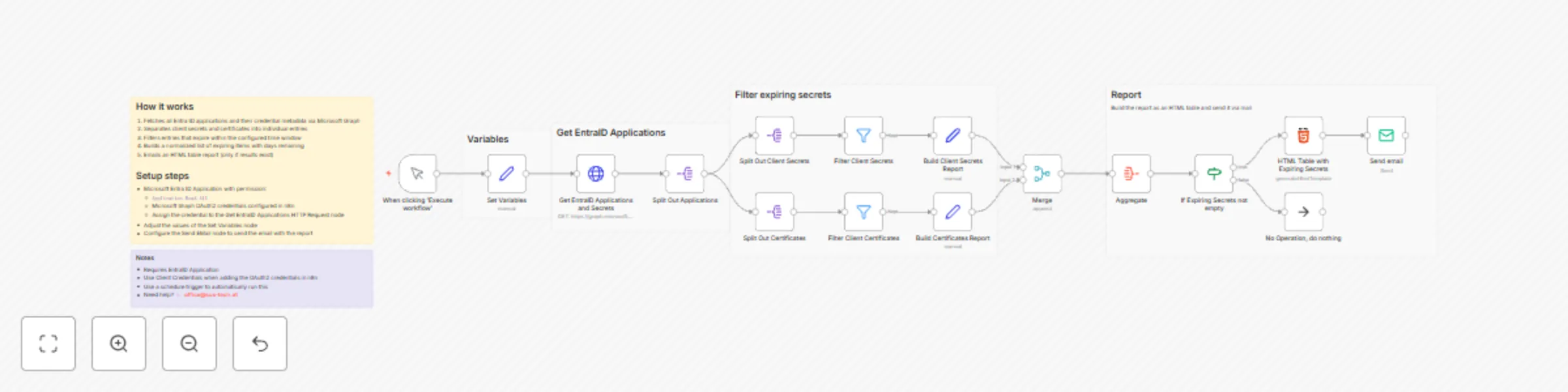
Fetches all Microsoft Entra ID applications along with:
Client secrets (passwordCredentials)
Certificates (keyCredentials)
Splits credentials into individual entries for easier processing
Filters credentials expiring within the next N days (configurable)
Normalizes results into a consistent structure including:
Application name
App ID
Credential type (Client Secret / Certificate)
Credential name + ID
Days remaining until expiration
Generates an HTML table report, sorted by application name
Sends an email only when expiring items are found (otherwise does nothing)
Microsoft Entra ID app registration with Microsoft Graph Application permissions:
Application.Read.AllIn n8n:
Create Microsoft Graph OAuth2 credentials (Client Credentials flow recommended)
Assign those credentials to the Get EntraID Applications and Secrets HTTP Request node
Update the Set Variables node:
notificationEmail: where to send the report
daysBeforeExpiry: alert window in days (e.g., 14)
The email table highlights soon-to-expire credentials more prominently (based on remaining days).
For automation, replace the manual trigger with a Schedule Trigger (e.g., daily/weekly).
The workflow accesses metadata only (names/IDs/expiry), not secret values.
This catalog entry is organized from the workflow JSON. The node-level section below shows the executable blocks available for review before importing the template.
| Workflow | Email reports on expiring Microsoft Entra ID app secrets and certificates with Microsoft Graph |
|---|---|
| Complexity | advanced |
| Nodes | 22 |
| Categories | DevOps |
| Author | Alexander Schnabl |
| Published | 02 Jan 2026 |
Use the JSON export at /data/workflows/12399/12399.json as the source template for this automation.
Open n8n, import the downloaded JSON, and review each node before activating the workflow.
Replace placeholder credentials, API keys, webhook URLs, account IDs, and environment-specific values with your own settings.
Run the workflow manually or in a staging workspace, inspect node output, and confirm downstream systems receive the expected data.
Enable the workflow only after testing, then monitor executions, errors, and rate limits during the first production runs.
Review imported nodes carefully before activation. This catalog entry is intended to help you inspect the workflow structure, understand required services, and find related templates faster.
Node names, credentials, schedules, webhook paths, and external service limits may need adjustment for your workspace.
Monitor expiring EntraID application secrets and notify responsible Stay ahead of credential expirations by automatically detecting Entra ID application client secrets and certificates that are abo...
Review the workflow JSON, configure any required credentials in n8n, and test the automation in a safe workspace before using it in production.
Yes. Use the block-by-block analysis and the downloadable JSON to inspect each node, then adjust credentials, prompts, schedules, filters, or destinations for your DevOps use case.