C

Calistus Christian

11
Workflows

Workflows by Calistus Christian

Workflow preview: Daily business news summary with OpenAI and Gmail from multiple RSS sources
Free advanced

Daily business news summary with OpenAI and Gmail from multiple RSS sources

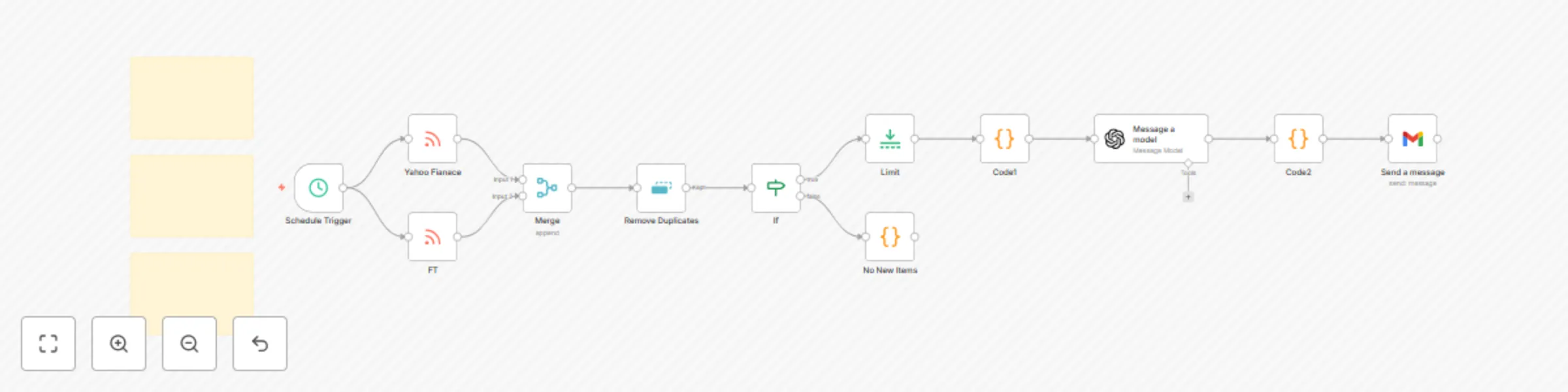
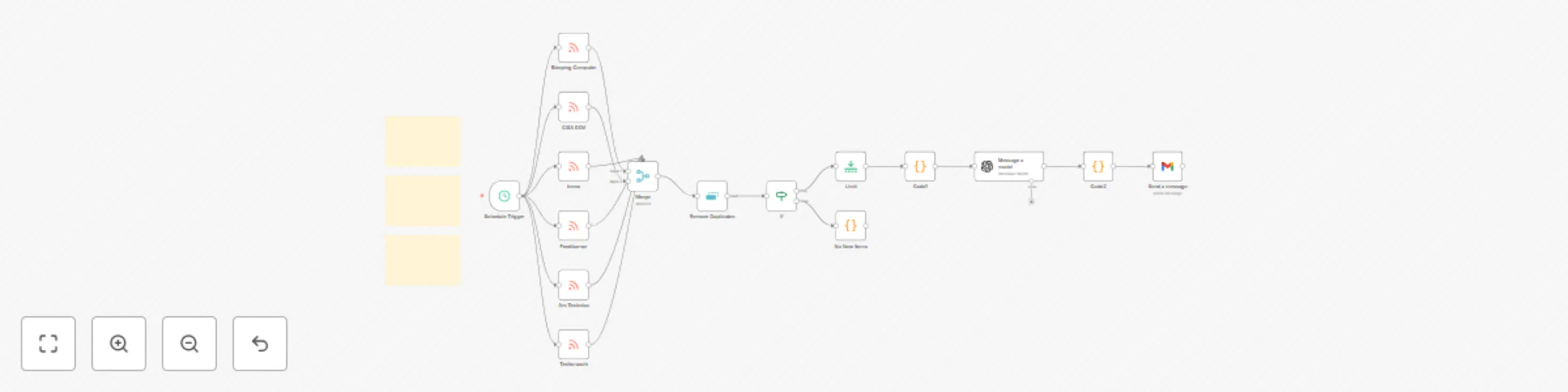
- Pulls free business and economic headlines from multiple publicly available RSS feeds (e.g., Reuters, Wall Street Journal, Federal Reserve, St. Louis Fed, BNP Paribas, WTO). - De-duplicates stories, keeps only the last 24 hours, and limits to a manageable number. - Uses OpenAI to generate a concise market brief with sections and "Why it matters." - Sends a clean HTML email via Gmail. **Category:** Business / Economics / News\ **Time to set up:** ~10--15 minutes\ **Difficulty:** Beginner--Intermediate\ **Cost:** Free (except minimal OpenAI tokens if summarization is used) * * * * * **What you'll need** -------------------- - n8n (recent version) - OpenAI credentials (for summaries, optional if you want raw feeds only) - Gmail (or SMTP) credentials - A few **free RSS feed URLs** (swap in/out as you like) * * * * * **Set up steps** ---------------- - Trigger -- Add a Cron to run daily (pick your time and timezone). - Fetch -- Add one RSS Read node per source and connect all to a Merge (append). - De-duplicate (this run) -- Add Remove Duplicates and compare on a stable key (prefer the article URL). - Freshness -- Add an IF to pass only items published in the last 24 hours. - Limit -- Add Limit to cap the total items (e.g., 25). - Summarize -- Add OpenAI → Message a model to produce a JSON brief with subject + HTML body. - Email -- Add Gmail → Send to deliver the brief to your inbox. * * * * * **Tips & troubleshooting** -------------------------- - If everything gets discarded at de-dup while testing, switch to "within current input" or reset the node's stored values. - If no items pass the IF, widen the date window temporarily (some feeds publish late). - If the email arrives blank, ensure Gmail email type is set to HTML and the subject/body fields map to the model's output. * * * * * **Free sources you can start with (swap freely)** ------------------------------------------------- - Yahoo News - Financial Times

C
Calistus Christian
Market Research
16 Sep 2025
82
0
Workflow preview: Send organized security CVE digests from NVD with AI-polished summaries to Gmail
Free intermediate

Send organized security CVE digests from NVD with AI-polished summaries to Gmail

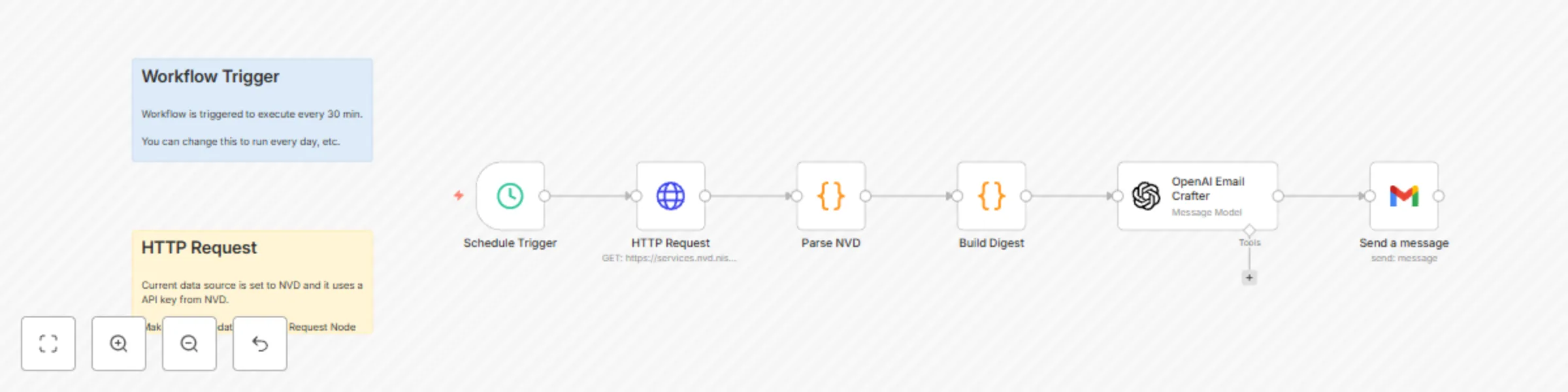
Summary ------- Turns the latest CVEs from NVD into a clean, sortable email digest (table + plaintext) and sends it via Gmail. The flow pulls the newest CVEs, extracts **Vendor / Product / Version**, severity & CVSS, highlights public exploit references, drafts an HTML table, then asks OpenAI to tighten the copy before emailing it. Optionally, you can swap the Gmail node to Signal, Slack, Microsoft Teams, etc. **Perfect for:** SecOps leads who want a low-noise digest of what changed recently, grouped and ranked by severity. * * * * * What this workflow does ----------------------- - Triggers on a schedule (every 30 minutes by default). - Calls the **NVD 2.0 API** to fetch recent CVEs. - Parses each CVE to extract: - **Vendor / Product / Version(s)** (from CPE 2.3 where available, with a text fallback) - **Severity + CVSS** (V3.1/V3.0/V2 fallback) and vector string - **Exploit signal** (tags/links like Exploit‑DB, GitHub PoCs, etc.) - **Short English summary** + direct **NVD link** - Builds an **HTML email** (and a plaintext fallback) ranked by severity then score. - Uses **OpenAI** to polish the subject line and copy into a concise, professional digest (JSON‑only contract). - Sends the digest with the **Gmail** node. * * * * * Prerequisites ------------- - **NVD API key** (free) --- create at https://nvd.nist.gov/developers/request-an-api-key - **OpenAI API key** with access to `gpt-4o-mini` (or change the model) - **Email sending**: - Gmail node with OAuth2 (recommended), **or** swap to the generic **Email Send (SMTP)** node if you prefer. Quick start ----------- 1. **Import** the workflow JSON below. 2. Open **HTTP Request → Headers** and confirm `apiKey` uses `{{$env.NVD_API_KEY}}`. 3. Open **Send a message (Gmail)** and set **To** to `{{$env.RECIPIENT_EMAIL}}` (or your address). 4. Open **OpenAI Email Crafter** and connect your OpenAI credential (or change model if needed). 5. Hit **Execute** to test, then **Activate** when happy. Credits ------- Created by **ca7ai** (n8n Creator). * * * * * Tags ---- security, cve, cisa, nvd, email, monitoring, openai, gmail, automation

C
Calistus Christian
SecOps
1 Sep 2025
506
0
Workflow preview: Manage Google Calendar events with OpenAI Assistant (Get, create, delete)
Free intermediate

Manage Google Calendar events with OpenAI Assistant (Get, create, delete)

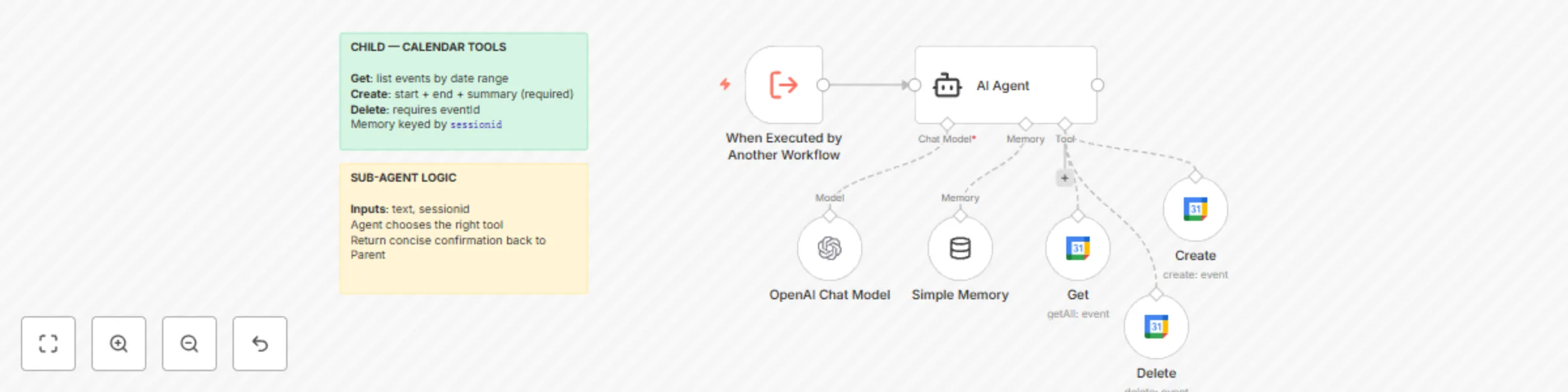
What this workflow does ----------------------- Provides the **tools layer** for the Parent agent to manage Google Calendar: **Get** (list events), **Create**, and **Delete**. Accepts `text` + `sessionid` from the Parent and uses an LLM with short-term memory to choose and run the correct tool. **Pipeline:** Execute Workflow Trigger → Sub-Agent → (Get / Create / Delete) → Google Calendar **Category:** Productivity / Calendar / Agentic\ **Time to set up:** ~10 minutes\ **Difficulty:** Intermediate\ **Cost:** Mostly free (n8n CE; OpenAI + Google Calendar usage as configured) * * * * * What you'll need ---------------- - OpenAI credentials. - Google Calendar OAuth2 credentials. - A calendar ID (use a placeholder like `[email protected]` in the node and select your actual calendar at runtime). * * * * * Set up steps ------------ 1. Import this Sub-Agent workflow. 2. Open the Google Calendar tool nodes (**Get**, **Create**, **Delete**) and **select your OAuth2 credential** and **calendar**. 3. Ensure the **Execute Workflow Trigger** exposes two inputs: `text` and `sessionid`. 4. Connect the Parent's `toolWorkflow` node to this workflow. * * * * * Testing (direct call example) ----------------------------- - From the Parent, send: "**Schedule 'Team Sync' tomorrow 10:00--11:00**" → Sub-Agent should call **Create**. - "**List events next week**" → **Get** with `timeMin`/`timeMax`. - "**Delete event 'Team Sync'**" → **Delete** with `eventId` once matched.

C
Calistus Christian
AI Chatbot
24 Aug 2025
503
0
Workflow preview: Manage Google Calendar events with GPT-4o virtual assistant (Orchestrator)
Free intermediate

Manage Google Calendar events with GPT-4o virtual assistant (Orchestrator)

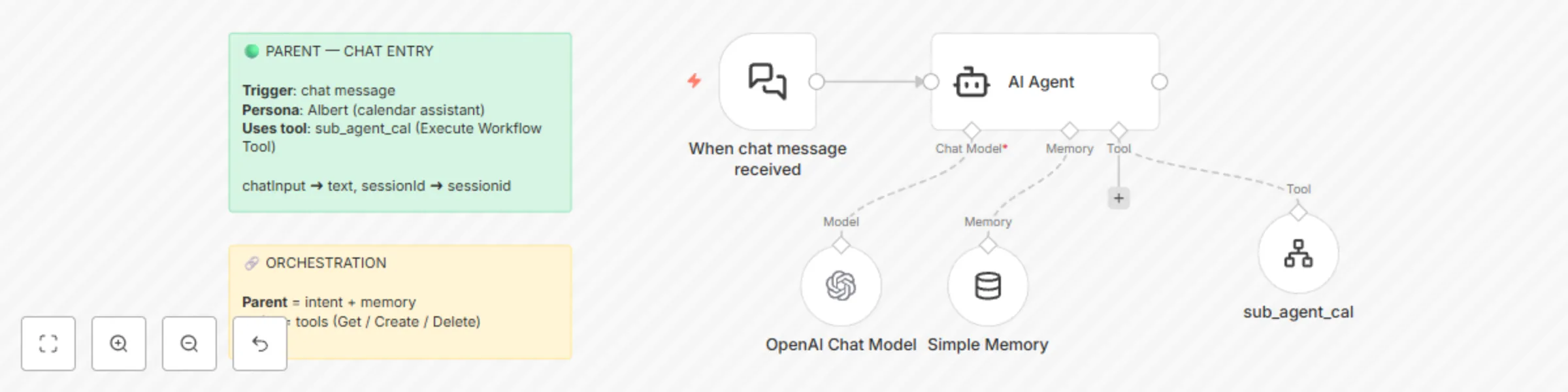
What this workflow does ----------------------- Front-door **chat orchestrator** that delegates calendar requests to a separate **Sub-Agent** workflow which holds Google Calendar tools (Get, Create, Delete). Keeps the agent persona and memory in the Parent for clean separation of concerns. **Pipeline:** Chat Trigger → Parent Agent ("Albert") → `sub_agent_cal` (Execute Workflow Tool) → Child Sub-Agent → Google Calendar **Category:** Productivity / Calendar / Agentic\ **Time to set up:** ~10--15 minutes\ **Difficulty:** Intermediate\ **Cost:** Mostly free (n8n CE; OpenAI + Google Calendar usage as configured) * * * * * What you'll need ---------------- - n8n with chat trigger enabled. - OpenAI credentials. - The companion template: **Agentic Google Calendar Assistant --- Sub-Agent (Calendar Tools)**. - After importing both, open this Parent and **re-select** the Sub-Agent in the `toolWorkflow` node. * * * * * Set up steps ------------ 1. **Import** this Parent workflow. 2. **Import** the Sub-Agent workflow (Template B). 3. In the Parent, open **`sub_agent_cal`** (Tool → Workflow) and select the imported Sub-Agent workflow. 4. Ensure the **input mapping** passes: - `chatInput` → `text` - `sessionId` → `sessionid` 5. Add your OpenAI credential to the **OpenAI Chat Model** node. 6. Activate the Parent workflow. * * * * * Testing ------- - "**Create a meeting tomorrow 3--4pm called 'Product Sync'**" → Sub-Agent should create the event and the agent should confirm. - "**What's on my calendar this week?**" → Lists events. - "**Delete my 'Dentist' appointment on Thursday**" → Finds and deletes the event.

C
Calistus Christian
AI Chatbot
24 Aug 2025
398
0
Workflow preview: Automate security incident triage with GPT-4o-mini and Gmail notifications
Free intermediate

Automate security incident triage with GPT-4o-mini and Gmail notifications

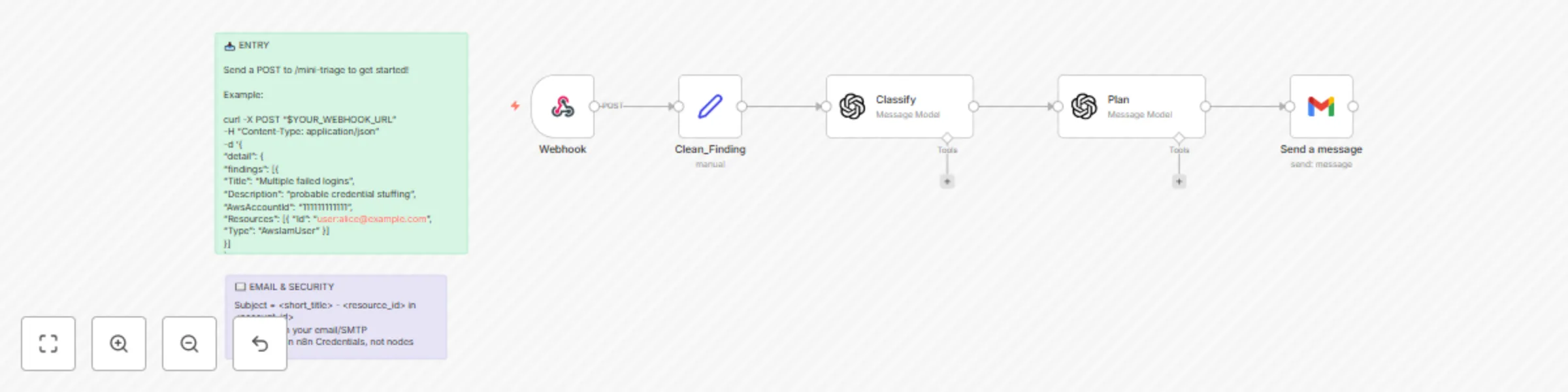
What this workflow does ----------------------- Automatically triages inbound security findings (e.g., from AWS Security Hub via EventBridge → SNS → Webhook), classifies them with an LLM, generates a 3-step remediation plan, and emails a compact incident brief. **Pipeline:** Webhook → Clean_Finding (normalize) → Classify (LLM) → Plan (LLM) → Gmail (email). You can substitute Microsoft Teams, Slack, etc. - Normalizes the incoming finding JSON (title, description, account, resource id/type, updated_at). - Uses an LLM to assign **incident_type**, **severity (P0--P3)**, **urgency**, **short_title**, and **why** (concise rationale). - Produces a **3-step remediation plan** with **owner_hint** and **success_criteria**---kept atomic and practical. - Sends a clean HTML email with all details (subject line includes short title, resource, and account). **Category:** Security / Cloud / Incident Management\ **Time to set up:** ~10--15 minutes\ **Difficulty:** Beginner--Intermediate\ **Cost:** Mostly free (n8n CE; OpenAI usage + Gmail/SMTP as used) * * * * * What you'll need ---------------- - An n8n instance reachable over **HTTP** (for the Webhook node). - OpenAI (or compatible) credentials set in n8n. - Gmail OAuth2 credentials (or swap Gmail node for SMTP). - A source that can POST a Security-Hub-style finding to your webhook (EventBridge/SNS, a SIEM, or curl). **Output (Email)** - Subject: `<short_title> - <resource_id> in <account_id>` - Body: HTML summary with **Type**, **Account**, **Urgency**, **Why**, **Next Actions (3 steps)**, **Owner**, **Success criteria**.

C
Calistus Christian
AI Summarization
24 Aug 2025
206
0
Workflow preview: Daily tech & cyber security brief with RSS, OpenAI GPT-4o, and Gmail
Free advanced

Daily tech & cyber security brief with RSS, OpenAI GPT-4o, and Gmail

**What this workflow does** --------------------------- - Pulls free security/tech headlines from multiple RSS feeds (e.g., CISA, BleepingComputer, Krebs, SecurityWeek, Ars Technica, TechCrunch, Hacker News). - De-duplicates stories, keeps only the last 24 hours, and limits to a manageable number. - Uses OpenAI to write a concise brief with sections and "Why it matters." - Sends a clean HTML email via Gmail. **Category:** Security / News\ **Time to set up:** ~10--15 minutes\ **Difficulty:** Beginner--Intermediate\ **Cost:** Mostly free (OpenAI tokens + Gmail) * * * * * **What you'll need** -------------------- - n8n (recent version) - OpenAI credentials - Gmail (or SMTP) credentials - A few free RSS feed URLs (swap in/out as you like) * * * * * **Set up steps** ---------------- - Trigger -- Add a Cron to run daily (pick your time and timezone). - Fetch -- Add one RSS Read node per source and connect all to a Merge (append). - De-duplicate (this run) -- Add Remove Duplicates and compare on a stable key (prefer the article URL). - Freshness -- Add an IF to pass only items published in the last 24 hours. - Limit -- Add Limit to cap the total items (e.g., 25). - Summarize -- Add OpenAI → Message a model to produce a JSON brief with subject + HTML body. - Email -- Add Gmail → Send to deliver the brief to your inbox. * * * * * **Tips & troubleshooting** -------------------------- - If everything gets discarded at de-dup e while testing, switch to "within current input" or reset the node's stored values. - If no items pass the IF, widen the date window temporarily (some feeds publish late). - If the email arrives blank, ensure Gmail email type is set to HTML and the subject/body fields map to the model's output. * * * * * **Sources you can start with (swap freely)** -------------------------------------------- CISA, BleepingComputer, KrebsOnSecurity, SecurityWeek, Ars Technica (Security), TechCrunch (Security), Hacker News (front page).

C
Calistus Christian
Personal Productivity
15 Aug 2025
1084
0
Workflow preview: Triage AWS security misconfigurations with GPT-4.1 Mini and send alerts to Gmail
Free intermediate

Triage AWS security misconfigurations with GPT-4.1 Mini and send alerts to Gmail

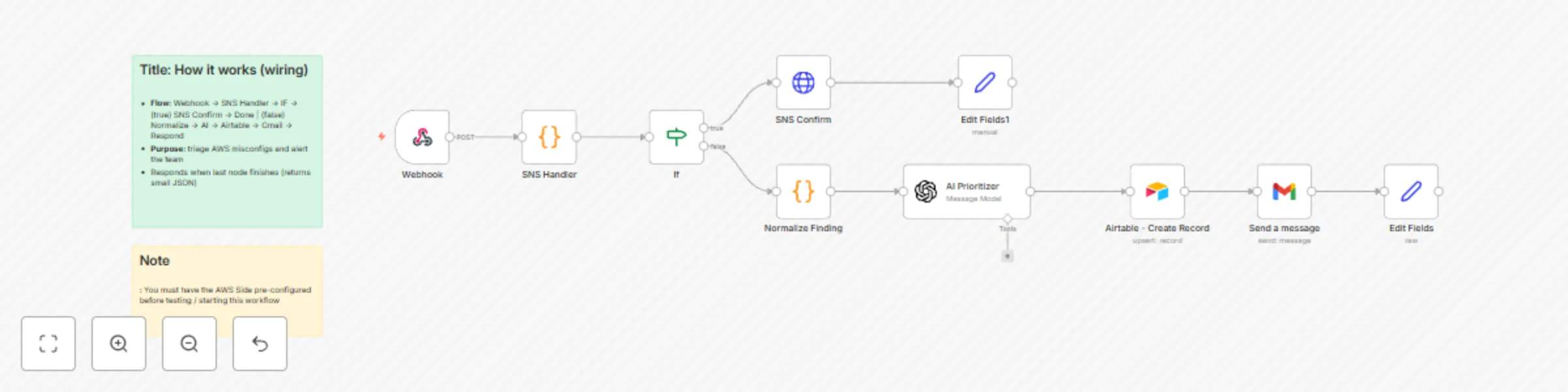
## What this workflow does Automatically triages risky AWS misconfigurations and alerts your team. **Pipeline:** Security Hub or AWS Config -> EventBridge rules -> SNS (HTTP) -> n8n Webhook -> Normalize -> AI Prioritizer -> Airtable (log) -> Gmail (email) - Normalizes incoming findings (S3 / Security Groups / IAM / RDS) into a consistent JSON. - Uses an LLM to assign a priority (**P0–P3**) with rationale and remediation steps. - Upserts the finding into Airtable (avoids duplicates). - Emails a compact incident summary to your inbox. This can be swapped for Microsoft Teams or Slack, etc. **Category:** Security / Cloud / Alerting **Time to set up:** ~10–15 minutes **Difficulty:** Beginner–Intermediate **Cost:** Mostly free (n8n CE + AWS SNS/EventBridge; OpenAI + Airtable/Gmail as used) ---------- ## What you’ll need - An n8n instance reachable over **HTTP**. - AWS account (one region) with permissions to create **SNS topics** and **EventBridge rules**. - **Security Hub** enabled (or AWS Config rules that emit compliance events). - n8n credentials: **OpenAI**, **Airtable**, **Gmail**. ---------- ## Nodes used - **Webhook** (POST `/aws-misconfig`) - **Code:** SNS Handler (token check, confirm/unwrap) - **IF:** route `mode === "confirm"` vs notification - **HTTP Request:** SNS `SubscriptionConfirmation` (GET) - **Code:** Normalize Finding - **Message a model:** AI Prioritizer (JSON out) - **Airtable:** Create/Upsert - **Gmail:** Send message - **Edit Fields:** final JSON response ---------- ## Setup steps 1. **Import and activate** the workflow in n8n. - Webhook Respond: **When Last Node Finishes -> First Entry JSON**. - Append a shared secret to the URL, e.g. `?token=MY_SUPER_TOKEN`, and keep the check in the SNS Handler code node. 2. **Create an SNS topic** (e.g., `misconfig-events`) in the same region as your EventBridge rules. 3. **Create EventBridge rules** targeting the SNS topic: - **Rule A (Security Hub):** `source = aws.securityhub`, `detail-type = Security Hub Findings - Imported` - **Rule B (AWS Config):** `source = aws.config`, `detail-type = Config Rules Compliance Change` 4. **Create an SNS subscription** with **Protocol = HTTP** and **Endpoint = your production webhook URL**: `http://YOUR_HOST:5678/webhook/aws-misconfig?token=MY_SUPER_TOKEN` (The workflow auto-confirms the subscription on first POST.) 5. Configure **Airtable** (Upsert on **Finding ID**) and **Gmail** recipients.

C
Calistus Christian
SecOps
10 Aug 2025
288
0
Workflow preview: Website uptime monitoring with GPT-4 analysis and Gmail notifications
Free intermediate

Website uptime monitoring with GPT-4 analysis and Gmail notifications

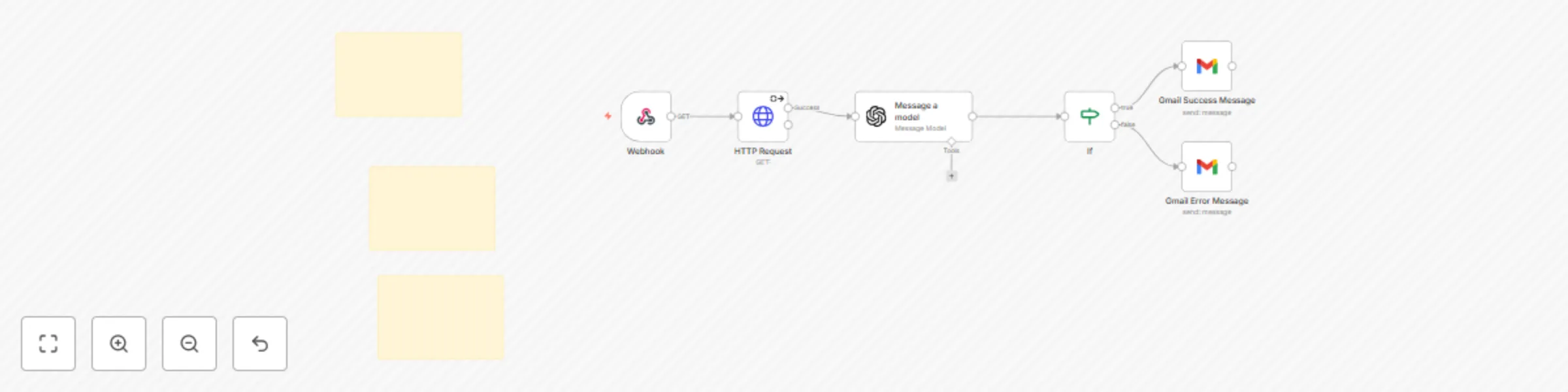
## How it works Checks if a website is up, sends the HTTP result to an AI model (ChatGPT) for analysis, and emails a clear success or failure message. Great for a quick “is this site up?” check you can trigger from any system via HTTP. 1. **Webhook** — Receives a POST with the target URL. 2. **HTTP Request** — Attempts to fetch the URL. 3. **Message a model** — Uses ChatGPT to explain the status and cause of any error. 4. **IF** — Checks if the HTTP status code equals 200. 5. **Gmail Success** — Sends a success email with AI explanation. 6. **Gmail Error** — Sends an error email with AI explanation and next steps. --- ## Set up steps - Estimated setup: 5–10 minutes. - Beginner friendly — no advanced config required. - Add your Webhook URL where needed and connect your Gmail account. - Keep detailed instructions and configuration notes inside **Sticky Notes** in your workflow. --- ## Inputs Send a POST request to your Webhook with: ```json { "url": "https://example.com" }

C
Calistus Christian
DevOps
9 Aug 2025
203
0
Workflow preview: Scan URLs for security threats with urlscan.io and GPT-4o mini
Free intermediate

Scan URLs for security threats with urlscan.io and GPT-4o mini

## How it works • **Webhook → urlscan.io → GPT-4o mini → Gmail** • Payload example: `{ "url": "https://example.com" }` • urlscan.io returns a **Scan ID** and raw JSON. • AI node classifies the scan as *malicious / suspicious / benign*, assigns a **1-10 risk score**, and writes a two-sentence summary. • Gmail sends an alert that includes the URL, Scan ID, AI verdict, screenshot link, and full report link. --- ## Set-up steps (~5 min) • Create three credentials in n8n 1. **urlscan.io** API key 2. **OpenAI** API key (GPT-4o mini access) 3. **Gmail** OAuth (or SMTP) • Replace those fields in the nodes, or reference env vars like `{{ $env.OPENAI_API_KEY }}`. • Switch the Webhook to **Production** → copy the live URL. • Test with: ```bash curl -X POST <your-webhook-url> \ -H "Content-Type: application/json" \ -d '{ "url": "https://example.com" }'

C
Calistus Christian
SecOps
8 Aug 2025
904
0
Workflow preview: Scan URLs with urlscan.io and send results via Gmail
Free intermediate

Scan URLs with urlscan.io and send results via Gmail

## Overview Receive a URL via Webhook, submit it to **urlscan.io**, **wait ~30 seconds** for artifacts (e.g., screenshot), then email a clean summary with links to the result page, screenshot, and API JSON. ## What this template does - Ingests a URL from a POST request. - Submits the URL to **urlscan.io** and captures the scan UUID. - **Waits 30s** to give urlscan time to generate the screenshot and result artifacts. - Sends a formatted HTML email via **Gmail** with all relevant links. ## Nodes used - **Webhook** (POST `/urlscan`) - **urlscan.io → Perform a scan** - **Wait** (30 seconds; configurable) - **Gmail → Send a message** ## Input ```json { "url": "https://example.com" }

C
Calistus Christian
SecOps
4 Aug 2025
210
0
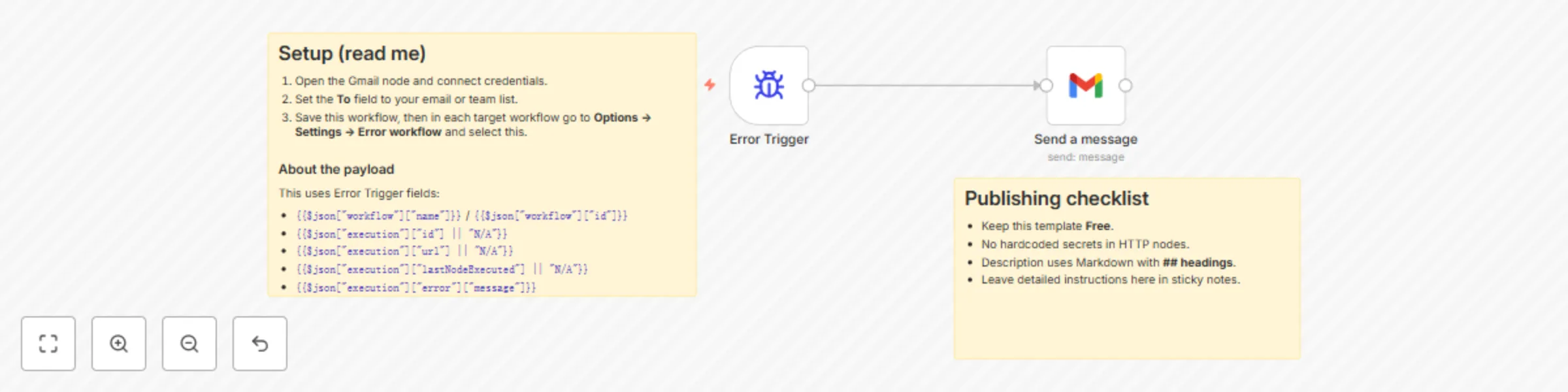
Workflow preview: Automatic workflow error notifications via Gmail
Free beginner

Automatic workflow error notifications via Gmail

## What this template does Sends you an email (via Gmail) whenever any workflow that references this one **fails**. The message includes the workflow name/ID, execution URL, last node executed, and the error message. ## Why it’s useful Centralizes error notifications so you notice failures immediately and can jump straight to the failed execution. ## Prerequisites - A Gmail account connected through n8n’s **Gmail** node credentials. - This workflow set as the **Error Workflow** inside the workflows you want to monitor. ## How it works 1. **Error Trigger** starts this workflow whenever a linked workflow fails. 2. **Gmail (Send → Message)** composes and sends an email using details from the Error Trigger. ## Notes - Error workflows **don’t need to be activated** to work. - You can’t test them by running manually—errors must occur in an **automatically** run workflow (cron, webhook, etc.).

C
Calistus Christian
DevOps
3 Aug 2025
437
0