Block 1 - Merge
- Type / Role
- n8n-nodes-base.merge - merge
- Config choices
- Version 3.2


 Early Deal
This workflow is provided as-is. Please review and test before using in production.
Pulls free business and economic headlines from multiple publicly available RSS feeds (e.g., Reuters, Wall Street Journal, Federal Reserve, St. Louis Fed, BNP Paribas, WTO). De duplicates stories, ...
n8n-nodes-base.merge, n8n-nodes-base.removeduplicates, n8n-nodes-base.if, n8n-nodes-base.limit, n8n-nodes-base.gmail, @n8n/n8n-nodes-langchain.openai, n8n-nodes-base.code, n8n-nodes-base.scheduletrigger
This workflow is cataloged by N8N Workflows and links back to its original n8n.io source page by Calistus Christian.
Original n8n.io sourcePulls free business and economic headlines from multiple publicly available RSS feeds (e.g., Reuters, Wall Street Journal, Federal Reserve, St. Louis Fed, BNP Paribas, WTO).
De-duplicates stories, keeps only the last 24 hours, and limits to a manageable number.
Uses OpenAI to generate a concise market brief with sections and "Why it matters."
Sends a clean HTML email via Gmail.
Category: Business / Economics / News
Time to set up: ~10--15 minutes
Difficulty: Beginner--Intermediate
Cost: Free (except minimal OpenAI tokens if summarization is used)
n8n (recent version)
OpenAI credentials (for summaries, optional if you want raw feeds only)
Gmail (or SMTP) credentials
A few free RSS feed URLs (swap in/out as you like)
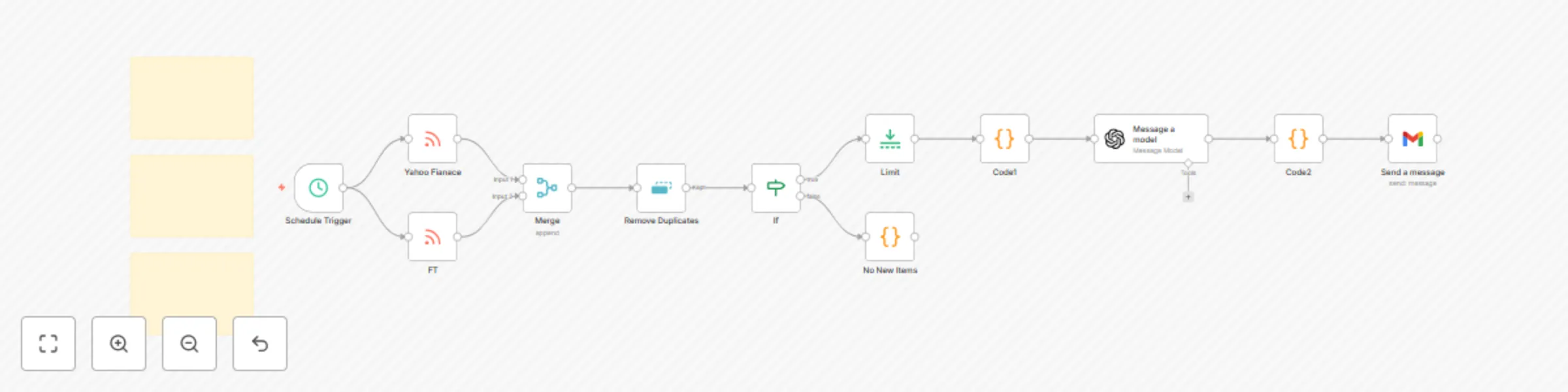
Trigger -- Add a Cron to run daily (pick your time and timezone).
Fetch -- Add one RSS Read node per source and connect all to a Merge (append).
De-duplicate (this run) -- Add Remove Duplicates and compare on a stable key (prefer the article URL).
Freshness -- Add an IF to pass only items published in the last 24 hours.
Limit -- Add Limit to cap the total items (e.g., 25).
Summarize -- Add OpenAI → Message a model to produce a JSON brief with subject + HTML body.
Email -- Add Gmail → Send to deliver the brief to your inbox.
If everything gets discarded at de-dup while testing, switch to "within current input" or reset the node's stored values.
If no items pass the IF, widen the date window temporarily (some feeds publish late).
If the email arrives blank, ensure Gmail email type is set to HTML and the subject/body fields map to the model's output.
This catalog entry is organized from the workflow JSON. The node-level section below shows the executable blocks available for review before importing the template.
| Workflow | Daily business news summary with OpenAI and Gmail from multiple RSS sources |
|---|---|
| Complexity | advanced |
| Nodes | 15 |
| Categories | Market Research, AI Summarization |
| Author | Calistus Christian |
| Published | 16 Sept 2025 |
Use the JSON export at /data/workflows/8621/8621.json as the source template for this automation.
Open n8n, import the downloaded JSON, and review each node before activating the workflow.
Replace placeholder credentials, API keys, webhook URLs, account IDs, and environment-specific values with your own settings.
Run the workflow manually or in a staging workspace, inspect node output, and confirm downstream systems receive the expected data.
Enable the workflow only after testing, then monitor executions, errors, and rate limits during the first production runs.
Review imported nodes carefully before activation. This catalog entry is intended to help you inspect the workflow structure, understand required services, and find related templates faster.
Node names, credentials, schedules, webhook paths, and external service limits may need adjustment for your workspace.
Pulls free business and economic headlines from multiple publicly available RSS feeds (e.g., Reuters, Wall Street Journal, Federal Reserve, St. Louis Fed, BNP Paribas, WTO). De duplicates stories, ...
Review the workflow JSON, configure any required credentials in n8n, and test the automation in a safe workspace before using it in production.
Yes. Use the block-by-block analysis and the downloadable JSON to inspect each node, then adjust credentials, prompts, schedules, filters, or destinations for your Market Research, AI Summarization use case.