Block 1 - Webhook
- Type / Role
- n8n-nodes-base.webhook - webhook
- Config choices
- Version 2


 Early Deal
This workflow is provided as-is. Please review and test before using in production.
What this workflow does Automatically triages risky AWS misconfigurations and alerts your team. Pipeline: Security Hub or AWS Config EventBridge rules SNS (HTTP) n8n Webhook Nor...
n8n-nodes-base.webhook, n8n-nodes-base.code, n8n-nodes-base.gmail, @n8n/n8n-nodes-langchain.openai, n8n-nodes-base.airtable, n8n-nodes-base.set, n8n-nodes-base.if, n8n-nodes-base.httprequest
This workflow is cataloged by N8N Workflows and links back to its original n8n.io source page by Calistus Christian.
Original n8n.io sourceAutomatically triages risky AWS misconfigurations and alerts your team.
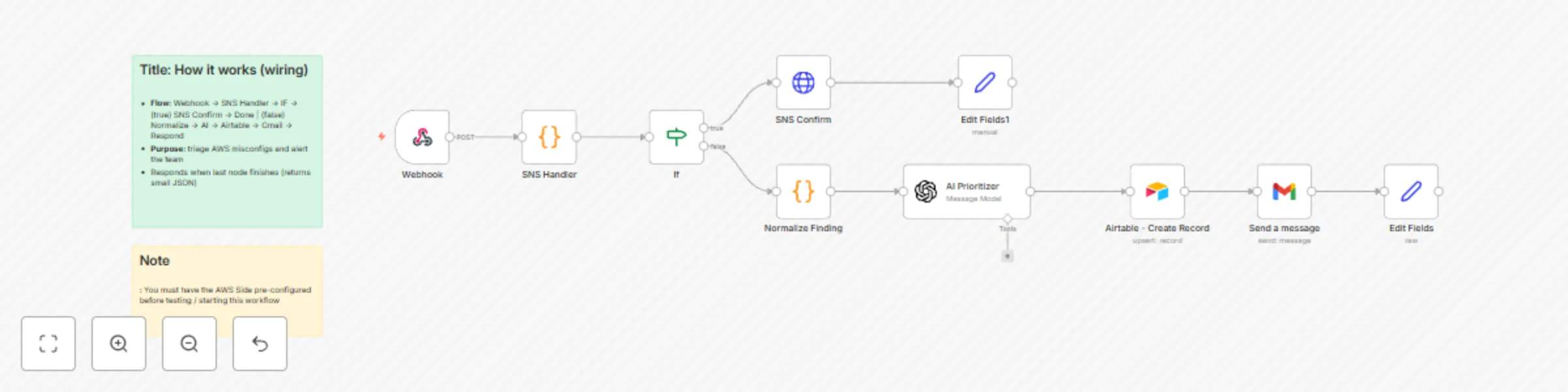
Pipeline: Security Hub or AWS Config -> EventBridge rules -> SNS (HTTP) -> n8n Webhook -> Normalize -> AI Prioritizer -> Airtable (log) -> Gmail (email)
Normalizes incoming findings (S3 / Security Groups / IAM / RDS) into a consistent JSON.
Uses an LLM to assign a priority (P0–P3) with rationale and remediation steps.
Upserts the finding into Airtable (avoids duplicates).
Emails a compact incident summary to your inbox. This can be swapped for Microsoft Teams or Slack, etc.
Category: Security / Cloud / Alerting
Time to set up: ~10–15 minutes
Difficulty: Beginner–Intermediate
Cost: Mostly free (n8n CE + AWS SNS/EventBridge; OpenAI + Airtable/Gmail as used)
An n8n instance reachable over HTTP.
AWS account (one region) with permissions to create SNS topics and EventBridge rules.
Security Hub enabled (or AWS Config rules that emit compliance events).
n8n credentials: OpenAI, Airtable, Gmail.
Webhook (POST /aws-misconfig)
Code: SNS Handler (token check, confirm/unwrap)
IF: route mode === "confirm" vs notification
HTTP Request: SNS SubscriptionConfirmation (GET)
Code: Normalize Finding
Message a model: AI Prioritizer (JSON out)
Airtable: Create/Upsert
Gmail: Send message
Edit Fields: final JSON response
Import and activate the workflow in n8n.
Webhook Respond: When Last Node Finishes -> First Entry JSON.
Append a shared secret to the URL, e.g. ?token=MY_SUPER_TOKEN, and keep the check in the SNS Handler code node.
Create an SNS topic (e.g., misconfig-events) in the same region as your EventBridge rules.
Create EventBridge rules targeting the SNS topic:
Rule A (Security Hub): source = aws.securityhub, detail-type = Security Hub Findings - Imported
Rule B (AWS Config): source = aws.config, detail-type = Config Rules Compliance Change
Create an SNS subscription with Protocol = HTTP and Endpoint = your production webhook URL:http://YOUR_HOST:5678/webhook/aws-misconfig?token=MY_SUPER_TOKEN
(The workflow auto-confirms the subscription on first POST.)
Configure Airtable (Upsert on Finding ID) and Gmail recipients.
This catalog entry is organized from the workflow JSON. The node-level section below shows the executable blocks available for review before importing the template.
| Workflow | Triage AWS security misconfigurations with GPT-4.1 Mini and send alerts to Gmail |
|---|---|
| Complexity | intermediate |
| Nodes | 12 |
| Categories | SecOps, Multimodal AI |
| Author | Calistus Christian |
| Published | 09 Aug 2025 |
Use the JSON export at /data/workflows/7202/7202.json as the source template for this automation.
Open n8n, import the downloaded JSON, and review each node before activating the workflow.
Replace placeholder credentials, API keys, webhook URLs, account IDs, and environment-specific values with your own settings.
Run the workflow manually or in a staging workspace, inspect node output, and confirm downstream systems receive the expected data.
Enable the workflow only after testing, then monitor executions, errors, and rate limits during the first production runs.
Review imported nodes carefully before activation. This catalog entry is intended to help you inspect the workflow structure, understand required services, and find related templates faster.
Node names, credentials, schedules, webhook paths, and external service limits may need adjustment for your workspace.
What this workflow does Automatically triages risky AWS misconfigurations and alerts your team. Pipeline: Security Hub or AWS Config EventBridge rules SNS (HTTP) n8n Webhook Nor...
Review the workflow JSON, configure any required credentials in n8n, and test the automation in a safe workspace before using it in production.
Yes. Use the block-by-block analysis and the downloadable JSON to inspect each node, then adjust credentials, prompts, schedules, filters, or destinations for your SecOps, Multimodal AI use case.