Block 1 - Google Gemini Chat Model (Agent)
- Type / Role
- @n8n/n8n-nodes-langchain.lmChatGoogleGemini - lmChatGoogleGemini
- Config choices
- Version 1


 Early Deal
This workflow is provided as-is. Please review and test before using in production.
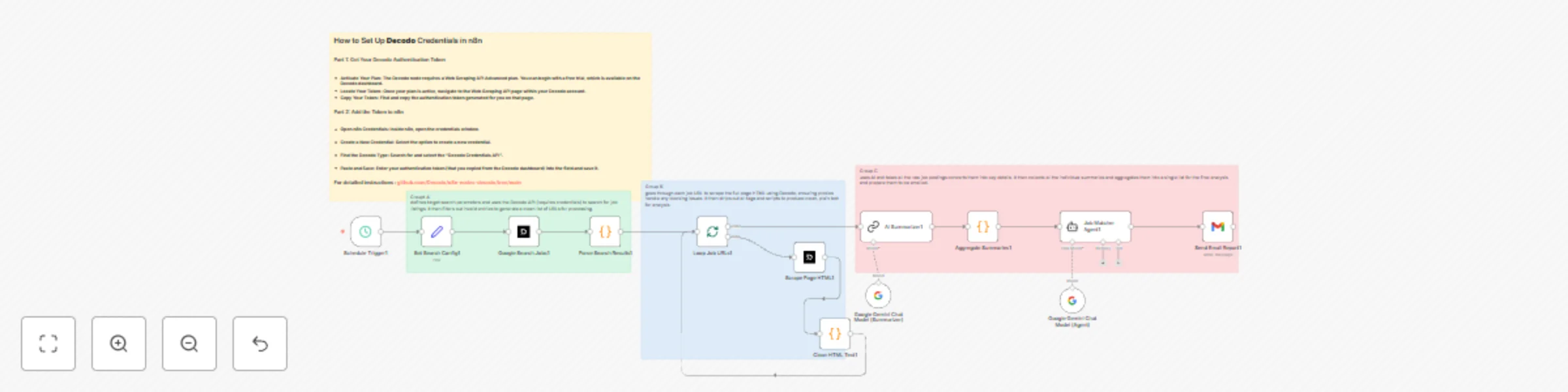
Header 1Smart Weekly Job Discovery Powered by Decodo This workflow automates the entire search process: every week, it uses Decodo’s reliable scraping engine to scan the web for fresh opportunities...
@n8n/n8n-nodes-langchain.lmchatgooglegemini, n8n-nodes-base.scheduletrigger, n8n-nodes-base.set, @decodo/n8n-nodes-decodo.decodo, n8n-nodes-base.code, n8n-nodes-base.splitinbatches, @n8n/n8n-nodes-langchain.chainsummarization, @n8n/n8n-nodes-langchain.agent
This workflow is cataloged by N8N Workflows and links back to its original n8n.io source page by Abdullah Alshiekh.
Original n8n.io sourceThis workflow automates the entire search process: every week, it uses Decodo’s reliable scraping engine to scan the web for fresh opportunities in your region and industry — no manual searching, no endless scrolling.
Decodo handles the heavy lifting behind the scenes: it gathers search results, opens each job link, and extracts clean, readable text from pages that are normally full of scripts and formatting noise. The workflow always receives structured, usable information ready for AI analysis.
Once the jobs are collected, the system analyzes the candidate’s CV and compares it to each posting. It evaluates:
Then it generates a Match Percentage for each role, filtering out weak options and keeping only meaningful opportunities.
Every week, the workflow sends a polished report straight to your inbox:
It reads like a personalized career briefing — generated automatically.
Add your Decodo API credentials to n8n. The Google Search + Scraper nodes rely on Decodo’s Web Scraping API. Make sure your plan supports scraping LinkedIn/Indeed pages.
Add your Google Gemini API key. The workflow uses two Gemini models: one for summarizing, one for job-matching. You can switch to OpenAI or Claude if you prefer.
Add your CV text into the workflow (or connect Google Drive/Sheets for auto-loading). The Job Matcher Agent will use this text to compute match percentages.
Add your Gmail credentials and choose where the final report should be sent.
With Decodo’s scraping pipeline at the core, the whole process stays consistent, fast, and dependable.
If you need any help Get in Touch
This catalog entry is organized from the workflow JSON. The node-level section below shows the executable blocks available for review before importing the template.
| Workflow | Weekly job discovery and CV matching with Gemini 1.5 Pro and Decodo Scraper |
|---|---|
| Complexity | advanced |
| Nodes | 17 |
| Categories | HR, AI Summarization |
| Author | Abdullah Alshiekh |
| Published | 22 Nov 2025 |
Use the JSON export at /data/workflows/11125/11125.json as the source template for this automation.
Open n8n, import the downloaded JSON, and review each node before activating the workflow.
Replace placeholder credentials, API keys, webhook URLs, account IDs, and environment-specific values with your own settings.
Run the workflow manually or in a staging workspace, inspect node output, and confirm downstream systems receive the expected data.
Enable the workflow only after testing, then monitor executions, errors, and rate limits during the first production runs.
Review imported nodes carefully before activation. This catalog entry is intended to help you inspect the workflow structure, understand required services, and find related templates faster.
Node names, credentials, schedules, webhook paths, and external service limits may need adjustment for your workspace.
Header 1Smart Weekly Job Discovery Powered by Decodo This workflow automates the entire search process: every week, it uses Decodo’s reliable scraping engine to scan the web for fresh opportunities...
Review the workflow JSON, configure any required credentials in n8n, and test the automation in a safe workspace before using it in production.
Yes. Use the block-by-block analysis and the downloadable JSON to inspect each node, then adjust credentials, prompts, schedules, filters, or destinations for your HR, AI Summarization use case.