Verify emails & enrich new form leads and save them to HubSpot
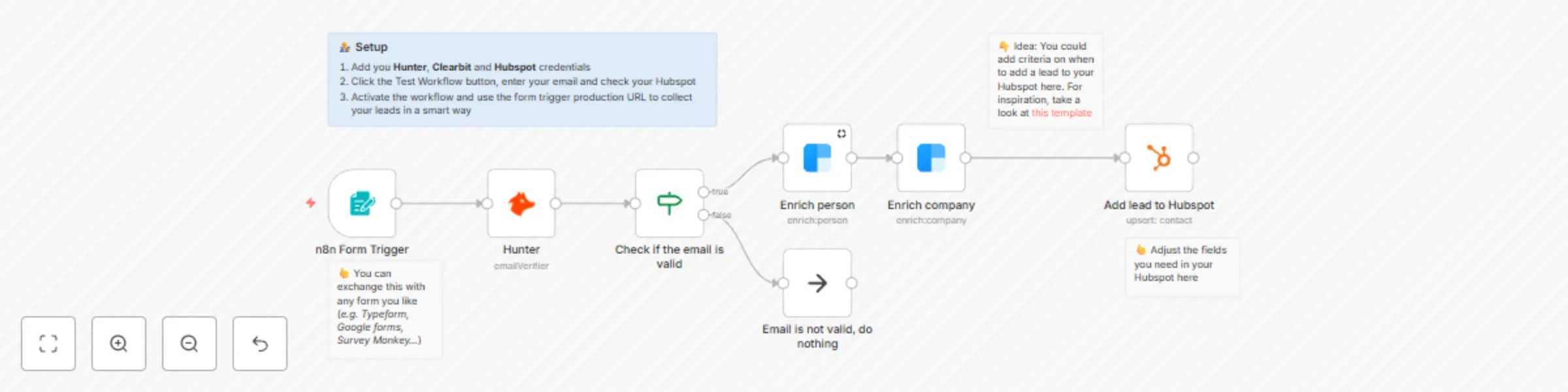
Workflow preview

$20/month : Unlimited workflows
2500 executions/month

THE #1 IN WEB SCRAPING
Scrape any website without limits
HOSTINGER  Early Deal
DISCOUNT 20% Try free
Early DealDISCOUNT 20%
Self-hosted n8n
Unlimited workflows - from $4.99/mo

#1 hub for scraping, AI & automation
6000+ actors - $5 credits/mo
Important notice
This workflow is provided as-is. Please review and test before using in production.
Overview
Use case
When collecting leads via a form you're typically facing a few problems:
- Often end up with a bunch of leads who don't have a valid email address
- You want to know as much about the new lead as possible but also want to keep the form short
- After forms are submitted you have to walk over the submissions and see which you want to add to your CRM
This workflow helps you to fix all those problems.
What this workflow does
The workflow checks every new form submission and verifies the email using Hunter.io. If the email is valid, it then tries to enrich the person using Clearbit and saves the new lead into your Hubspot CRM.
Setup
- Add you Hunter, Clearbit and Hubspot credentials
- Click the Test Workflow button, enter your email and check your Hubspot
- Activate the workflow and use the form trigger production URL to collect your leads in a smart way
How to adjust it to your needs
- Change the form to the form you need in your use case (e.g. Typeform, Google Forms, SurveyMonkey etc.)
- Add criteria before an account is added to your CRM. This could for example be the size of company, industry etc. You can find some inspiration in our other template Reach out via Email to new form submissions that meet a certain criteria
- Add more data sources to save the new lead in