Trigger outbound Vapi AI voice calls from new Jotform submissions
Workflow preview

$20/month : Unlimited workflows
2500 executions/month

THE #1 IN WEB SCRAPING
Scrape any website without limits
HOSTINGER  Early Deal
DISCOUNT 20% Try free
Early DealDISCOUNT 20%
Self-hosted n8n
Unlimited workflows - from $4.99/mo

#1 hub for scraping, AI & automation
6000+ actors - $5 credits/mo
Important notice
This workflow is provided as-is. Please review and test before using in production.
Overview
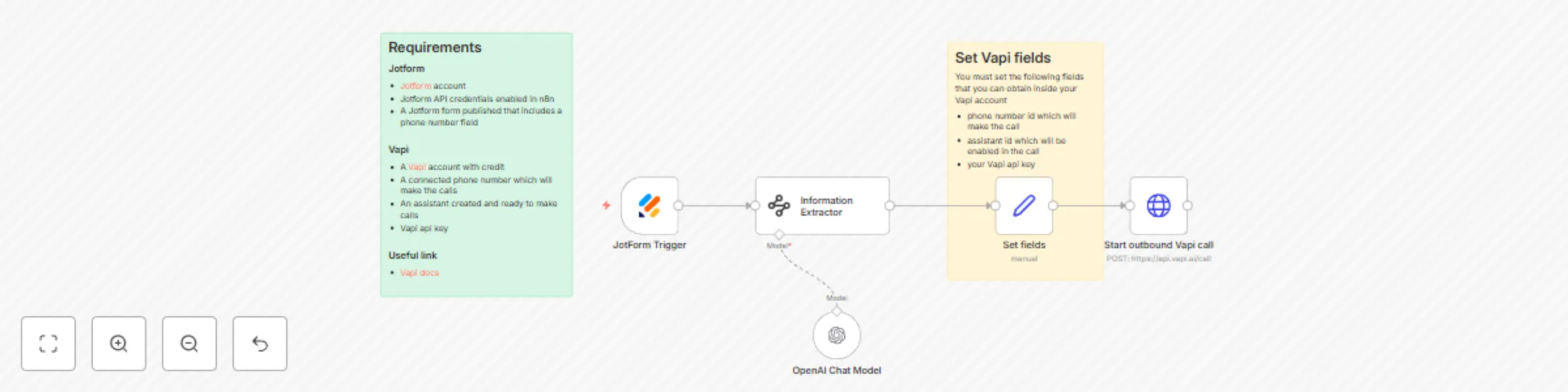
This workflow connects JotForm submissions to Vapi AI, triggering a personalized outbound call via an AI voice assistant immediately after a user submits your form.
Requirements
JotForm
- A JotForm account
- JotForm API credentials enabled in n8n
- A published JotForm form with a phone number field
Vapi
- A Vapi account with credit
- A connected phone number for making calls
- An assistant created and ready for outbound calls
- Your Vapi API key
Workflow Steps
1. JotForm Trigger
- Starts the workflow when a new form submission is received.
2. Information Extractor
- Formats the phone number with a
+, country code, and full number (e.g.,+391234567890) for compatibility with Vapi.
4. Set Fields for Vapi
- Configure these fields:
phone_number_id: ID of the Vapi number used for the callassistant_id: ID of the Vapi assistantapi_key: Your Vapi API key
5. Start Outbound Vapi Call
- Sends a POST request to
https://api.vapi.ai/callwith:- The formatted phone number
- All required Vapi fields
- Any additional info mapped from the form, for personalization
Customization
- Add more form fields: Include extra data (such as name, appointment time) and add to the Vapi payload.
- Conditional logic: Use n8n filter nodes to control if/when calls are made.
- Dynamic assistant selection: Route submissions to different assistants or numbers based on user responses.
Notes
- Ensure phone numbers are formatted correctly in the extractor node to prevent call errors.
- Any field from your form can be passed in the API payload and used in the assistant's script.
Need Help?
For additional resources or help, visit 1 Node.