Sync upcoming anime releases from Jikan API to Google Calendar with rate limiting
Workflow preview

$20/month : Unlimited workflows
2500 executions/month

THE #1 IN WEB SCRAPING
Scrape any website without limits
HOSTINGER  Early Deal
DISCOUNT 20% Try free
Early DealDISCOUNT 20%
Self-hosted n8n
Unlimited workflows - from $4.99/mo

#1 hub for scraping, AI & automation
6000+ actors - $5 credits/mo
Important notice
This workflow is provided as-is. Please review and test before using in production.
Overview
Who is this for
- Anime Enthusiasts: Users who want to automate their watchlists based on specific voice actors or creators.
- n8n Learners: Anyone looking for a best-practice example of handling API rate limiting, loops, and data filtering.
- Calendar Power Users: People who want to populate their personal schedule with external data sources automatically.
What it does
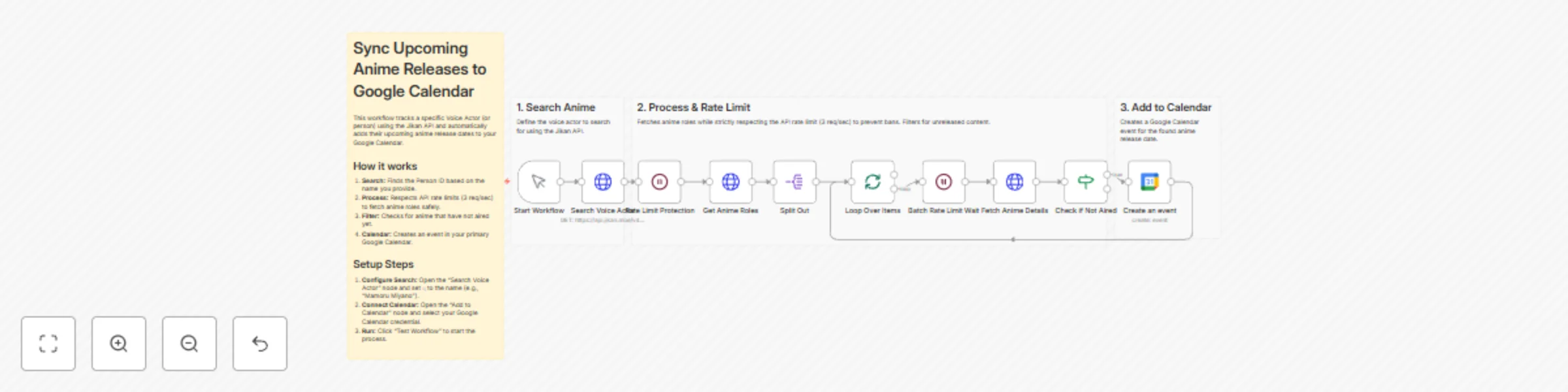
- Search: Queries the Jikan API for a specific person (e.g., Voice Actor "Mamoru Miyano").
- Wait: Pauses execution to respect the API rate limit.
- Retrieve: Fetches the list of anime roles associated with that person.
- Loop & Filter: Iterates through the list one by one, fetches detailed status, and filters for shows marked as "Not yet aired."
- Schedule: Creates an event in your Google Calendar using the anime's title and release date.
Setup Steps
- Configure Search: Open the 'Search Voice Actor' node. In "Query Parameters," change the value of
qto the name of the voice actor or person you want to track. - Connect Calendar: Open the 'Create an event' node. Select your Google Calendar credentials and choose the Calendar ID where events should be created.
- Test: Run the workflow manually to populate your calendar.
Requirements
- An active n8n instance.
- A Google account (for Google Calendar).
- No API Key is required for Jikan API (Public), but rate limiting logic must be preserved.
How to customize
- Change the Filter: Modify the 'Check if Not Aired' node to track "Currently Airing" shows instead of upcoming ones.
- Enrich Event Details: Update the 'Create an event' node to include the MyAnimeList URL or synopsis in the calendar event description.
- Search Different Entities: Adjust the API endpoint to search for Manga authors or specific Studios instead of voice actors.
Expected Result
Upon successful execution, this workflow will:
- Search for the specified voice actor.
- Retrieve their upcoming anime roles.
- Create events in your Google Calendar for anime that hasn't aired yet.
Example Calendar Entry:
- Title: Anime Name - Release Date
- Description: Details regarding the release...