M

Miki Arai

4
Workflows

Workflows by Miki Arai

Workflow preview: AI-powered content factory: RSS to blog, Instagram & TikTok with Slack approval
Free advanced

AI-powered content factory: RSS to blog, Instagram & TikTok with Slack approval

This workflow automates the daily content creation process by monitoring trends, generating drafts for multiple platforms using AI, and requiring human approval before saving. It acts as an autonomous "AI Content Factory" that turns raw news into polished content for SEO Blogs, Instagram, and TikTok/Reels. ## How it works 1. **Trend Monitoring:** Fetches the latest trend data via RSS (e.g., Google News or Google Trends). 2. **AI Filtering:** An AI Agent acts as an "Editor-in-Chief," selecting only the most viral-worthy topics relevant to your niche. 3. **Multi-Format Generation:** Three specialized AI Agents (using `gpt-4o-mini` for cost efficiency) run in parallel to generate: - An SEO-optimized Blog post structure. - An Instagram Carousel plan (5 slides). - A Short Video Script (TikTok/Reels). 4. **Human-in-the-Loop:** Sends a formatted message with interactive buttons to Slack. The workflow waits for your decision. 5. **Final Storage:** If approved, the content is automatically appended to Google Sheets. ## Who is this for - Social Media Managers & Content Creators - Marketing Agencies managing multiple accounts - Anyone wanting to automate "research to draft" without losing quality control. ## Requirements - **n8n:** Version 1.19.0+ (requires AI Agent nodes). - **OpenAI:** API Key (works great with low-cost `gpt-4o-mini`). - **Slack:** A workspace to receive notifications. - **Google Sheets:** To store the approved content. ## How to set up 1. **Configure Credentials:** Set up your OpenAI, Slack, and Google Sheets credentials. 2. **Slack App:** Create a Slack App, enable "Interactivity," and set the Request URL to your n8n Production Webhook URL. Add the `chat:write` scope and install it to your workspace. 3. **Google Sheet:** Create a sheet with columns for `Blog`, `Instagram`, and `Script` (row 1 as headers). 4. **RSS Feed:** Change the RSS node URL to your preferred topic source.

M
Miki Arai
Content Creation
27 Nov 2025
6915
0
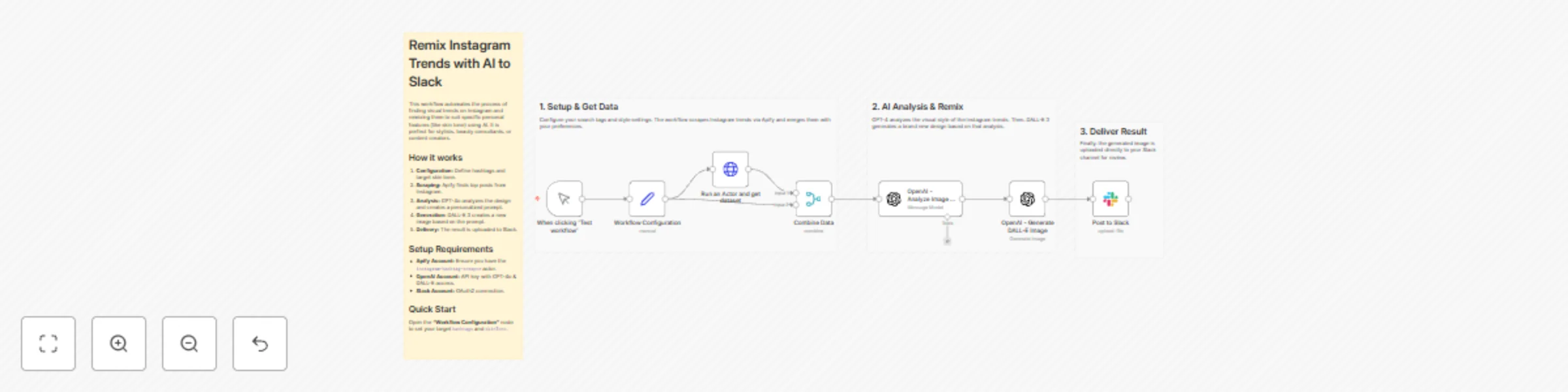
Workflow preview: Personalize Instagram trends for custom skin tones with GPT-4o, DALL-E & Slack
Free intermediate

Personalize Instagram trends for custom skin tones with GPT-4o, DALL-E & Slack

Who is it for Beauty & Fashion Consultants: To visualize trends for specific client profiles. Content Creators: To generate personalized variations of trending aesthetics. Trend Watchers: To automate the collection and adaptation of social media designs. How it works Configuration: You define the target hashtags (e.g., #trendnails) and the target skin tone (e.g., "Yellow Base Spring") in the set node. Scraping: The workflow uses Apify to scrape the latest top posts from Instagram based on your hashtags. Analysis & Prompting: GPT-4o (Vision) analyzes the original image to understand the pattern and atmosphere, then generates a new prompt optimized for the specified skin tone. Generation: DALL-E 3 creates a new image based on the generated prompt. Delivery: The final personalized image is uploaded directly to a Slack channel. How to set up Apify: Create an account and get your API Token. Ensure you have access to the instagram-hashtag-scraper actor. OpenAI: You need an API Key with access to GPT-4o and DALL-E 3. Slack: Connect your Slack account with OAuth2 in n8n. Workflow Configuration: Open the "Workflow Configuration" node and fill in your apifyApiToken, desired hashtags, and skinTone. Requirements Apify account OpenAI API key (GPT-4o & DALL-E model access) Slack account

M
Miki Arai
Content Creation
27 Nov 2025
54
0
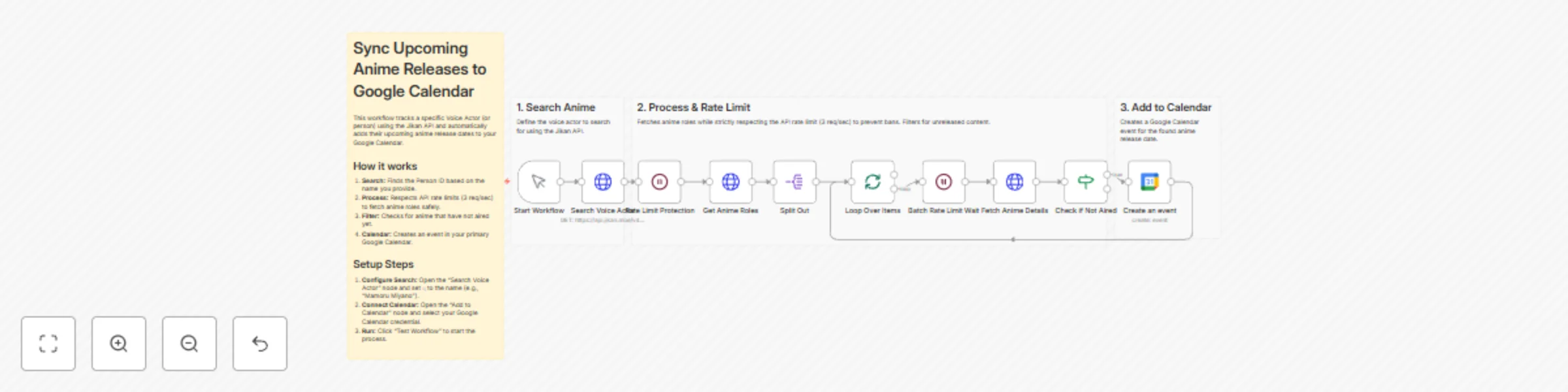
Workflow preview: Sync upcoming anime releases from Jikan API to Google Calendar with rate limiting
Free intermediate

Sync upcoming anime releases from Jikan API to Google Calendar with rate limiting

## Who is this for - **Anime Enthusiasts:** Users who want to automate their watchlists based on specific voice actors or creators. - **n8n Learners:** Anyone looking for a best-practice example of handling API rate limiting, loops, and data filtering. - **Calendar Power Users:** People who want to populate their personal schedule with external data sources automatically. ## What it does - **Search:** Queries the Jikan API for a specific person (e.g., Voice Actor "Mamoru Miyano"). - **Wait:** Pauses execution to respect the API rate limit. - **Retrieve:** Fetches the list of anime roles associated with that person. - **Loop & Filter:** Iterates through the list one by one, fetches detailed status, and filters for shows marked as "Not yet aired." - **Schedule:** Creates an event in your Google Calendar using the anime's title and release date. ## Setup Steps 1. **Configure Search:** Open the 'Search Voice Actor' node. In "Query Parameters," change the value of `q` to the name of the voice actor or person you want to track. 2. **Connect Calendar:** Open the 'Create an event' node. Select your Google Calendar credentials and choose the Calendar ID where events should be created. 3. **Test:** Run the workflow manually to populate your calendar. ## Requirements - An active n8n instance. - A Google account (for Google Calendar). - No API Key is required for Jikan API (Public), but rate limiting logic must be preserved. ## How to customize - **Change the Filter:** Modify the 'Check if Not Aired' node to track "Currently Airing" shows instead of upcoming ones. - **Enrich Event Details:** Update the 'Create an event' node to include the MyAnimeList URL or synopsis in the calendar event description. - **Search Different Entities:** Adjust the API endpoint to search for Manga authors or specific Studios instead of voice actors. ## Expected Result Upon successful execution, this workflow will: - Search for the specified voice actor. - Retrieve their upcoming anime roles. - Create events in your Google Calendar for anime that hasn't aired yet. **Example Calendar Entry:** - **Title:** Anime Name - Release Date - **Description:** Details regarding the release...

M
Miki Arai
Personal Productivity
22 Nov 2025
44
0

Workflow preview: Automate menstrual cycle tracking with GPT-4, Google Sheets and Telegram notifications
Free advanced

Automate menstrual cycle tracking with GPT-4, Google Sheets and Telegram notifications

## Who's it for Women and healthcare providers who want to automate menstrual cycle tracking with personalized AI-powered health insights delivered through multiple channels. ## What it does This workflow automates the complete cycle tracking process: - Retrieves period and symptom data from Google Sheets every morning - Analyzes patterns using OpenAI GPT to generate personalized health insights - Sends daily notifications via Telegram on weekdays - Creates Google Calendar reminders for upcoming cycle events - Generates comprehensive weekly reports sent via email on weekends ## How it works 1. **Daily Trigger**: Activates every morning at 8 AM 2. **Data Collection**: Fetches period tracking and symptom logs from Google Sheets 3. **AI Analysis**: GPT-4 analyzes your cycle data to provide personalized insights and predictions 4. **Smart Distribution**: Weekday updates go to Telegram for quick access, weekend summaries are emailed 5. **Calendar Integration**: Automatically creates events for predicted cycle phases ## Requirements - Google account (for Sheets and Calendar) - Telegram account and bot token - OpenAI API key - Gmail account for email reports ## Setup steps 1. Configure the "Configuration Settings" node with your personal IDs 2. Connect your Google Sheets with period and symptom data 3. Set up Telegram bot and add your chat ID 4. Add OpenAI credentials for AI analysis 5. Connect Gmail for weekly reports 6. Activate the workflow ## How to customize - Adjust trigger time to your preferred schedule - Modify AI prompts for different health focuses - Add more notification channels (Slack, Discord, etc.) - Customize report formatting and frequency - Add additional data sources for more comprehensive tracking

M
Miki Arai
Personal Productivity
20 Nov 2025
61
0