Sort Gmail emails with GPT-4o into action required and no action labels
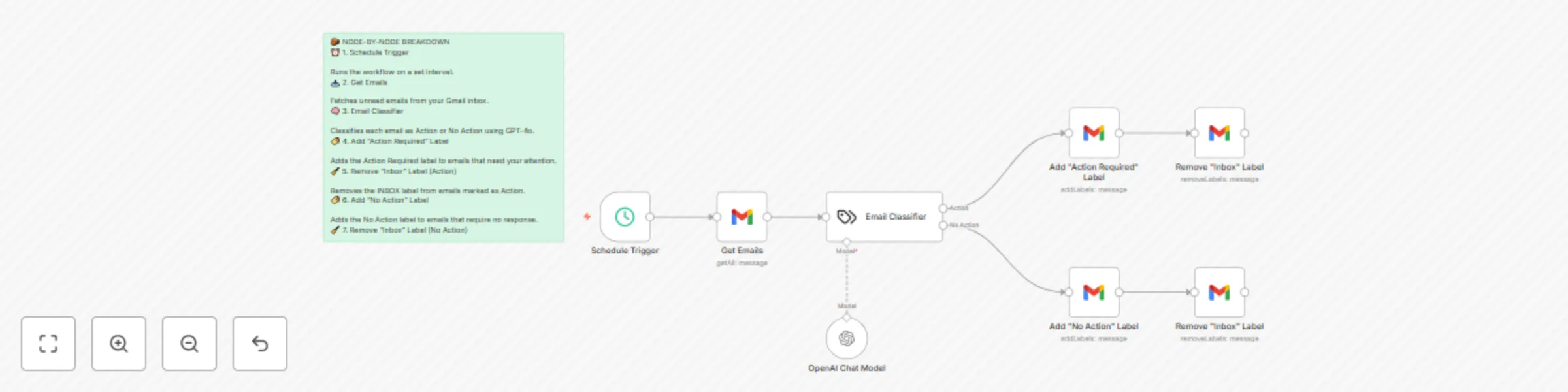
Workflow preview

$20/month : Unlimited workflows
2500 executions/month

THE #1 IN WEB SCRAPING
Scrape any website without limits
HOSTINGER  Early Deal
DISCOUNT 20% Try free
Early DealDISCOUNT 20%
Self-hosted n8n
Unlimited workflows - from $4.99/mo

#1 hub for scraping, AI & automation
6000+ actors - $5 credits/mo
Important notice
This workflow is provided as-is. Please review and test before using in production.
Overview
🧾 Description:
This automation uses GPT-4o to scan unread Gmail emails and intelligently classify them as:
Action → Requires your attention (reply, review, schedule, or respond)

No Action → Informational or promotional; no action needed
The result? You eliminate inbox noise and gain a clear daily routine: only check what's in Action Required. ⚙️ How It Works:
Trigger: Runs on a customizable schedule

Fetch Emails: Pulls unread messages from Gmail

Classify via GPT-4o: Determines if each email needs action or not

Sort Emails:

    Labels actionable emails as Action Required

    Labels non-actionable ones as No Action

    Removes the Inbox label to clean your primary inbox view

    ✅ Emails stay in your account—just better organized
🚀 How to Use:
Import the workflow into your n8n instance

Set up Gmail and OpenAI credentials

Create Gmail labels:

    Action Required

    No Action

Activate the workflow

Start your day by checking only the Action Required label
📦 Requirements:
n8n (self-hosted or cloud)

Gmail OAuth2 account

OpenAI API key (GPT-4o or GPT-4o-mini)

Gmail labels: Action Required, No Action
💡 Why It Matters:
Stop manually filtering emails. This workflow helps you focus only on what matters while keeping everything else out of your way—without deleting or archiving anything.