Block 1 - Gmail Trigger
- Type / Role
- n8n-nodes-base.gmailTrigger - gmailTrigger
- Config choices
- Version 1.2


 Early Deal
This workflow is provided as-is. Please review and test before using in production.
Smart Email Auto Responder with AI Classification Automatically Categorize and Reply to Emails using LangChain + Google Gemini + Gmail + SMTP + Brevo This n8n workflow is designed to intelligently ...
n8n-nodes-base.gmailtrigger, @n8n/n8n-nodes-langchain.textclassifier, @n8n/n8n-nodes-langchain.lmchatgooglegemini, n8n-nodes-base.emailsend, n8n-nodes-base.gmail, n8n-nodes-base.sendinblue, n8n-nodes-base.if, n8n-nodes-base.stickynote
This workflow is cataloged by N8N Workflows and links back to its original n8n.io source page by Amjid Ali.
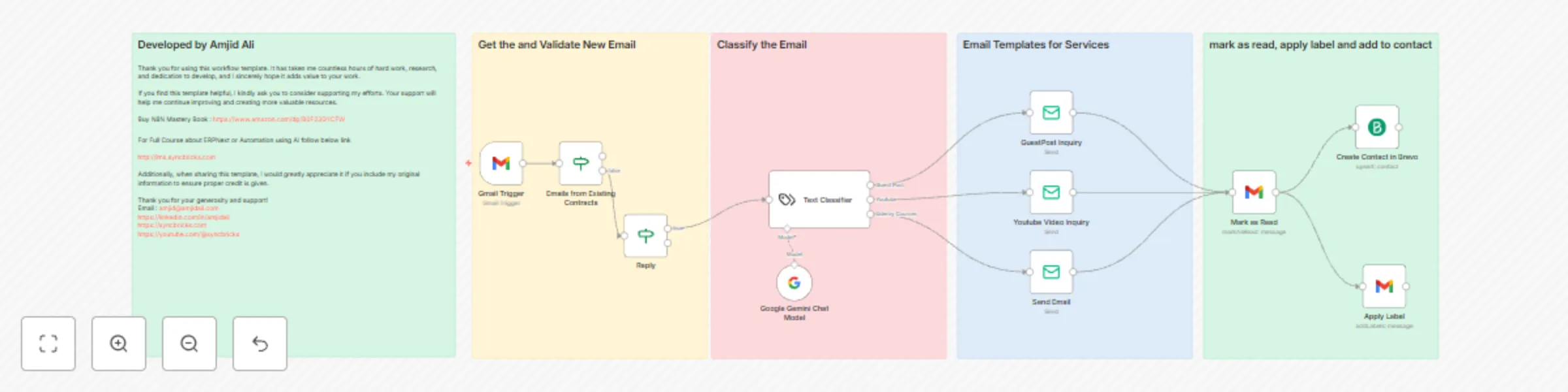
Original n8n.io sourceThis n8n workflow is designed to intelligently manage incoming emails and automatically send personalized responses based on the content. It classifies emails using LangChain's Text Classifier, sends HTML responses depending on the category, and updates Gmail and Brevo CRM accordingly.
Triggers and Classifies Emails
Responds Automatically
Enhances Workflow with Automation
Optional AI Chat Integration
Polls Gmail every hour for new emails.
Filters out internal addresses (e.g., @syncbricks.com).
Avoids replying to already-responded emails (Re: subject filter).
Uses AI to categorize the content of the email based on pre-defined categories:
Provides additional AI support to enhance classification accuracy.
Can be used to summarize or enrich the context if needed.
Each response category has a separate SMTP node with a custom HTML email:
Marks the email so it isn’t processed again.
Adds a label (e.g., Handled by Bot) for organization.
Saves the sender to your CRM for future communication or marketing.
Includes pricing, website list, submission guidelines, and payment instructions.
Includes package pricing, review samples, video thumbnails, and inquiry instructions.
More courses:
http://lms.syncbricks.com
YouTube Channel:
https://youtube.com/@syncbricks
from.value[0].name match your use case.Developed by Amjid Ali
This template took extensive time and effort to build. If you find it useful, please consider supporting my work.
Buy My Book:
Mastering n8n on Amazon
Full Courses & Tutorials:
http://lms.syncbricks.com
Follow Me Online:
LinkedIn: https://linkedin.com/in/amjidali
Website: https://amjidali.com
YouTube: https://youtube.com/@syncbricks
This catalog entry is organized from the workflow JSON. The node-level section below shows the executable blocks available for review before importing the template.
| Workflow | Smart email auto-responder template using AI |
|---|---|
| Complexity | advanced |
| Nodes | 16 |
| Categories | Lead Nurturing, AI Summarization |
| Author | Amjid Ali |
| Published | 21 Mar 2025 |
Use the JSON export at /data/workflows/3277/3277.json as the source template for this automation.
Open n8n, import the downloaded JSON, and review each node before activating the workflow.
Replace placeholder credentials, API keys, webhook URLs, account IDs, and environment-specific values with your own settings.
Run the workflow manually or in a staging workspace, inspect node output, and confirm downstream systems receive the expected data.
Enable the workflow only after testing, then monitor executions, errors, and rate limits during the first production runs.
Review imported nodes carefully before activation. This catalog entry is intended to help you inspect the workflow structure, understand required services, and find related templates faster.
Node names, credentials, schedules, webhook paths, and external service limits may need adjustment for your workspace.
Smart Email Auto Responder with AI Classification Automatically Categorize and Reply to Emails using LangChain + Google Gemini + Gmail + SMTP + Brevo This n8n workflow is designed to intelligently ...
Review the workflow JSON, configure any required credentials in n8n, and test the automation in a safe workspace before using it in production.
Yes. Use the block-by-block analysis and the downloadable JSON to inspect each node, then adjust credentials, prompts, schedules, filters, or destinations for your Lead Nurturing, AI Summarization use case.