Block 1 - Trigger Weekly
- Type / Role
- n8n-nodes-base.cron - cron
- Config choices
- Version 1


 Early Deal
This workflow is provided as-is. Please review and test before using in production.
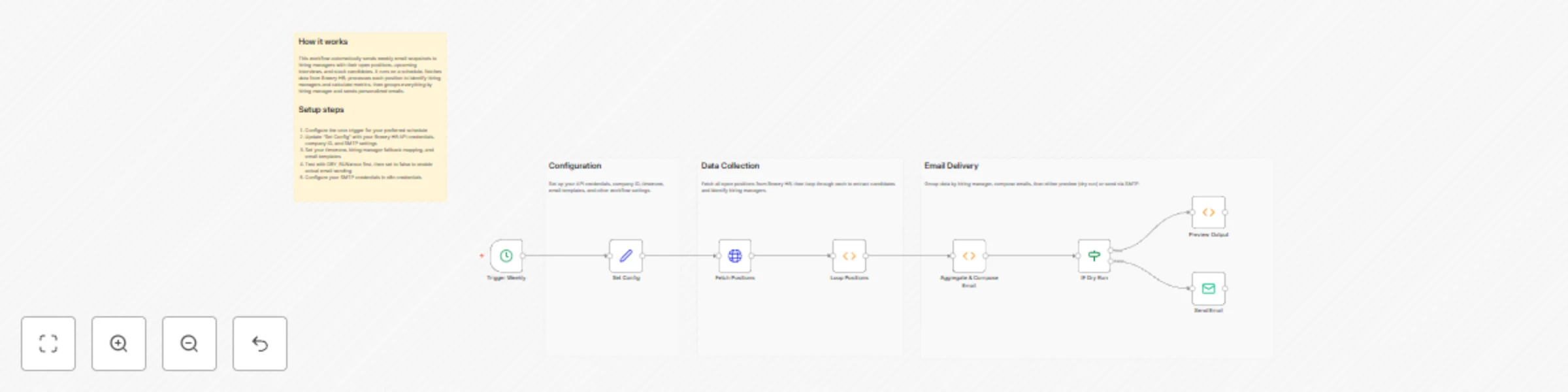
Weekly hiring‑manager snapshot from Breezy HR to email (pipeline, next‑week interviews, stuck) This workflow sends each hiring manager a single weekly email with an overview of their open roles: pi...
n8n-nodes-base.cron, n8n-nodes-base.set, n8n-nodes-base.httprequest, n8n-nodes-base.function, n8n-nodes-base.if, n8n-nodes-base.emailsend, n8n-nodes-base.stickynote
This workflow is cataloged by N8N Workflows and links back to its original n8n.io source page by WeblineIndia.
Original n8n.io sourceThis workflow sends each hiring manager a single weekly email with an overview of their open roles: pipeline totals, a per‑position summary, interviews scheduled next week and stuck candidates (no movement ≥ 7 days). It queries Breezy HR using your API token, detects the HM via each position’s team (falling back to a simple map when unavailable), aggregates results and emails one digest per HM. The job runs Mondays at 07:30 Asia/Kolkata, includes a DRY_RUN preview and rate‑limits sends.
STUCK_AFTER_DAYS. Authorization: Bearer <YOUR_TOKEN> in a credential (don’t hardcode in the node). BREEZY_API_BASE = https://api.breezy.hr/v3 COMPANY_ID = your Breezy company ID TIMEZONE = Asia/Kolkata INCLUDE_ONLY_OPEN = true (use STATE_FILTER = open) USE_BREEZY_HM_DETECTION = true HM_FALLBACK_MAP_JSON = e.g., { "Default": "[email protected]", "Java TL": "[email protected]" } STUCK_AFTER_DAYS = 7 INTERVIEW_EVENT_KEYWORDS_CSV = interview SMTP_FROM = sender address SUBJECT_TEMPLATE = Weekly HM snapshot {{range}} — {{positions_count}} roles, {{candidates_count}} candidates INTRO_TEMPLATE / OUTRO_TEMPLATE DRY_RUN = false (set true to preview) RATE_LIMIT_EMAIL_SECONDS = 5INCLUDE_ONLY_OPEN=false to include other position states. INTERVIEW_EVENT_KEYWORDS_CSV to match your account’s event labels. STUCK_AFTER_DAYS (e.g., 10 or 14). SUBJECT_TEMPLATE, INTRO_TEMPLATE, OUTRO_TEMPLATE. HM_FALLBACK_MAP_JSON for positions lacking team data.| Issue | Possible Cause | Solution |
|---|---|---|
| No emails sent | DRY_RUN=true |
Set DRY_RUN=false to send. |
| Missing HM recipients | Team endpoint returned no “hiring manager” and fallback map not configured | Add position→email in HM_FALLBACK_MAP_JSON (or set a better default). |
| Interviews list is empty | Different event label in your Breezy account | Add your labels to INTERVIEW_EVENT_KEYWORDS_CSV (comma‑separated). |
| Stuck candidates not flagged | Threshold too high or activity timestamps missing | Lower STUCK_AFTER_DAYS or verify candidate activity data. |
| API errors | Bad token or insufficient scopes | Recreate the Breezy credential with a valid Bearer token. |
| Emails fail to send | SMTP auth/quota issues | Check SMTP credentials/from‑address permissions and provider limits. |
If you’d like help tuning the interview filters, changing the grouping logic, or adding Slack/CSV writebacks, feel free to reach out our n8n experts at WeblineIndia. We'll be happy to help you tailor this to your stack.
This catalog entry is organized from the workflow JSON. The node-level section below shows the executable blocks available for review before importing the template.
| Workflow | Send weekly hiring manager reports with BreezyHR data to email |
|---|---|
| Complexity | intermediate |
| Nodes | 12 |
| Categories | HR |
| Author | WeblineIndia |
| Published | 29 Oct 2025 |
Use the JSON export at /data/workflows/10271/10271.json as the source template for this automation.
Open n8n, import the downloaded JSON, and review each node before activating the workflow.
Replace placeholder credentials, API keys, webhook URLs, account IDs, and environment-specific values with your own settings.
Run the workflow manually or in a staging workspace, inspect node output, and confirm downstream systems receive the expected data.
Enable the workflow only after testing, then monitor executions, errors, and rate limits during the first production runs.
Review imported nodes carefully before activation. This catalog entry is intended to help you inspect the workflow structure, understand required services, and find related templates faster.
Node names, credentials, schedules, webhook paths, and external service limits may need adjustment for your workspace.
Weekly hiring‑manager snapshot from Breezy HR to email (pipeline, next‑week interviews, stuck) This workflow sends each hiring manager a single weekly email with an overview of their open roles: pi...
Review the workflow JSON, configure any required credentials in n8n, and test the automation in a safe workspace before using it in production.
Yes. Use the block-by-block analysis and the downloadable JSON to inspect each node, then adjust credentials, prompts, schedules, filters, or destinations for your HR use case.