Send interview reminders (10 minutes) from Google Calendar to Slack DMs

Workflow preview

Workflow preview
100%
Send interview reminders (10 minutes) from Google Calendar to Slack DMs preview
Open on n8n.io

Important notice

This workflow is provided as-is. Please review and test before using in production.

1. Workflow Overview

This workflow sends a “Join in 10” Slack ping to each interviewer shortly before their interview starts. It checks the Interviews Google Calendar every minute, finds interviews starting in the next...

Best for

  • HR automation workflows
  • intermediate n8n builders looking for reusable templates

Tools used

n8n-nodes-base.cron, n8n-nodes-base.function, n8n-nodes-base.if, n8n-nodes-base.slack, n8n-nodes-base.set, n8n-nodes-base.googlecalendar

Source and attribution

This workflow is cataloged by N8N Workflows and links back to its original n8n.io source page by WeblineIndia.

Original n8n.io source

1.1 Workflow description

Title
Send interview reminders (10 minutes) from Google Calendar to Slack DMs
Workflow name
Send interview reminders (10 minutes) from Google Calendar to Slack DMs

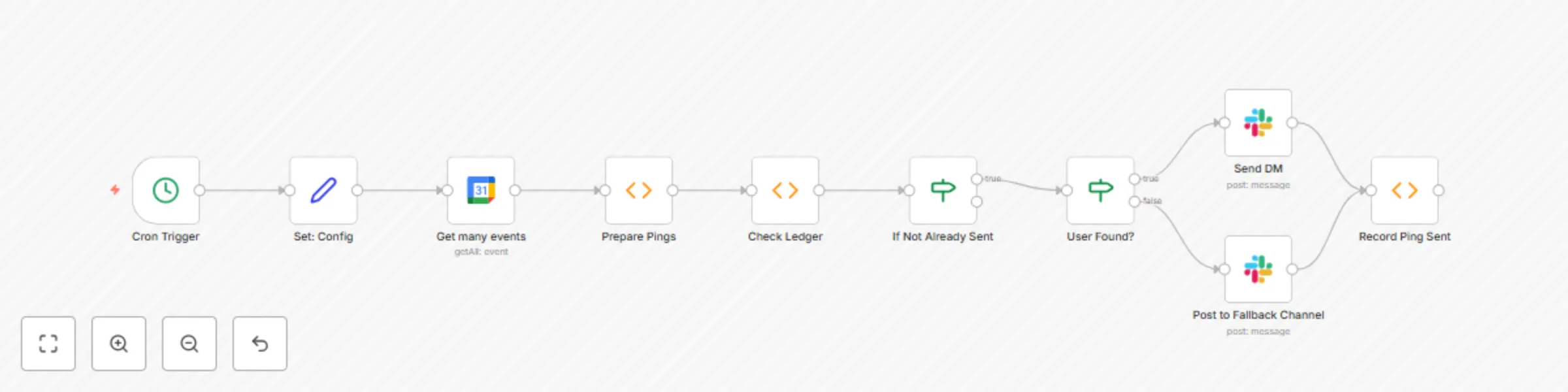
This workflow sends a “Join in 10” Slack ping to each interviewer shortly before their interview starts. It checks the Interviews Google Calendar every minute, finds interviews starting in the next LEAD_MINUTES (default 10), and sends a Slack DM with the candidate name, role, local start time, meeting link, and any CV: / Notes: links present in the event description. If the Slack user can’t be found by email, it posts to a fallback channel (default #recruiting-alerts) with an @‑style email mention. A Data Store prevents duplicate pings for the same event + attendee.

Who’s It For

  • Interviewers who prefer a timely Slack nudge instead of calendar alerts.
  • Recruiting coordinators who want consistent reminders without manual follow‑ups.
  • Teams that include links directly in the calendar event description.

How It Works

  1. Cron (every minute) polls near‑term events so pings arrive about 10 minutes before start.
  2. Google Calendar (Interviews) fetches upcoming events.
  3. Prepare pings filters interviews starting in ≤ LEAD_MINUTES, creates one item per internal attendee (company domain), and extracts meeting/CV/Notes links.
  4. Data Store checks a ledger to avoid re‑notifying the same event+attendee.
  5. Slack looks up the user by email and sends a DM with Block Kit buttons; otherwise posts to the fallback channel.
  6. Data Store records that the ping was sent.

Attendees marked declined are skipped; accepted, tentative, and needsAction are included.

How To Set Up

  1. Ensure interviews are on the Interviews Google Calendar and that interviewers are added as attendees.
  2. In each event’s description, optionally add lines like CV: https://... and Notes: https://....
  3. Import the workflow and add credentials:
    • Google Calendar (OAuth)
    • Slack OAuth2 with users:read.email, chat:write, and im:write
  4. Open Set: Config and confirm:
    • CALENDAR_NAME = Interviews
    • COMPANY_DOMAIN = weblineindia.com
    • TIMEZONE = Asia/Kolkata
    • LEAD_MINUTES = 10
    • FALLBACK_CHANNEL = #recruiting-alerts
  5. Activate the workflow. It will begin checking every minute.

Requirements

  • Google Workspace calendar access for Interviews.
  • Slack workspace + an app with the scopes: users:read.email, chat:write, im:write.
  • n8n (cloud or self‑hosted) with access to both services.

How to Customize the Workflow

  • Lead time: Change LEAD_MINUTES in Set: Config (e.g., 5, 15).
  • Audience: Modify attendee filters to include/exclude tentative or needsAction.
  • Message format: Tweak the Block Kit text/buttons (e.g., hide CV/Notes buttons).
  • Fallback policy: Switch the fallback from channel post to “skip and log” if needed.
  • Time windows: Add logic to silence pings at night or only during business hours.
  • Calendar name: Update CALENDAR_NAME in Set: Config if you use a different calendar.

Add-Ons to level up the Workflow with additional nodes

  • Conflict detector: Warn if an interviewer is double‑booked in the next hour.
  • Escalation: If no DM can be sent (no Slack user), also notify a coordinator channel.
  • Logging: Append each ping to Google Sheets/Airtable for audit.
  • Weekday rules: Auto‑mute on specific days or holidays via a calendar/lookup table.
  • Follow‑up: Send a post‑interview Slack message with the feedback form link.

Common Troubleshooting

  • No pings: Ensure events actually start within the next LEAD_MINUTES and that attendees include internal emails (@weblineindia.com).
  • Wrong recipients: Verify interviewer emails on the event match Slack emails; otherwise it will post to the fallback channel.
  • Duplicate pings: Confirm the Data Store is configured and the workflow isn’t duplicated.
  • Missing meeting link: Add a proper meeting URL to the event description or rely on Google Meet/Zoom links detected in the event.
  • Time mismatch: Make sure TIMEZONE is Asia/Kolkata (or your local TZ) and calendar times are correct.

Need Help ?

If you’d like a hand adjusting filters, message formatting or permissions, feel free to reach out we'll be happy to help you get this running smoothly.

1.2 Logical Blocks

This catalog entry is organized from the workflow JSON. The node-level section below shows the executable blocks available for review before importing the template.

2. Block-by-Block Analysis

Block 1 - Cron Trigger

Type / Role
n8n-nodes-base.cron - cron
Config choices
Version 1

Block 2 - Prepare Pings

Type / Role
n8n-nodes-base.function - function
Config choices
Version 1

Block 3 - Check Ledger

Type / Role
n8n-nodes-base.function - function
Config choices
Version 1

Block 4 - If Not Already Sent

Type / Role
n8n-nodes-base.if - if
Config choices
Version 1

Block 5 - User Found?

Type / Role
n8n-nodes-base.if - if
Config choices
Version 1

Block 6 - Send DM

Type / Role
n8n-nodes-base.slack - slack
Config choices
Version 1

Block 7 - Post to Fallback Channel

Type / Role
n8n-nodes-base.slack - slack
Config choices
Version 1

Block 8 - Record Ping Sent

Type / Role
n8n-nodes-base.function - function
Config choices
Version 1

Block 9 - Set: Config

Type / Role
n8n-nodes-base.set - set
Config choices
Version 1

Block 10 - Get many events

Type / Role
n8n-nodes-base.googleCalendar - googleCalendar
Config choices
Version 1

3. Summary Table

Workflow Send interview reminders (10 minutes) from Google Calendar to Slack DMs
Complexity intermediate
Nodes 10
Categories HR
Author WeblineIndia
Published 30 Jul 2025

4. Reproducing the Workflow from Scratch

  1. 1. Download the workflow JSON

    Use the JSON export at /data/workflows/6683/6683.json as the source template for this automation.

  2. 2. Import the template into n8n

    Open n8n, import the downloaded JSON, and review each node before activating the workflow.

  3. 3. Configure credentials and variables

    Replace placeholder credentials, API keys, webhook URLs, account IDs, and environment-specific values with your own settings.

  4. 4. Test with sample data

    Run the workflow manually or in a staging workspace, inspect node output, and confirm downstream systems receive the expected data.

  5. 5. Activate and monitor

    Enable the workflow only after testing, then monitor executions, errors, and rate limits during the first production runs.

5. General Notes & Resources

Review imported nodes carefully before activation. This catalog entry is intended to help you inspect the workflow structure, understand required services, and find related templates faster.

Node names, credentials, schedules, webhook paths, and external service limits may need adjustment for your workspace.

Frequently asked questions

What does Send interview reminders (10 minutes) from Google Calendar to Slack DMs do?

This workflow sends a “Join in 10” Slack ping to each interviewer shortly before their interview starts. It checks the Interviews Google Calendar every minute, finds interviews starting in the next...

What do I need before importing this workflow?

Review the workflow JSON, configure any required credentials in n8n, and test the automation in a safe workspace before using it in production.

Can I customize this workflow?

Yes. Use the block-by-block analysis and the downloadable JSON to inspect each node, then adjust credentials, prompts, schedules, filters, or destinations for your HR use case.