Send AI-generated emails via Telegram using GPT-4o-mini and Gmail
Workflow preview


 Early Deal
DISCOUNT 20%

Important notice
This workflow is provided as-is. Please review and test before using in production.
Overview
✉️ Telegram Email Agent with GPT + Gmail Category: Messaging / AI Agent Level: Beginner-Friendly Tags: Telegram, Email Automation, AI Agent, Gmail, GPT Model
Watch Step-by-step video guide here: https://www.youtube.com/watch?v=nyI40s9QOuw&t=420s&pp=0gcJCb4JAYcqIYzv
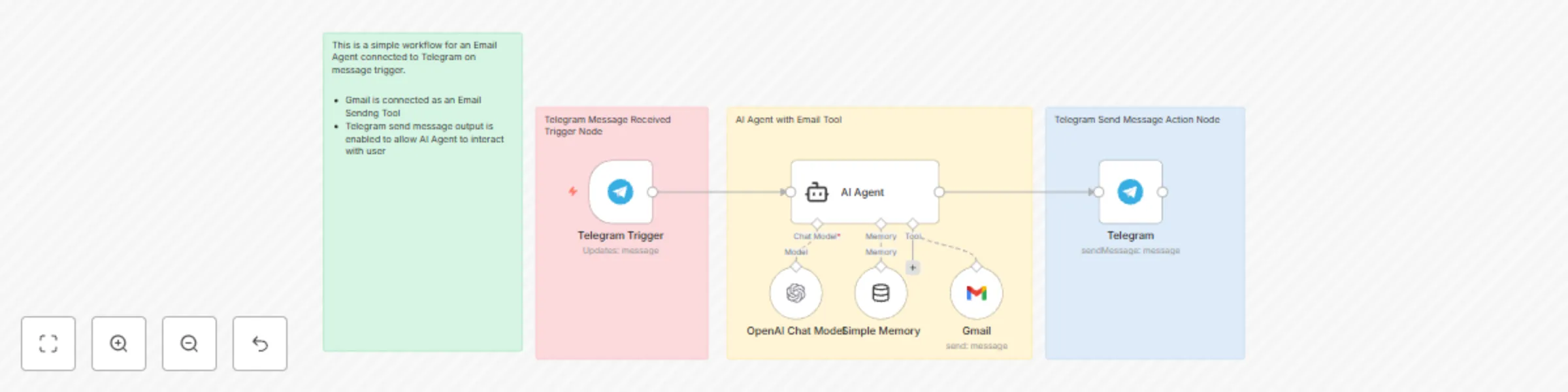
🤖 What This Workflow Does This workflow turns your Telegram bot into a personal email assistant powered by AI.
With just a message on Telegram, users can:
Send an email via Gmail
Automatically generate the email content using OpenAI Models.
Get confirmation or responses directly in Telegram
It's like ChatGPT meets Gmail, inside your Telegram chat.
🔧 How It Works Telegram Trigger – Listens for incoming messages from your bot.
AI Agent – Processes the input using OpenAI Model and converts it into structured email content (To, Subject, Body).
Memory Node – Stores short-term context per user (via chat ID), so the agent can hold simple conversations.
Gmail Node – Sends the generated email using your Gmail account.
Telegram Node – Replies to the user confirming the output or status.
🧠 Why This is Useful Ever wanted to send an email while on the go, without typing the whole thing out in Gmail?
This is a fast, intuitive, and AI-powered way to:
Dictate or draft emails from anywhere
Create an AI-powered virtual assistant via Telegram
Integrate n8n's Langchain Agent with real-world productivity use cases
🪜 Setup Instructions Connect your Telegram bot via BotFather and add the credentials in n8n.
Set up your OpenAI API key (GPT-4o-mini recommended).
Add your Gmail OAuth credentials.
Activate the workflow and start messaging your bot!