Block 1 - Telegram Trigger
- Type / Role
- n8n-nodes-base.telegramTrigger - telegramTrigger
- Config choices
- Version 1.2


 Early Deal
This workflow is provided as-is. Please review and test before using in production.
️ Telegram Email Agent with GPT + Gmail Category: Messaging / AI Agent Level: Beginner Friendly Tags: Telegram, Email Automation, AI Agent, Gmail, GPT Model Watch Step by step video guide here: ht...
n8n-nodes-base.telegramtrigger, @n8n/n8n-nodes-langchain.agent, @n8n/n8n-nodes-langchain.lmchatopenai, @n8n/n8n-nodes-langchain.memorybufferwindow, n8n-nodes-base.gmailtool, n8n-nodes-base.telegram, n8n-nodes-base.stickynote
This workflow is cataloged by N8N Workflows and links back to its original n8n.io source page by Automate With Marc.
Original n8n.io source✉️ Telegram Email Agent with GPT + Gmail Category: Messaging / AI Agent Level: Beginner-Friendly Tags: Telegram, Email Automation, AI Agent, Gmail, GPT Model
Watch Step-by-step video guide here: https://www.youtube.com/watch?v=nyI40s9QOuw&t=420s&pp=0gcJCb4JAYcqIYzv
🤖 What This Workflow Does This workflow turns your Telegram bot into a personal email assistant powered by AI.
With just a message on Telegram, users can:
Send an email via Gmail
Automatically generate the email content using OpenAI Models.
Get confirmation or responses directly in Telegram
It's like ChatGPT meets Gmail, inside your Telegram chat.
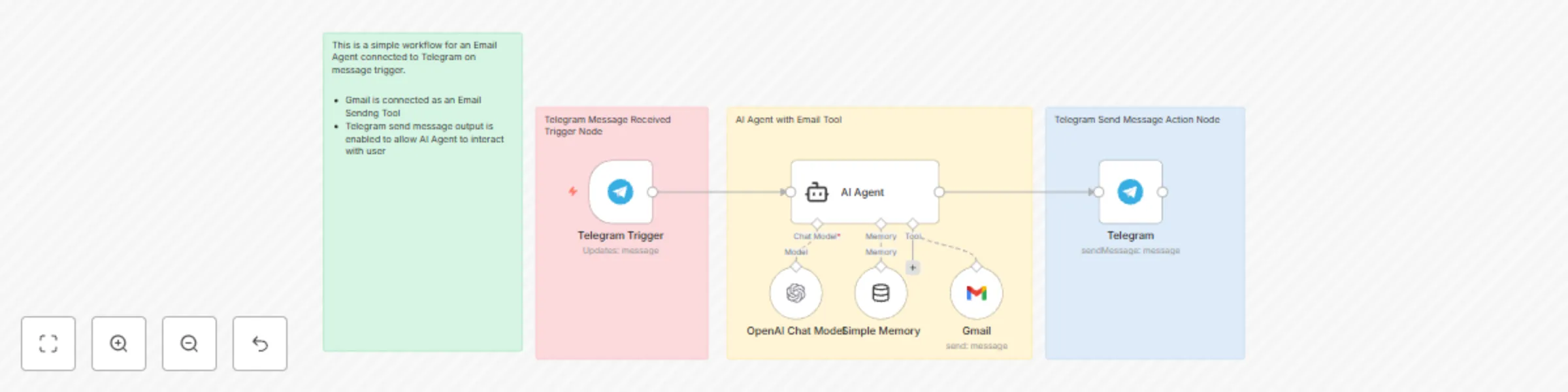
🔧 How It Works Telegram Trigger – Listens for incoming messages from your bot.
AI Agent – Processes the input using OpenAI Model and converts it into structured email content (To, Subject, Body).
Memory Node – Stores short-term context per user (via chat ID), so the agent can hold simple conversations.
Gmail Node – Sends the generated email using your Gmail account.
Telegram Node – Replies to the user confirming the output or status.
🧠 Why This is Useful Ever wanted to send an email while on the go, without typing the whole thing out in Gmail?
This is a fast, intuitive, and AI-powered way to:
Dictate or draft emails from anywhere
Create an AI-powered virtual assistant via Telegram
Integrate n8n's Langchain Agent with real-world productivity use cases
🪜 Setup Instructions Connect your Telegram bot via BotFather and add the credentials in n8n.
Set up your OpenAI API key (GPT-4o-mini recommended).
Add your Gmail OAuth credentials.
Activate the workflow and start messaging your bot!
This catalog entry is organized from the workflow JSON. The node-level section below shows the executable blocks available for review before importing the template.
| Workflow | Send AI-generated emails via Telegram using GPT-4o-mini and Gmail |
|---|---|
| Complexity | intermediate |
| Nodes | 10 |
| Categories | Personal Productivity, AI Chatbot |
| Author | Automate With Marc |
| Published | 21 May 2025 |
Use the JSON export at /data/workflows/4265/4265.json as the source template for this automation.
Open n8n, import the downloaded JSON, and review each node before activating the workflow.
Replace placeholder credentials, API keys, webhook URLs, account IDs, and environment-specific values with your own settings.
Run the workflow manually or in a staging workspace, inspect node output, and confirm downstream systems receive the expected data.
Enable the workflow only after testing, then monitor executions, errors, and rate limits during the first production runs.
Review imported nodes carefully before activation. This catalog entry is intended to help you inspect the workflow structure, understand required services, and find related templates faster.
Node names, credentials, schedules, webhook paths, and external service limits may need adjustment for your workspace.
️ Telegram Email Agent with GPT + Gmail Category: Messaging / AI Agent Level: Beginner Friendly Tags: Telegram, Email Automation, AI Agent, Gmail, GPT Model Watch Step by step video guide here: ht...
Review the workflow JSON, configure any required credentials in n8n, and test the automation in a safe workspace before using it in production.
Yes. Use the block-by-block analysis and the downloadable JSON to inspect each node, then adjust credentials, prompts, schedules, filters, or destinations for your Personal Productivity, AI Chatbot use case.