Security reconnaissance with Google Dorks, Parsera scraping, and Gmail reports
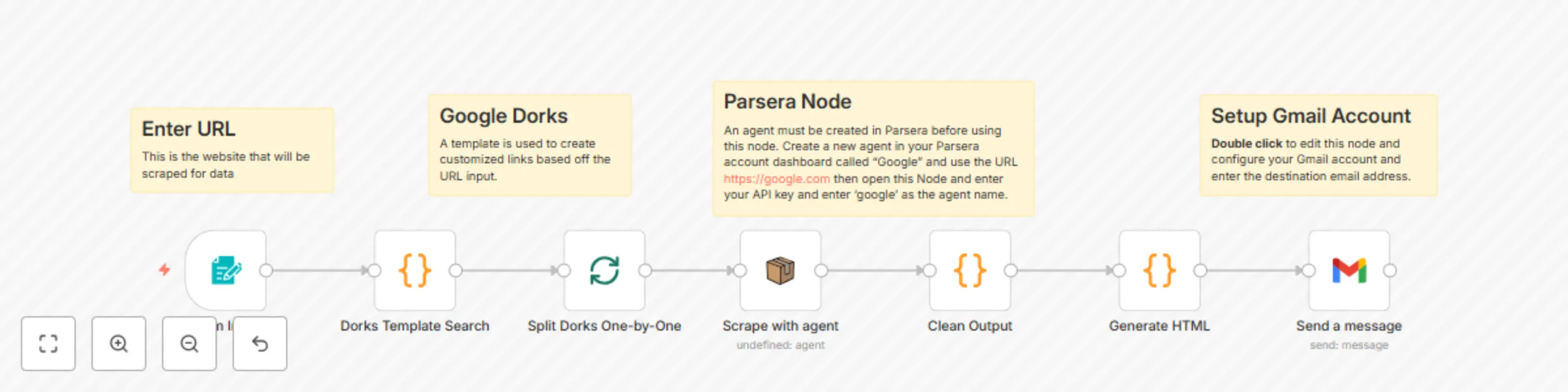
Workflow preview

$20/month : Unlimited workflows
2500 executions/month

THE #1 IN WEB SCRAPING
Scrape any website without limits
HOSTINGER  Early Deal
DISCOUNT 20% Try free
Early DealDISCOUNT 20%
Self-hosted n8n
Unlimited workflows - from $4.99/mo

#1 hub for scraping, AI & automation
6000+ actors - $5 credits/mo
Important notice
This workflow is provided as-is. Please review and test before using in production.
Overview
This workflow contains community nodes that are only compatible with the self-hosted version of n8n.
How it Works:
- Accepts a domain from a web form
- Generates a list of Google dorks targeting that domain
- Scrapes Google search results for each dork
- Filters out junk links (Google internal, non-http)
- Formats valid results as a markdown report
- Emails the report to your inbox
For this workflow you will need to configure credentials in n8n as well as create a Parsera.io agent:
1. AI Scraper Account
- Create an account for: https://app.parsera.io
- Create an agent named "Google" and use the URL https://google.com
- Copy/Paste your Parsera.io API key to the 'Scrape with agent' node in the n8n workflow
2. Gmail OAuth2
- Go to Google Cloud Console
- Enable Gmail API
- Create OAuth2 credentials
- Copy/Paste the Gmail API key to the Gmail node in the n8n workflow