Screen resumes with OpenAI GPT‐4.1 and route candidates via Gmail, Slack and Sheets

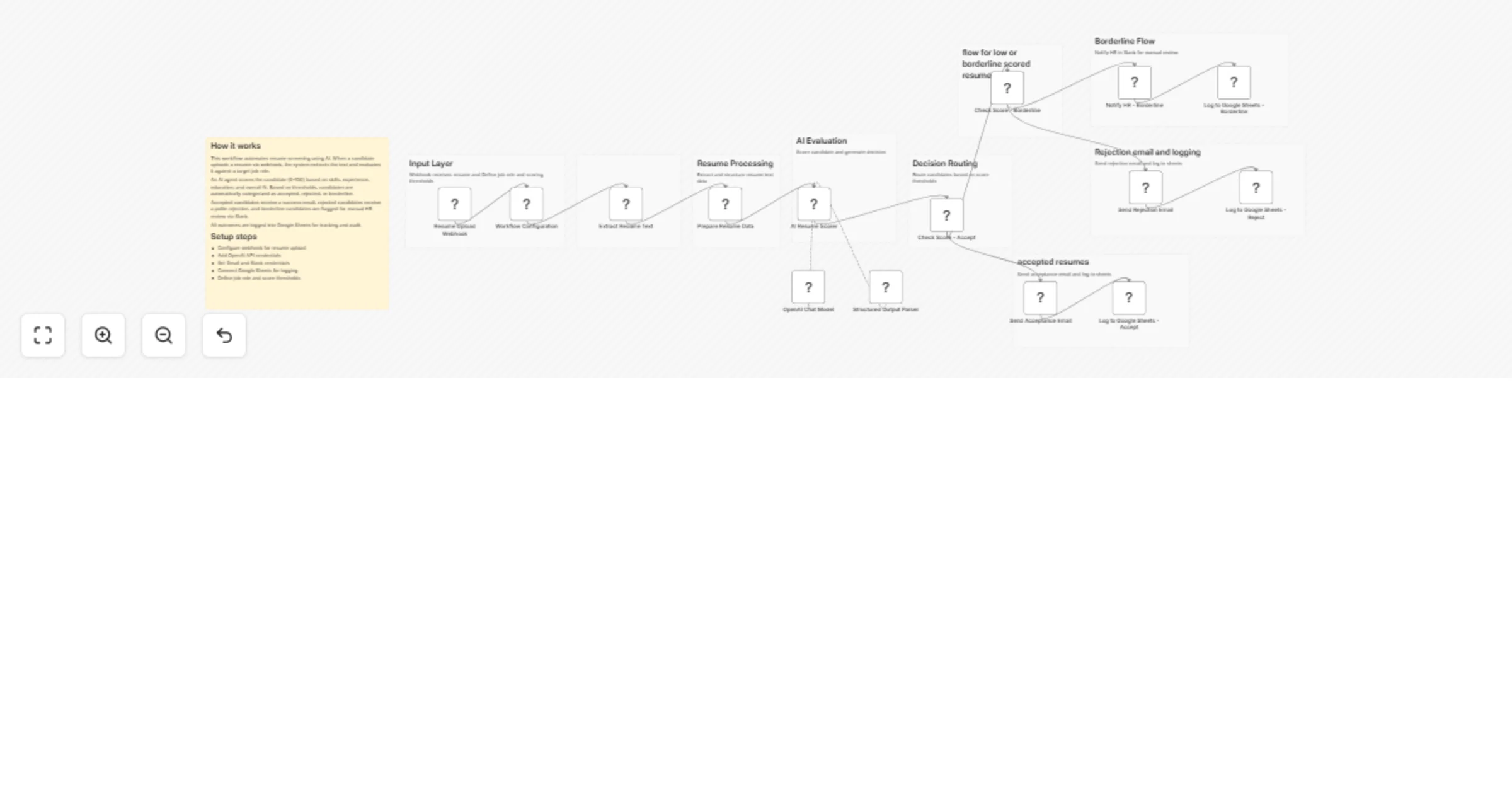
Workflow preview

Workflow preview
100%
Screen resumes with OpenAI GPT‐4.1 and route candidates via Gmail, Slack and Sheets preview
Open on n8n.io

1. Workflow Overview

Overview This workflow automates the resume screening process using AI, enabling faster and more consistent candidate evaluation. It analyzes uploaded resumes, scores candidates based on job fit, a...

Best for

  • HR automation workflows
  • AI Summarization automation workflows
  • advanced n8n builders looking for reusable templates

Tools used

n8n-nodes-base.webhook, n8n-nodes-base.set, n8n-nodes-base.extractfromfile, @n8n/n8n-nodes-langchain.agent, @n8n/n8n-nodes-langchain.lmchatopenai, @n8n/n8n-nodes-langchain.outputparserstructured, n8n-nodes-base.if, n8n-nodes-base.gmail

Source and attribution

This workflow is cataloged by N8N Workflows and links back to its original n8n.io source page by ResilNext.

Original n8n.io source

1.1 Workflow description

Title
Screen resumes with OpenAI GPT‐4.1 and route candidates via Gmail, Slack and Sheets
Workflow name
Screen resumes with OpenAI GPT‐4.1 and route candidates via Gmail, Slack and Sheets

Overview

This workflow automates the resume screening process using AI, enabling faster and more consistent candidate evaluation. It analyzes uploaded resumes, scores candidates based on job fit, and automatically routes them into acceptance, rejection, or manual review flows.

By combining AI scoring, decision logic, and automated communication, this workflow helps HR teams save time, reduce bias, and streamline hiring operations.


How It Works

  1. Webhook Trigger
  • Receives resume uploads along with candidate details.
  1. Workflow Configuration
  • Defines:
  • Target job role
  • Acceptance threshold
  • Borderline threshold
  1. Resume Extraction
  • Extracts text from uploaded PDF resumes.
  1. Data Preparation
  • Structures candidate name, email, and resume content.
  1. AI Resume Scoring
  • AI evaluates candidate based on:
  • Skills match (40%)
  • Experience (35%)
  • Education (15%)
  • Overall fit (10%)
  • Returns:
  • Score (0–100)
  • Decision (accept / reject / borderline)
  • Reason
  1. Decision Routing
  • Accept → proceed to acceptance flow
  • Borderline → escalate for review
  • Reject → send rejection
  1. Action Flows
  • Accepted Candidates

  • Send acceptance email

  • Log to Google Sheets

  • Rejected Candidates

  • Send rejection email

  • Log to Google Sheets

  • Borderline Candidates

  • Notify HR via Slack

  • Log as escalated in Google Sheets


Setup Instructions

  1. Webhook Setup
  • Configure the webhook endpoint (resume-upload)
  • Connect it to your application or form
  1. OpenAI Credentials
  • Add API credentials for resume scoring
  1. Gmail Integration
  • Connect Gmail account for sending emails
  1. Slack Setup
  • Configure Slack credentials
  • Set HR review channel
  1. Google Sheets
  • Connect your Google account
  • Create a sheet for candidate tracking
  1. Customize Parameters
  • Set job role
  • Adjust:
  • Acceptance threshold (e.g., 75)
  • Borderline threshold (e.g., 50)

Use Cases

  • Automated resume screening for HR teams
  • High-volume hiring pipelines
  • Startup hiring automation
  • Candidate pre-filtering before interviews
  • AI-assisted recruitment workflows

Requirements

  • OpenAI API key
  • Gmail account
  • Slack workspace (optional)
  • Google Sheets account
  • n8n instance

Key Features

  • AI-powered resume evaluation
  • Structured scoring and decision output
  • Automated candidate communication
  • Slack-based human review escalation
  • Centralized tracking in Google Sheets
  • Configurable thresholds and job roles

Summary

A complete AI-driven hiring assistant that evaluates resumes, scores candidates, and automates decision-making workflows. It reduces manual screening effort while ensuring consistent and scalable recruitment processes.

1.2 Logical Blocks

This catalog entry is organized from the workflow JSON. The node-level section below shows the executable blocks available for review before importing the template.

2. Block-by-Block Analysis

Block 1 - Resume Upload Webhook

Type / Role
n8n-nodes-base.webhook - webhook
Config choices
Version 2.1

Block 2 - Workflow Configuration

Type / Role
n8n-nodes-base.set - set
Config choices
Version 3.4

Block 3 - Extract Resume Text

Type / Role
n8n-nodes-base.extractFromFile - extractFromFile
Config choices
Version 1.1

Block 4 - Prepare Resume Data

Type / Role
n8n-nodes-base.set - set
Config choices
Version 3.4

Block 5 - AI Resume Scorer

Type / Role
@n8n/n8n-nodes-langchain.agent - agent
Config choices
Version 3

Block 6 - OpenAI Chat Model

Type / Role
@n8n/n8n-nodes-langchain.lmChatOpenAi - lmChatOpenAi
Config choices
Version 1.3

Block 7 - Structured Output Parser

Type / Role
@n8n/n8n-nodes-langchain.outputParserStructured - outputParserStructured
Config choices
Version 1.3

Block 8 - Check Score - Accept

Type / Role
n8n-nodes-base.if - if
Config choices
Version 2.3

Block 9 - Check Score - Borderline

Type / Role
n8n-nodes-base.if - if
Config choices
Version 2.3

Block 10 - Send Acceptance Email

Type / Role
n8n-nodes-base.gmail - gmail
Config choices
Version 2.2

Block 11 - Send Rejection Email

Type / Role
n8n-nodes-base.gmail - gmail
Config choices
Version 2.2

Block 12 - Notify HR - Borderline

Type / Role
n8n-nodes-base.slack - slack
Config choices
Version 2.4

Block 13 - Log to Google Sheets - Accept

Type / Role
n8n-nodes-base.googleSheets - googleSheets
Config choices
Version 4.7

Block 14 - Log to Google Sheets - Reject

Type / Role
n8n-nodes-base.googleSheets - googleSheets
Config choices
Version 4.7

Block 15 - Log to Google Sheets - Borderline

Type / Role
n8n-nodes-base.googleSheets - googleSheets
Config choices
Version 4.7

Block 16 - Sticky Note

Type / Role
n8n-nodes-base.stickyNote - stickyNote
Config choices
Version 1

Block 17 - Sticky Note1

Type / Role
n8n-nodes-base.stickyNote - stickyNote
Config choices
Version 1

Block 18 - Sticky Note2

Type / Role
n8n-nodes-base.stickyNote - stickyNote
Config choices
Version 1

Block 19 - Sticky Note3

Type / Role
n8n-nodes-base.stickyNote - stickyNote
Config choices
Version 1

Block 20 - Sticky Note4

Type / Role
n8n-nodes-base.stickyNote - stickyNote
Config choices
Version 1

Block 21 - Sticky Note5

Type / Role
n8n-nodes-base.stickyNote - stickyNote
Config choices
Version 1

Block 22 - Sticky Note6

Type / Role
n8n-nodes-base.stickyNote - stickyNote
Config choices
Version 1

Block 23 - Sticky Note7

Type / Role
n8n-nodes-base.stickyNote - stickyNote
Config choices
Version 1

Block 24 - Sticky Note8

Type / Role
n8n-nodes-base.stickyNote - stickyNote
Config choices
Version 1

Showing the first 24 of 25 workflow blocks. Download the JSON for the full node graph.

3. Summary Table

Workflow Screen resumes with OpenAI GPT‐4.1 and route candidates via Gmail, Slack and Sheets
Complexity advanced
Nodes 25
Categories HR, AI Summarization
Author ResilNext
Published 03 Apr 2026

4. Reproducing the Workflow from Scratch

  1. 1. Download the workflow JSON

    Use the JSON export at /data/workflows/14686/14686.json as the source template for this automation.

  2. 2. Import the template into n8n

    Open n8n, import the downloaded JSON, and review each node before activating the workflow.

  3. 3. Configure credentials and variables

    Replace placeholder credentials, API keys, webhook URLs, account IDs, and environment-specific values with your own settings.

  4. 4. Test with sample data

    Run the workflow manually or in a staging workspace, inspect node output, and confirm downstream systems receive the expected data.

  5. 5. Activate and monitor

    Enable the workflow only after testing, then monitor executions, errors, and rate limits during the first production runs.

5. General Notes & Resources

Review imported nodes carefully before activation. This catalog entry is intended to help you inspect the workflow structure, understand required services, and find related templates faster.

Node names, credentials, schedules, webhook paths, and external service limits may need adjustment for your workspace.

Frequently asked questions

What does Screen resumes with OpenAI GPT‐4.1 and route candidates via Gmail, Slack and Sheets do?

Overview This workflow automates the resume screening process using AI, enabling faster and more consistent candidate evaluation. It analyzes uploaded resumes, scores candidates based on job fit, a...

What do I need before importing this workflow?

Review the workflow JSON, configure any required credentials in n8n, and test the automation in a safe workspace before using it in production.

Can I customize this workflow?

Yes. Use the block-by-block analysis and the downloadable JSON to inspect each node, then adjust credentials, prompts, schedules, filters, or destinations for your HR, AI Summarization use case.