Screen job applications from Google Forms with Google Gemini and email results
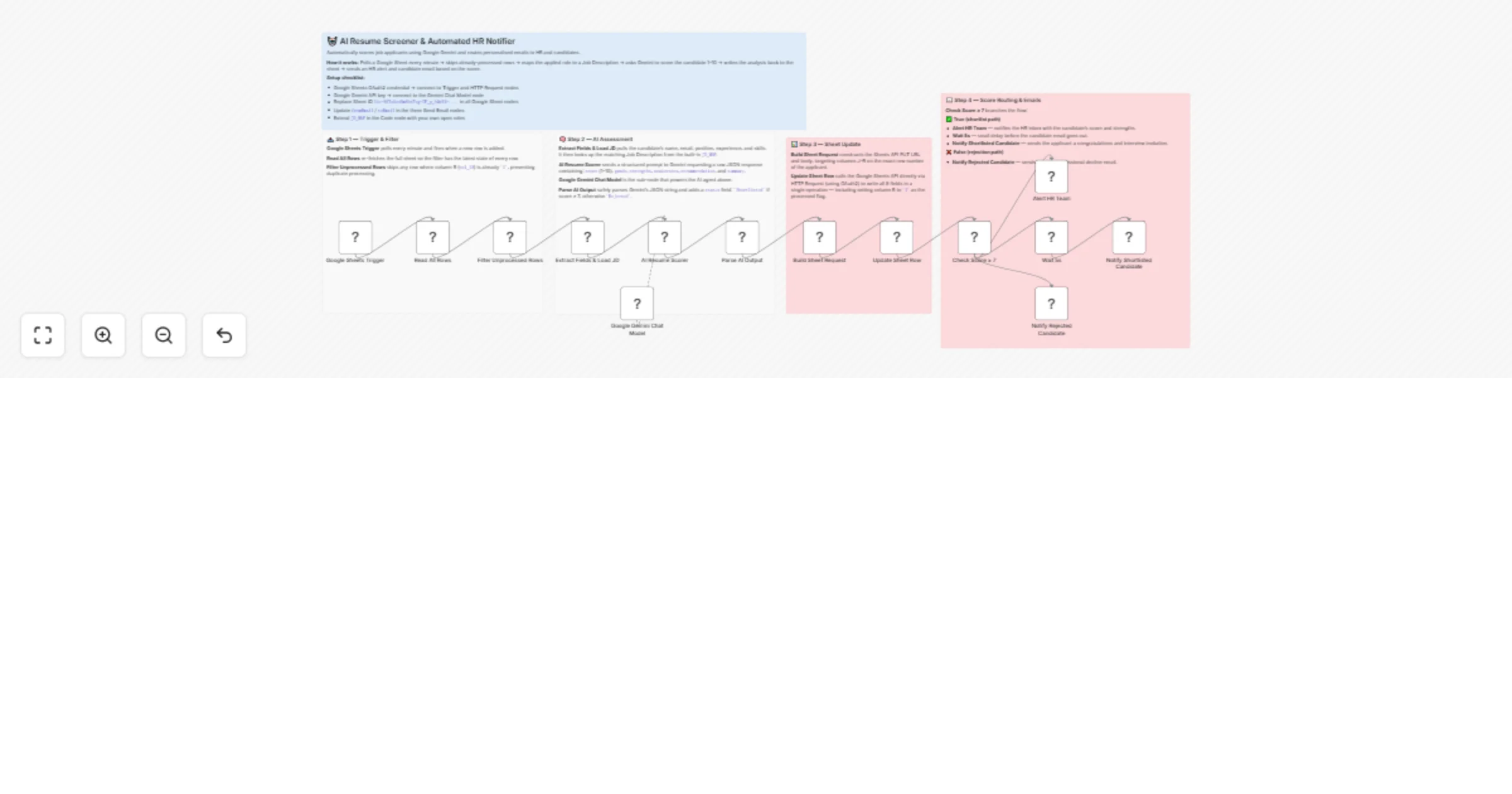
Workflow preview


 Early Deal
DISCOUNT 20%

Overview
🤖 AI Resume Screener — Google Forms to Automated Shortlisting & Email
Automatically score every job application with AI, update your tracking sheet, and send personalised emails to candidates — all without human review.
📖 Description
This workflow automates your entire first-round resume screening process. When a candidate submits your Google Form application, the workflow triggers, extracts their details, scores them against the job description using AI, writes the results back to your Google Sheet, and sends the right email — a congratulations to shortlisted candidates, a polite rejection to others.
Your HR team only reviews candidates the AI has already scored 7 or above.
Built for companies hiring across multiple roles simultaneously, HR teams wanting to reduce screening time, and startups with no dedicated recruiting staff.
✨ Key Features
- Google Sheets Trigger — fires automatically when a new application row is added
- Duplicate prevention — tracks processed rows with a
Processedcolumn, never scores the same application twice - Multi-role support — built-in Job Description map for 5 roles, easily extendable
- AI scoring 1–10 — Google Gemini scores each candidate against the JD with strengths, weaknesses, recommendation
- Direct sheet write via API — writes score + grade + status to exact row using Google Sheets API
- Smart email routing — score ≥ 7 → shortlisted (HR alert + candidate email), score < 7 → rejection email
- Rate limit protection — Wait node between HR alert and candidate email prevents SMTP throttling
- Robust AI parsing — 3-layer fallback ensures AI output always produces a usable result
🔄 How It Works
New Google Form submission
 ↓
Google Sheets Trigger (rowAdded, polls every minute)
 ↓
Read All Rows → Filter Unprocessed Rows (col_18 / Processed ≠ 1)
 ↓
Extract Fields + Load Job Description
 → name, email, phone, position, experience, skills, cover note
 → loads matching JD from built-in map
 ↓
AI Resume Scorer (Google Gemini)
 → score: 1–10
 → grade: Strong Yes / Maybe / No
 → strengths, weaknesses, recommendation, summary
 ↓
Parse AI Output (3-layer fallback)
 ↓
Build Sheet Request → Write to Sheet via API
 → writes score, grade, strengths, weaknesses,
 recommendation, summary, status, timestamp, Processed=1
 ↓
Score ≥ 7?
 ✅ YES → Alert Email to HR + Wait 10s → Shortlist Email to Candidate
 ❌ NO → Rejection Email to Candidate
🤖 AI Scoring System
The AI scores each candidate from 1 to 10 against the job description:
| Score | Grade | Action |
|---|---|---|
| 8–10 | Strong Yes | Shortlisted ✅ |
| 7 | Strong Yes / Maybe | Shortlisted ✅ |
| 5–6 | Maybe | Rejected ❌ |
| 1–4 | No | Rejected ❌ |
For each application the AI also provides:
- Strengths — what the candidate does well vs the JD
- Weaknesses — gaps or concerns
- Recommendation — e.g. "Invite for technical interview"
- Summary — 2–3 sentence overall assessment
📋 Built-in Job Descriptions
Five roles are pre-configured and auto-matched by position name:
| Role | Key Requirements |
|---|---|
| Frontend Developer | 2+ yrs React/Vue, HTML/CSS/JS, REST APIs, Git |
| Backend Developer | 2+ yrs Node.js/Python/Java, PostgreSQL/MongoDB, Docker |
| UI/UX Designer | 2+ yrs UI/UX, Figma or Adobe XD, portfolio |
| Project Manager | 3+ yrs PM, PMP/Scrum preferred, Jira/Asana |
| Digital Marketing Executive | 2+ yrs digital marketing, Google Ads, Meta Ads, GA4 |
Add more roles by editing the JD_MAP object in the Extract Fields + Load JD node.
📧 Email Templates
Shortlist Email (to candidate)
- Subject:
Congratulations [Name] - You have been shortlisted! - Navy blue header
- Score table (score/10, grade, position, experience, skills)
- Strengths highlighted in green
- AI assessment in blue
- Promise: HR contacts within 2 business days
HR Alert Email (internal)
- Subject:
Strong Candidate - [Name] for [Position] - Amber header — urgent feel
- Full candidate details + complete AI breakdown
- Strengths, weaknesses, recommendation, summary all included
Rejection Email (to candidate)
- Subject:
Your application for [Position] - Update - Grey header — professional and neutral
- Polite decline with encouragement
- No score or feedback shared
🛠 Setup Requirements
1. Google Form
Create a Google Form with these fields:
| Field | Type |
|---|---|
| Full Name | Short answer |
| Email Address | Short answer |
| Phone Number | Short answer |
| Select the Position You Are Applying For | Dropdown |
| Years of Experience | Short answer |
| Relevant Skills | Long answer |
| Cover Note | Long answer |
Link the form to a Google Sheet (Responses tab).
2. Google Sheet — Response Sheet Columns
The form creates columns A–H automatically. Add these columns manually for AI results:
| Col | Header | Filled by |
|---|---|---|
| A | Timestamp | Google Forms |
| B | Select the Position... | Google Forms |
| C | Full Name | Google Forms |
| D | Email Address | Google Forms |
| E | Phone Number | Google Forms |
| F | Years of Experience | Google Forms |
| G | Relevant Skills | Google Forms |
| H | Upload CV | Google Forms |
| I | Cover Note | Google Forms |
| J | AI Score | This workflow |
| K | Grade | This workflow |
| L | Strengths | This workflow |
| M | Weaknesses | This workflow |
| N | Recommendation | This workflow |
| O | Summary | This workflow |
| P | Status | This workflow |
| Q | Processed At | This workflow |
| R | Processed | This workflow (1 = done) |
> Important: The workflow uses column R (Processed) to track which rows have been scored. Rows where R = 1 are skipped on subsequent triggers.
3. Credentials Required
| Credential | Used for | Free? |
|---|---|---|
| Google Sheets Trigger OAuth2 | Detects new rows | Free |
| Google Sheets OAuth2 | Read rows + write results | Free |
| Google Gemini (PaLM) API | AI resume scoring | Free tier available |
| SMTP | Sending emails | Depends on provider |
4. Update Sheet ID
In the Read All Rows and Write to Sheet via API nodes, replace the Sheet ID with your own:
https://docs.google.com/spreadsheets/d/YOUR_SHEET_ID/...
5. Update Email Addresses
In all three email nodes, update:
fromEmail— your HR sending address- HR alert
toEmail— your internal HR inbox - SMTP credential — your email provider
⚙️ Workflow Nodes
| Node | Type | Purpose |
|---|---|---|
| Google Sheets Trigger | Trigger | Fires on new row (polls every minute) |
| Read All Rows | Google Sheets | Reads all form responses |
| Filter Unprocessed Rows | Code | Skips rows where Processed = 1 |
| Extract Fields + Load JD | Code | Extracts candidate data + matches JD |
| AI Resume Scorer | AI Agent | Scores candidate vs JD using Gemini |
| Google Gemini Chat Model | LLM | AI model for scoring |
| Parse AI Output | Code | Parses JSON with 3-layer fallback |
| Build Sheet Request | Code | Prepares API write request for exact row |
| Write to Sheet via API | HTTP Request | Writes results to columns J–R |
| Score ≥ 7? | IF | Routes by score |
| Alert Email - HR Team | Email Send | Notifies HR of strong candidates |
| Wait 10s | Wait | Prevents SMTP rate limiting |
| Shortlist Email - Candidate | Email Send | Congratulations to shortlisted |
| Rejection Email - Candidate | Email Send | Polite rejection to others |
🔑 Key Technical Details
Why HTTP Request for sheet write instead of Google Sheets node?
The standard Google Sheets node cannot reliably write to a specific row by row number. Using the Sheets API PUT values/{range} endpoint writes to the exact cell range Form responses 1!J{rowNum}:R{rowNum} — always the correct row regardless of concurrent submissions.
Why Read All Rows then Filter instead of reading one row?
The Google Sheets Trigger fires on rowAdded but may not pass the exact new row data reliably. Reading all rows and filtering by Processed ≠ 1 is more reliable and handles backlog processing too.
The Processed column (R)
Set to 1 after scoring completes. This prevents re-processing if the trigger fires again before the workflow finishes, or if old unprocessed rows exist.
3-layer AI output fallback:
- Direct JSON parse
- Strip markdown fences then parse
- Regex extract JSON block
- Default values if all fail (score: 5, grade: Maybe)
📊 Sample Sheet Output After Scoring
Col J (AI Score): 8
Col K (Grade): Strong Yes
Col L (Strengths): 3+ yrs React experience; Strong TypeScript skills; Relevant API work
Col M (Weaknesses): No Docker experience mentioned; No TypeScript explicitly listed
Col N (Recommendation): Invite for technical interview
Col O (Summary): Strong frontend candidate with solid React/Vue background. Experience aligns well with role requirements. Minor gaps in DevOps knowledge.
Col P (Status): Shortlisted
Col Q (Processed At): 2026-03-18T10:30:00.000Z
Col R (Processed): 1
🔧 Customisation
Add more roles:
Edit the JD_MAP object in Extract Fields + Load JD:
const JD_MAP = {
 'Your New Role': 'ROLE: ... REQUIREMENTS: ...',
 // add as many as needed
};
Change the score threshold:
In the Score ≥ 7? IF node, change rightValue: 5 to any number. Setting to 8 makes the bar higher (only Strong Yes candidates shortlisted).
Add a second HR alert channel: After the HR Alert Email, add a Slack or Telegram node to ping your team instantly for high-scoring candidates.
Add calendar booking link: Include a Calendly link in the shortlist email so candidates can self-schedule interviews immediately.
Extend with CV parsing: Add a Google Drive node before the AI scorer to download the CV attachment, extract text, and include it in the AI prompt for more accurate scoring.
⚠️ Important Notes
- The Google Sheets Trigger polls every minute — there may be up to a 1-minute delay after form submission before scoring begins
- The
Processedcolumn must exist in your sheet (column R) before activating the workflow - Trailing spaces in Google Forms column headers are common — the
key.trim()normalization in the code handles this automatically - The Wait node between HR alert and shortlist email is intentional — prevents hitting SMTP rate limits when processing multiple candidates
💡 Enhancement Ideas
- CV download + parse — download Google Drive CV attachment and include content in AI scoring
- Calendly integration — auto-create interview slot and include booking link in shortlist email
- Slack alert — instant Slack message to hiring manager for score ≥ 9 candidates
- Airtable sync — mirror all candidate data to an Airtable CRM for pipeline tracking
- Telegram bot — let HR check candidate status by texting a bot with the candidate email
- Multi-stage pipeline — add a second workflow that triggers when HR marks a candidate for second round
📦 Requirements Summary
- n8n (cloud or self-hosted)
- Google Workspace account (Forms + Sheets)
- Google AI Studio account for Gemini API key (free tier available)
- SMTP email account (Gmail, SendGrid, Mailtrap etc.)
Built with n8n · Google Gemini AI · Google Forms · Google Sheets · SMTP