Screen and score CV candidates with Mistral OCR and Gemini

Workflow preview

Workflow preview
100%
Screen and score CV candidates with Mistral OCR and Gemini preview
Open on n8n.io

1. Workflow Overview

AI Powered Hiring Pipeline: Auto Screen CVs, Score Candidates & Send Interview Invites Stop manually reading every CV. This workflow watches your inbox, extracts CV text using Mistral OCR, scores e...

Best for

  • HR automation workflows
  • AI Summarization automation workflows
  • advanced n8n builders looking for reusable templates

Tools used

n8n-nodes-base.stickynote, n8n-nodes-base.emailreadimap, n8n-nodes-base.mistralai, @n8n/n8n-nodes-langchain.googlegemini, n8n-nodes-base.code, n8n-nodes-base.if, n8n-nodes-base.emailsend

Source and attribution

This workflow is cataloged by N8N Workflows and links back to its original n8n.io source page by AppStoneLab Technologies LLP.

Original n8n.io source

1.1 Workflow description

Title
Screen and score CV candidates with Mistral OCR and Gemini
Workflow name
Screen and score CV candidates with Mistral OCR and Gemini

AI-Powered Hiring Pipeline: Auto-Screen CVs, Score Candidates & Send Interview Invites

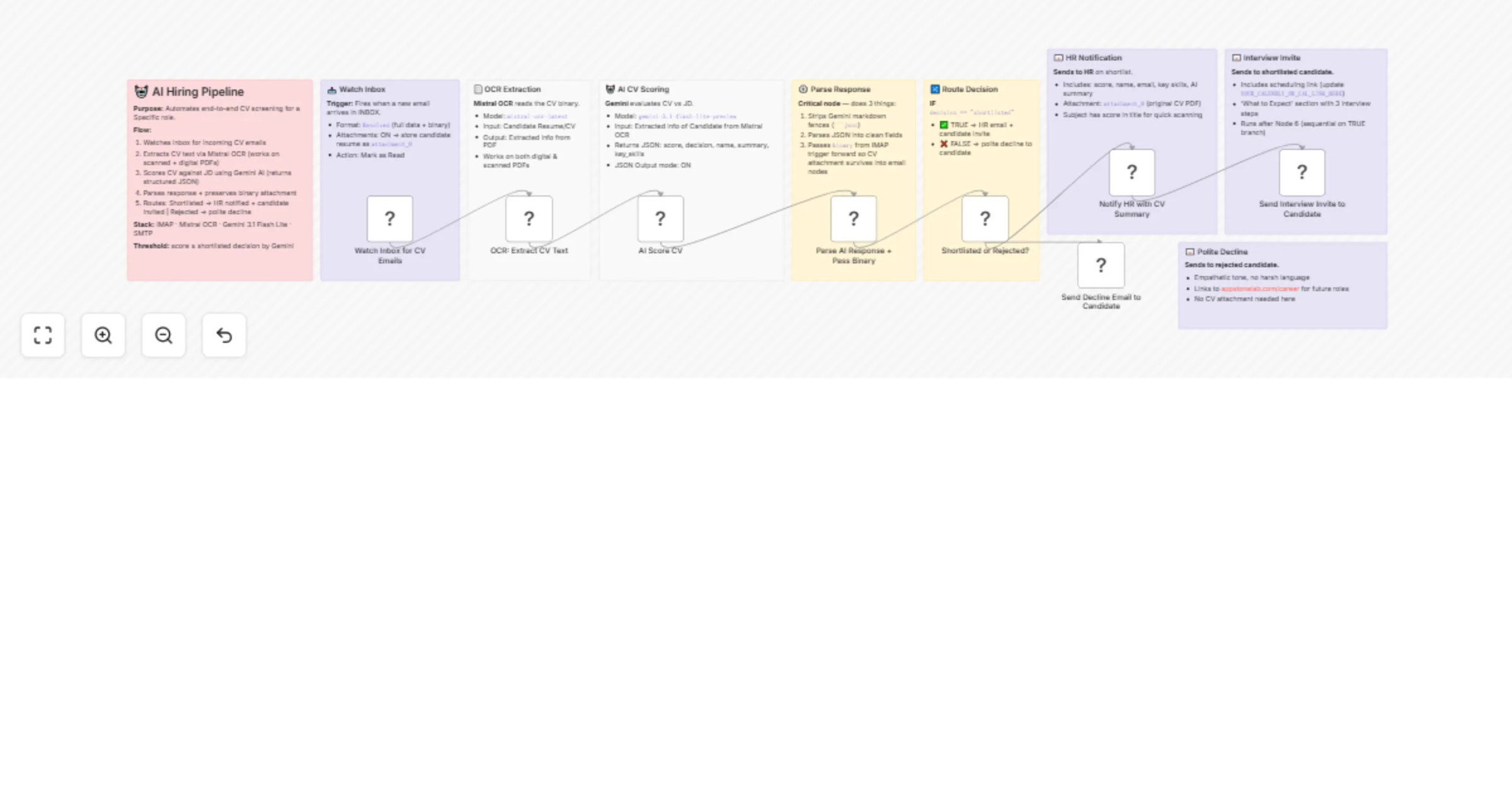
Stop manually reading every CV. This workflow watches your inbox, extracts CV text using Mistral OCR, scores every candidate against your job description using Google Gemini AI, and automatically routes them - shortlisted candidates get a professional interview invite, rejected ones get a polite decline, and HR receives a full AI summary with the CV attached. All hands-free.

Who Is This For?

  • HR teams and recruiters at startups or growing companies who receive a high volume of CV emails
  • Technical hiring managers who want AI-assisted pre-screening before spending time on interviews
  • Solo founders who are hiring but don't have a dedicated recruiter
  • No-code automation builders looking for a production-ready hiring automation template

What Problem Does This Solve?

Manually reviewing CVs is time-consuming, inconsistent, and expensive. This workflow eliminates the bottleneck by automatically:

  • Extracting CV text from PDF attachments (including scanned documents) via Mistral OCR
  • Evaluating every candidate against your specific job description using Gemini AI
  • Routing candidates and sending the right email to the right person - instantly

You focus on interviewing. The pipeline handles everything else.

Key Features

  • πŸ“₯ Email-triggered β†’ fires automatically when a CV arrives in your inbox, no manual steps
  • πŸ“„ Mistral OCR β†’ works on both digitally-created and scanned/image-based PDF CVs
  • πŸ€– Gemini AI scoring β†’ returns a 0–100 score, shortlist/reject decision, candidate summary, and key skills
  • πŸ”€ Smart routing β†’ shortlisted and rejected candidates are handled differently in the same workflow
  • πŸ“§ 3 beautiful HTML email templates β†’ HR notification (with CV attached), interview invite, and polite decline
  • βš™οΈ Binary passthrough β†’ original CV PDF is preserved and forwarded to HR's email as an attachment
  • πŸ“‹ Sticky note documentation β†’ every node is documented inside the workflow canvas

How It Works (Step-by-Step)

  1. πŸ“₯ Watch Inbox β†’ IMAP trigger fires when a new email arrives with a CV attachment
  2. πŸ“„ OCR Extraction β†’ Mistral's mistral-ocr-latest model reads the CV and outputs clean structured text
  3. πŸ€– AI Scoring β†’ Google Gemini evaluates the CV against your job description and returns a structured JSON with score, decision, candidate name, 3–4 sentence summary, and top 5 skills
  4. βš™οΈ Parse & Route β†’ a Code node cleans Gemini's response, extracts candidate email from the IMAP from field, and passes the binary CV forward
  5. πŸ”€ IF Decision β†’ routes shortlisted candidates to the true branch and rejected to the false branch
  6. πŸ“§ HR Email β†’ HR receives a branded email with the AI score, candidate summary, key skills, and the original CV attached
  7. πŸ“§ Interview Invite β†’ shortlisted candidate receives a professional invitation with a scheduling link and "What to Expect" section
  8. πŸ“§ Polite Decline β†’ rejected candidate receives a warm, empathetic decline with a link to your careers page

πŸ› οΈ Setup Instructions

Step 1 - Credentials Required

You need to set up 4 credentials in n8n:

Credential Node Used Where to Get It
IMAP account Email Trigger Your email provider settings (Gmail: use App Password)
Mistral Cloud API OCR Extraction Mistral AI Studio β†’ API Keys
Google Gemini (PaLM) API AI Scoring Google AI Studio β†’ Get API Key
SMTP account All 3 email nodes Your email provider SMTP settings

> πŸ’‘ Gmail users: Enable 2FA and generate an App Password for both IMAP and SMTP. Use imap.gmail.com:993 and smtp.gmail.com:587.

Step 2 - Update Email Addresses

In all 3 Send Email nodes, replace the placeholder emails:

  • fromEmail β†’ your sending address (e.g. [email protected])
  • toEmail in the HR node β†’ your HR team's inbox
  • The candidate email fields are already dynamic ({{ $json.candidate_email }})

Step 3 - Add Your Job Description

Open the πŸ€– AI Score CV (Gemini) node and replace the JOB DESCRIPTION: section in the prompt with your actual role requirements. The current template uses an AI Engineer JD from AppStoneLab as a working example.

Step 4 - Add Your Interview Scheduling Link

In the πŸ“§ Send Interview Invite to Candidate node, find YOUR_CALENDLY_OR_CAL_LINK_HERE in the HTML and replace it with your actual booking link (Calendly, Cal.com, TidyCal, etc.).

How to Customize for Your Use Case

What to Change Where Example
Job description Gemini node prompt Swap in your own role requirements
Scoring threshold IF node condition Change "shortlisted" to score-based logic e.g. score >= 70
Company name & branding All 3 HTML email templates Replace "AppStoneLab Technologies" with your company
Careers page URL Decline email HTML Replace appstonelab.com/career with your URL
AI model Gemini node Switch to gemini-3-flash-preview or gemini-3.1-pro-preview for different speed/quality
Watched mailbox IMAP trigger Change INBOX to a dedicated folder like INBOX.careers
Interview questions Invite email HTML Add/edit the "What to Expect" section steps

API Keys β€” Quick Links

Important Notes

  • The IMAP Format field must be set to Resolved (not Simple) - this is required for binary attachment data to flow correctly through the workflow
  • The Code node carries the binary CV attachment forward from the IMAP trigger to the HR email node. If you add new nodes between them, make sure binary passthrough is preserved
  • Mistral OCR works on both text-based and scanned/image PDFs, making it more reliable than n8n's built-in Extract from File node
  • The workflow uses the from.value[0].address path to extract the candidate's email from the IMAP trigger output - this is the correct path for the Resolved format

πŸ’¬ Questions or Issues?

Drop a comment on this template or reach out on the n8n community forum. Happy to help you adapt this for your specific hiring use case.

1.2 Logical Blocks

This catalog entry is organized from the workflow JSON. The node-level section below shows the executable blocks available for review before importing the template.

2. Block-by-Block Analysis

Block 1 - Sticky Note

Type / Role
n8n-nodes-base.stickyNote - stickyNote
Config choices
Version 1

Block 2 - Sticky Note1

Type / Role
n8n-nodes-base.stickyNote - stickyNote
Config choices
Version 1

Block 3 - Sticky Note2

Type / Role
n8n-nodes-base.stickyNote - stickyNote
Config choices
Version 1

Block 4 - Sticky Note3

Type / Role
n8n-nodes-base.stickyNote - stickyNote
Config choices
Version 1

Block 5 - Sticky Note4

Type / Role
n8n-nodes-base.stickyNote - stickyNote
Config choices
Version 1

Block 6 - Sticky Note5

Type / Role
n8n-nodes-base.stickyNote - stickyNote
Config choices
Version 1

Block 7 - Sticky Note6

Type / Role
n8n-nodes-base.stickyNote - stickyNote
Config choices
Version 1

Block 8 - Sticky Note7

Type / Role
n8n-nodes-base.stickyNote - stickyNote
Config choices
Version 1

Block 9 - Sticky Note8

Type / Role
n8n-nodes-base.stickyNote - stickyNote
Config choices
Version 1

Block 10 - Watch Inbox for CV Emails

Type / Role
n8n-nodes-base.emailReadImap - emailReadImap
Config choices
Version 2.1

Block 11 - OCR: Extract CV Text

Type / Role
n8n-nodes-base.mistralAi - mistralAi
Config choices
Version 1

Block 12 - AI Score CV

Type / Role
@n8n/n8n-nodes-langchain.googleGemini - googleGemini
Config choices
Version 1.1

Block 13 - Parse AI Response + Pass Binary

Type / Role
n8n-nodes-base.code - code
Config choices
Version 2

Block 14 - Shortlisted or Rejected?

Type / Role
n8n-nodes-base.if - if
Config choices
Version 2.3

Block 15 - Notify HR with CV Summary

Type / Role
n8n-nodes-base.emailSend - emailSend
Config choices
Version 2.1

Block 16 - Send Interview Invite to Candidate

Type / Role
n8n-nodes-base.emailSend - emailSend
Config choices
Version 2.1

Block 17 - Send Decline Email to Candidate

Type / Role
n8n-nodes-base.emailSend - emailSend
Config choices
Version 2.1

3. Summary Table

Workflow Screen and score CV candidates with Mistral OCR and Gemini
Complexity advanced
Nodes 17
Categories HR, AI Summarization
Author AppStoneLab Technologies LLP
Published 11 Mar 2026

4. Reproducing the Workflow from Scratch

  1. 1. Download the workflow JSON

    Use the JSON export at /data/workflows/13990/13990.json as the source template for this automation.

  2. 2. Import the template into n8n

    Open n8n, import the downloaded JSON, and review each node before activating the workflow.

  3. 3. Configure credentials and variables

    Replace placeholder credentials, API keys, webhook URLs, account IDs, and environment-specific values with your own settings.

  4. 4. Test with sample data

    Run the workflow manually or in a staging workspace, inspect node output, and confirm downstream systems receive the expected data.

  5. 5. Activate and monitor

    Enable the workflow only after testing, then monitor executions, errors, and rate limits during the first production runs.

5. General Notes & Resources

Review imported nodes carefully before activation. This catalog entry is intended to help you inspect the workflow structure, understand required services, and find related templates faster.

Node names, credentials, schedules, webhook paths, and external service limits may need adjustment for your workspace.

Frequently asked questions

What does Screen and score CV candidates with Mistral OCR and Gemini do?

AI Powered Hiring Pipeline: Auto Screen CVs, Score Candidates & Send Interview Invites Stop manually reading every CV. This workflow watches your inbox, extracts CV text using Mistral OCR, scores e...

What do I need before importing this workflow?

Review the workflow JSON, configure any required credentials in n8n, and test the automation in a safe workspace before using it in production.

Can I customize this workflow?

Yes. Use the block-by-block analysis and the downloadable JSON to inspect each node, then adjust credentials, prompts, schedules, filters, or destinations for your HR, AI Summarization use case.