Score WhatsApp PDF resumes with OpenAI GPT-4o-mini and Supabase

Workflow preview

Workflow preview
100%
Score WhatsApp PDF resumes with OpenAI GPT-4o-mini and Supabase preview
Open on n8n.io

1. Workflow Overview

WhatsApp Resume Ranking Bot — AI Powered Career Score via PDF Upload Let job seekers check their resume strength directly on WhatsApp — no app, no sign up, no friction. Users send a keyword, answer...

Best for

  • HR automation workflows
  • AI Chatbot automation workflows
  • advanced n8n builders looking for reusable templates

Tools used

n8n-nodes-base.stickynote, n8n-nodes-base.whatsapptrigger, n8n-nodes-base.code, n8n-nodes-base.switch, n8n-nodes-base.whatsapp, n8n-nodes-base.httprequest, n8n-nodes-base.extractfromfile, n8n-nodes-base.set

Source and attribution

This workflow is cataloged by N8N Workflows and links back to its original n8n.io source page by Panth1823.

Original n8n.io source

1.1 Workflow description

Title
Score WhatsApp PDF resumes with OpenAI GPT-4o-mini and Supabase
Workflow name
Score WhatsApp PDF resumes with OpenAI GPT-4o-mini and Supabase

WhatsApp Resume Ranking Bot — AI-Powered Career Score via PDF Upload

Let job seekers check their resume strength directly on WhatsApp — no app, no sign-up, no friction. Users send a keyword, answer 2 quick questions, upload their PDF resume, and receive a personalized career score, ATS feedback, and rejection analysis in under 60 seconds.

Who is this for?

Career coaches, job portals, HR-tech startups, or recruitment agencies who want to offer a self-serve resume evaluation tool directly inside WhatsApp — where their audience already is.


What this workflow does

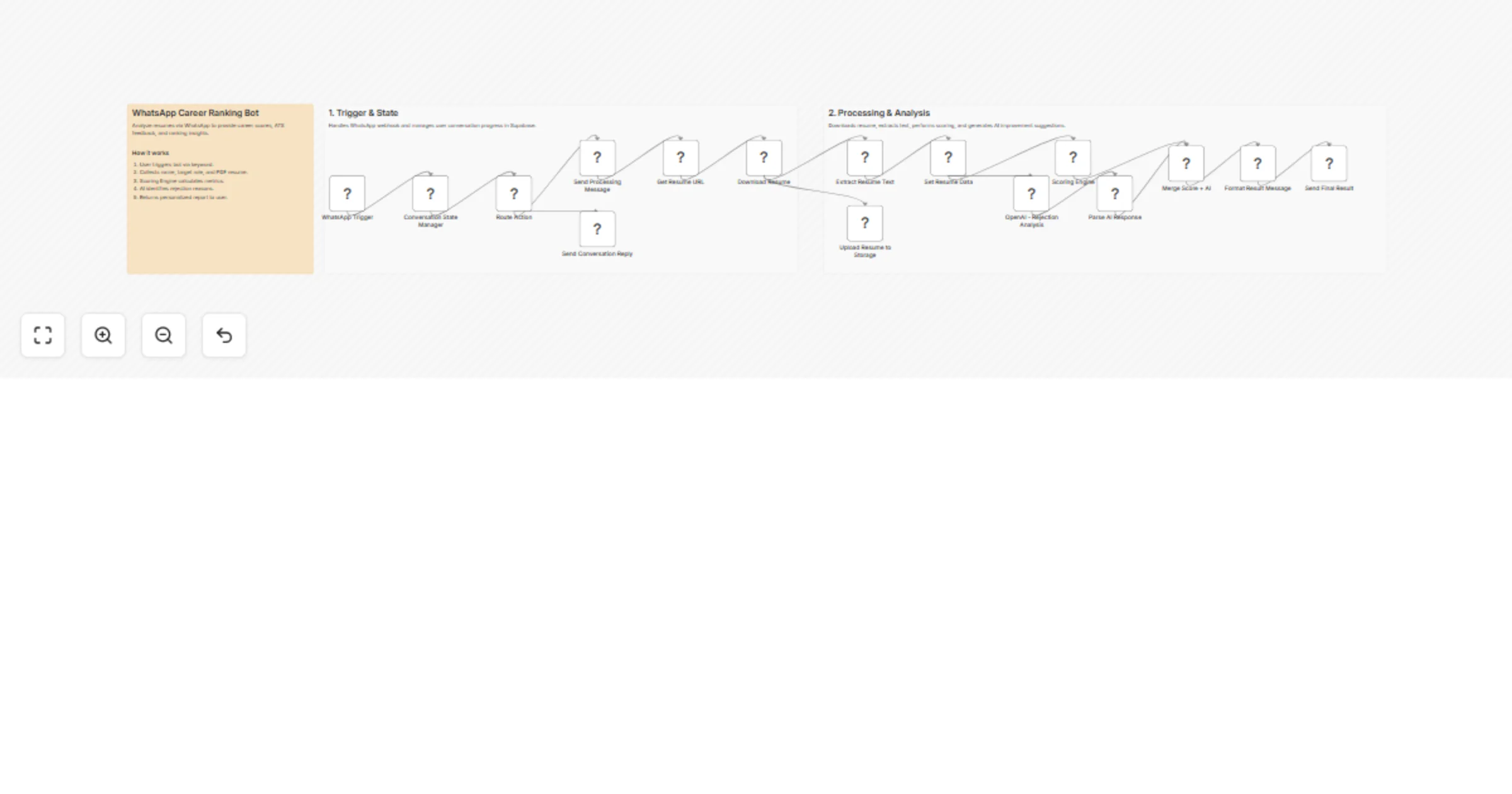
  1. Listens for incoming WhatsApp messages via the WhatsApp Business Cloud API
  2. Manages multi-turn conversation state in Supabase — tracks each user's progress through the flow (idle → name → role → resume → processing)
  3. Guides the user step-by-step to provide their name, target job role, and PDF resume
  4. Downloads the resume PDF from WhatsApp's media server using the Business API
  5. Extracts resume text for analysis
  6. Runs a Scoring Engine that calculates a career score (0–100) based on resume content and target role
  7. Calls OpenAI (GPT-4o-mini) in parallel to generate rejection reasons and actionable improvement tips
  8. Merges both results and formats a final WhatsApp message
  9. Sends the personalized report back to the user — score, weaknesses, and what to fix

Prerequisites

  • A WhatsApp Business Cloud API account (Meta Developer App in Live mode)
  • A Supabase project with a whatsapp_sessions table
  • An OpenAI API key (GPT-4o-mini recommended)
  • A self-hosted n8n instance or n8n Cloud

Supabase table setup

Create a table called whatsapp_sessions with these columns:

Column Type Notes
phone text Primary key / unique
state text Conversation state (IDLE, WAITING_NAME, etc.)
name text User's name
target_role text Job role they're targeting
started_at timestamptz Session start time
updated_at timestamptz Last activity timestamp

Setup steps

  1. Connect WhatsApp Business API credentials in n8n (Meta App token + Phone Number ID)
  2. Connect OpenAI credentials in n8n
  3. Update the Supabase URL and API key inside the Conversation State Manager Code node
  4. Replace YOUR_PHONE_NUMBER_HERE in the Send nodes with your WhatsApp Phone Number ID
  5. Set up Meta webhook pointing to your n8n WhatsApp Trigger URL, subscribed to messages
  6. Activate the workflow — users can now send CHECK MY RANK to trigger the bot

Conversation flow

User: CHECK MY RANK
Bot: Intro + "Type YES to start"
User: YES
Bot: "What's your full name?"
User: Rahul Sharma
Bot: "Which job role are you targeting?"
User: Data Analyst
Bot: "Upload your resume as a PDF"
User: [uploads PDF]
Bot: "Analyzing... hang tight 🔍"
Bot: [sends career score + rejection reasons + tips]

Customization

  • Modify the Scoring Engine Code node to adjust how the score is calculated (weights for skills, experience, formatting, etc.)
  • Edit the OpenAI prompt to change the tone or depth of feedback
  • Add a Supabase insert after analysis to log all submissions for your own analytics
  • Extend the flow to offer a paid detailed report or booking link after the free score

⚠️ Important notes

  • The WhatsApp App must be in Live mode (not sandbox) to receive messages from non-whitelisted numbers — requires completing Meta Business Verification
  • Only PDF resumes are supported; DOCX files are rejected with a helpful prompt
  • Session state persists in Supabase, so users can resume mid-flow if they get disconnected
  • The bot handles concurrent users independently via phone number as the session key

1.2 Logical Blocks

This catalog entry is organized from the workflow JSON. The node-level section below shows the executable blocks available for review before importing the template.

2. Block-by-Block Analysis

Block 1 - Main Sticky

Type / Role
n8n-nodes-base.stickyNote - stickyNote
Config choices
Version 1

Block 2 - WhatsApp Trigger

Type / Role
n8n-nodes-base.whatsAppTrigger - whatsAppTrigger
Config choices
Version 1

Block 3 - Conversation State Manager

Type / Role
n8n-nodes-base.code - code
Config choices
Version 2

Block 4 - Route Action

Type / Role
n8n-nodes-base.switch - switch
Config choices
Version 3.2

Block 5 - Send Conversation Reply

Type / Role
n8n-nodes-base.whatsApp - whatsApp
Config choices
Version 1

Block 6 - Send Processing Message

Type / Role
n8n-nodes-base.whatsApp - whatsApp
Config choices
Version 1

Block 7 - Get Resume URL

Type / Role
n8n-nodes-base.whatsApp - whatsApp
Config choices
Version 1

Block 8 - Download Resume

Type / Role
n8n-nodes-base.httpRequest - httpRequest
Config choices
Version 4.2

Block 9 - Extract Resume Text

Type / Role
n8n-nodes-base.extractFromFile - extractFromFile
Config choices
Version 1

Block 10 - Set Resume Data

Type / Role
n8n-nodes-base.set - set
Config choices
Version 3.4

Block 11 - Scoring Engine

Type / Role
n8n-nodes-base.code - code
Config choices
Version 2

Block 12 - OpenAI - Rejection Analysis

Type / Role
n8n-nodes-base.httpRequest - httpRequest
Config choices
Version 4.2

Block 13 - Parse AI Response

Type / Role
n8n-nodes-base.set - set
Config choices
Version 3.4

Block 14 - Merge Score + AI

Type / Role
n8n-nodes-base.merge - merge
Config choices
Version 3

Block 15 - Format Result Message

Type / Role
n8n-nodes-base.code - code
Config choices
Version 2

Block 16 - Send Final Result

Type / Role
n8n-nodes-base.whatsApp - whatsApp
Config choices
Version 1

Block 17 - Upload Resume to Storage

Type / Role
n8n-nodes-base.code - code
Config choices
Version 2

Block 18 - Section 1

Type / Role
n8n-nodes-base.stickyNote - stickyNote
Config choices
Version 1

Block 19 - Section 2

Type / Role
n8n-nodes-base.stickyNote - stickyNote
Config choices
Version 1

3. Summary Table

Workflow Score WhatsApp PDF resumes with OpenAI GPT-4o-mini and Supabase
Complexity advanced
Nodes 19
Categories HR, AI Chatbot
Author Panth1823
Published 06 Apr 2026

4. Reproducing the Workflow from Scratch

  1. 1. Download the workflow JSON

    Use the JSON export at /data/workflows/14814/14814.json as the source template for this automation.

  2. 2. Import the template into n8n

    Open n8n, import the downloaded JSON, and review each node before activating the workflow.

  3. 3. Configure credentials and variables

    Replace placeholder credentials, API keys, webhook URLs, account IDs, and environment-specific values with your own settings.

  4. 4. Test with sample data

    Run the workflow manually or in a staging workspace, inspect node output, and confirm downstream systems receive the expected data.

  5. 5. Activate and monitor

    Enable the workflow only after testing, then monitor executions, errors, and rate limits during the first production runs.

5. General Notes & Resources

Review imported nodes carefully before activation. This catalog entry is intended to help you inspect the workflow structure, understand required services, and find related templates faster.

Node names, credentials, schedules, webhook paths, and external service limits may need adjustment for your workspace.

Frequently asked questions

What does Score WhatsApp PDF resumes with OpenAI GPT-4o-mini and Supabase do?

WhatsApp Resume Ranking Bot — AI Powered Career Score via PDF Upload Let job seekers check their resume strength directly on WhatsApp — no app, no sign up, no friction. Users send a keyword, answer...

What do I need before importing this workflow?

Review the workflow JSON, configure any required credentials in n8n, and test the automation in a safe workspace before using it in production.

Can I customize this workflow?

Yes. Use the block-by-block analysis and the downloadable JSON to inspect each node, then adjust credentials, prompts, schedules, filters, or destinations for your HR, AI Chatbot use case.